Solved

Can I adjust the connector nodes in a mind map in order to fit onto a PowerPoint slide?

  • August 4, 2025
  • 2 replies
  • 45 views

Forum|alt.badge.img

Hi all!

I often need to export the mind maps and fit them on a power point slide.
The problem is that as airy and spaced put the map looks, on a slide, it just does not work: I have to scale it down, the text is tiny, so much empty space, and overall a bit of an “ugh” look. 

Any way to move the nodes closer to the root word/make branches shorter?


Thank you!

Best answer by Craig Mackie

Hi ​@Kate_2025,

Thank you for reaching out with your challenge.

It is oftentimes difficult to use large diagrams in PowerPoint, as although a picture paints a thousand words, they also can take up a lot of space - very frustrating. 

Although there isn’t a way to adjust the length of the connectors in a mind map, there is a method you may want to try (further to those suggested in the link above) that I use to give myself just a little more room:

  1. Create your mind-map
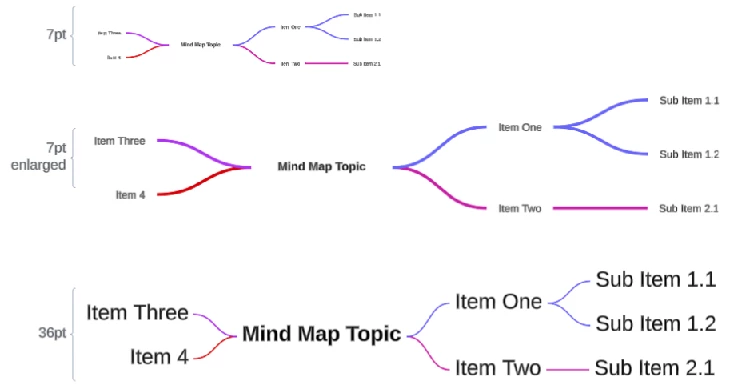
  2. Counter-intuitively, adjusting your font to something very large (e.g. change from 7pt to 36pt)
  3. You will see that the text enlarges, but the connectors don’t, so you have effectively ‘shrunk’ the connectors, when compared to the text
  4. Now you can copy and past the ‘enlarged’ mind-map into PowerPoint, which will scale to something easier to read (see my example below)


I hope this helps

All the best, Craig

Comments

Humas1985
Lucid Legend Level 10
Forum|alt.badge.img+24
  • Lucid Legend Level 10
  • August 4, 2025

Hi ​@Kate_2025 

Currently there is no direct setting to shorten branch length or automatically tighten spacing and there are some discussions on this context and to learn more - How do you reduce space between nodes in a mind map? | Community

Hope this helps - Happy to help further!!
Thank you very much and have a great one!
Warm regards


Craig Mackie
Forum|alt.badge.img+5

Hi ​@Kate_2025,

Thank you for reaching out with your challenge.

It is oftentimes difficult to use large diagrams in PowerPoint, as although a picture paints a thousand words, they also can take up a lot of space - very frustrating. 

Although there isn’t a way to adjust the length of the connectors in a mind map, there is a method you may want to try (further to those suggested in the link above) that I use to give myself just a little more room:

  1. Create your mind-map
  2. Counter-intuitively, adjusting your font to something very large (e.g. change from 7pt to 36pt)
  3. You will see that the text enlarges, but the connectors don’t, so you have effectively ‘shrunk’ the connectors, when compared to the text
  4. Now you can copy and past the ‘enlarged’ mind-map into PowerPoint, which will scale to something easier to read (see my example below)


I hope this helps

All the best, Craig