Question

Bug: Undo after delete results in different layout

  • March 3, 2026
  • 4 replies
  • 16 views

Forum|alt.badge.img+1

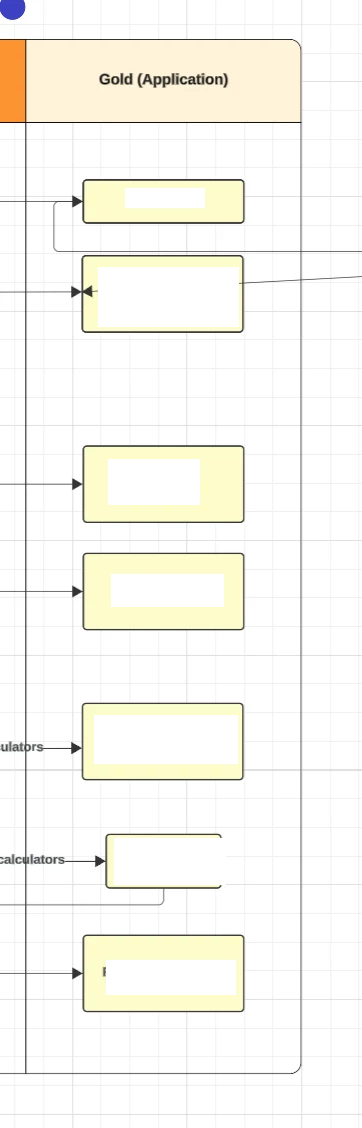
I had a set of shapes that I cut with cmd-x, then hit undo, and when they were restored the layout was completely different than before.

Before:
After:
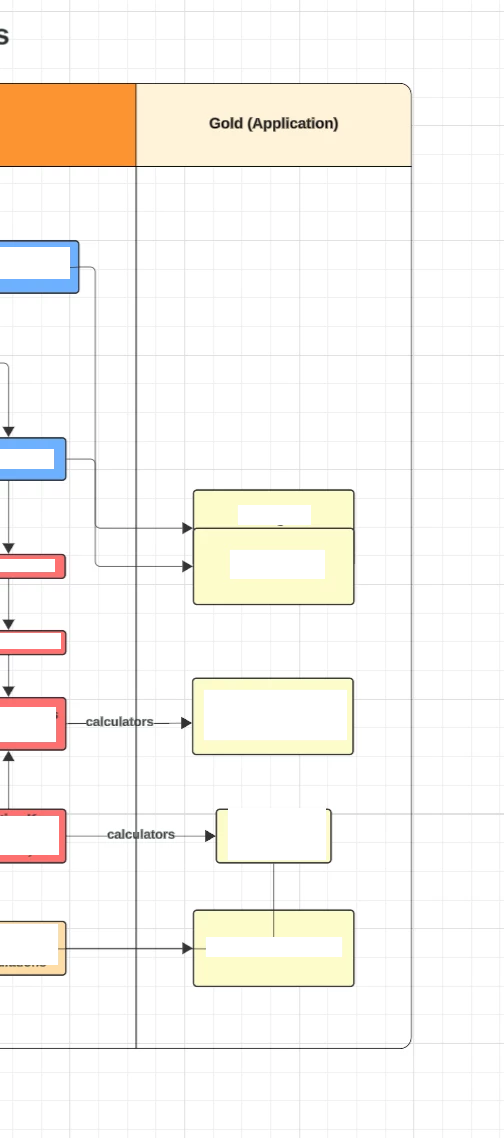
 

Not ideal

Comments

Forum|alt.badge.img+1

There are also bugs with copying. I copied the entire diagram and pasted it, and the new version had some random lines still connecting to the previous version, but only for a few shapes. Seems they retained a pointer to their past nodes in addition to the new ones. You can see this in the top image, which is the “before” version connecting to the after, but only for two shapes. 


alison cheney
Forum|alt.badge.img+4
  • Lucid community team
  • March 5, 2026

Hi ​@yuletide-ec,

Thank you for posting in the Lucid Community!

Could you try opening your document in a private or incognito window to help us narrow down the potential cause? Could you also try connecting to a different network or disconnecting from your VPN (if applicable)? Sometimes account performance issues can be related to internet security/speed or browser issues. These steps will help us eliminate that possibility. For help with opening an incognito window, please see this community post.

If those don’t resolve the problem, can you please send the following information so I can take a closer look?

  • A screenshot of the issue.

  • A screenshot of the associated Javascript Console output after reproducing the issue. You can open your Javascript Console by pressing Ctrl+Shift+J (if your computer is a Windows/Linux) OR Cmd+Opt+J (if your computer is a Mac).


Also, I wanted to mention that if you are on a Team or Enterprise account, you can use Revision history which allows you to view the change history of a document, revert a document to a previous version, and create a new document from a previous version. This will allow you to fix the layout of your shapes. Please see this Lucid Help Center article: Revision history for specific instructions!

Thanks in advance for your help and patience.


Forum|alt.badge.img+1

Screenshot is already there, no VPN in use. Just tried it in incognito and it didn’t happen but my only extensions are AdGuard, Okta, and 1password


There are lots of console warnings and errors though:


c683f19529db1ef3b479068529fa962717b7c95cee8dbbeaff0e1ee04875c0.js.gz:13 Error: Attempting to delete item with key when item does not exist
    at Ucw5d.Ig (22f7bcf578f20dea1fe49488d182d60e828803b6fc859c9ff8c35cebef84fc.js.gz:926:420)
    at 9455cc5f9ebfd5e98b5839b560461e45f8879288091b34a6669629697a6041.js.gz:1630:194
    at Array.forEach (<anonymous>)
    at Uc0u.qy (9455cc5f9ebfd5e98b5839b560461e45f8879288091b34a6669629697a6041.js.gz:1630:145)
    at Uc4ih.Ry (a7d32b1e5367e196a3f6d96000d430b0ecbc7ba528162286cbb1cef68fcf49.js.gz:1149:37)
    at Uc4ih.Fc (c74fbd5fb35578139f8f5f1867c05986d3f456aa3babe942288f385d8032fa.js.gz:263:168)
    at a7d32b1e5367e196a3f6d96000d430b0ecbc7ba528162286cbb1cef68fcf49.js.gz:1964:252
    at UcLre (9455cc5f9ebfd5e98b5839b560461e45f8879288091b34a6669629697a6041.js.gz:108:233)
    at a7d32b1e5367e196a3f6d96000d430b0ecbc7ba528162286cbb1cef68fcf49.js.gz:1964:232
    at UcSie.run (6683fd53e27229f2e4887cab1fa12a942dcc216dcbbe2a366c99db2c27e856.js.gz:115:200)
    at Uccvh.Ry (a7d32b1e5367e196a3f6d96000d430b0ecbc7ba528162286cbb1cef68fcf49.js.gz:1964:197)
    at a7d32b1e5367e196a3f6d96000d430b0ecbc7ba528162286cbb1cef68fcf49.js.gz:1963:461
    at UcSie.run (6683fd53e27229f2e4887cab1fa12a942dcc216dcbbe2a366c99db2c27e856.js.gz:115:200)
    at Uccvh.Fc (a7d32b1e5367e196a3f6d96000d430b0ecbc7ba528162286cbb1cef68fcf49.js.gz:1963:153)
    at a7d32b1e5367e196a3f6d96000d430b0ecbc7ba528162286cbb1cef68fcf49.js.gz:1965:596
    at Ucxwf.eOa (a262fa611168d871431c57e55f4db62aee0365ba0acb01b1ac58253b3ee016.js.gz:291:352)
    at UcvA.eOa (a262fa611168d871431c57e55f4db62aee0365ba0acb01b1ac58253b3ee016.js.gz:917:523)
    at UcFXg (a7d32b1e5367e196a3f6d96000d430b0ecbc7ba528162286cbb1cef68fcf49.js.gz:44:449)
    at Ucdvh.<anonymous> (a7d32b1e5367e196a3f6d96000d430b0ecbc7ba528162286cbb1cef68fcf49.js.gz:1965:580)
    at UcDr.dispatchEvent (37aac6f5abcb66c28e92a6da140a39289a7f9721c2025d81546c10e3b5175b.js.gz:478:58)
    at UcDr.q0k (6683fd53e27229f2e4887cab1fa12a942dcc216dcbbe2a366c99db2c27e856.js.gz:313:349)
    at UcLne (6683fd53e27229f2e4887cab1fa12a942dcc216dcbbe2a366c99db2c27e856.js.gz:308:103)
    at UcGne (6683fd53e27229f2e4887cab1fa12a942dcc216dcbbe2a366c99db2c27e856.js.gz:306:495)
    at UcEne (6683fd53e27229f2e4887cab1fa12a942dcc216dcbbe2a366c99db2c27e856.js.gz:304:761)
globalConsole.<computed> @ c683f19529db1ef3b479068529fa962717b7c95cee8dbbeaff0e1ee04875c0.js.gz:13Understand this error
c683f19529db1ef3b479068529fa962717b7c95cee8dbbeaff0e1ee04875c0.js.gz:13 Object
globalConsole.<computed> @ c683f19529db1ef3b479068529fa962717b7c95cee8dbbeaff0e1ee04875c0.js.gz:13Understand this error
c683f19529db1ef3b479068529fa962717b7c95cee8dbbeaff0e1ee04875c0.js.gz:13 Error: Attempting to delete item with key when item does not exist
    at Ucw5d.Ig (22f7bcf578f20dea1fe49488d182d60e828803b6fc859c9ff8c35cebef84fc.js.gz:926:420)
    at 9455cc5f9ebfd5e98b5839b560461e45f8879288091b34a6669629697a6041.js.gz:1630:194
    at Array.forEach (<anonymous>)
    at Uc0u.qy (9455cc5f9ebfd5e98b5839b560461e45f8879288091b34a6669629697a6041.js.gz:1630:145)
    at Uc4ih.Ry (a7d32b1e5367e196a3f6d96000d430b0ecbc7ba528162286cbb1cef68fcf49.js.gz:1149:37)
    at Uc4ih.Fc (c74fbd5fb35578139f8f5f1867c05986d3f456aa3babe942288f385d8032fa.js.gz:263:168)
    at a7d32b1e5367e196a3f6d96000d430b0ecbc7ba528162286cbb1cef68fcf49.js.gz:1964:252
    at UcLre (9455cc5f9ebfd5e98b5839b560461e45f8879288091b34a6669629697a6041.js.gz:108:233)
    at a7d32b1e5367e196a3f6d96000d430b0ecbc7ba528162286cbb1cef68fcf49.js.gz:1964:232
    at UcSie.run (6683fd53e27229f2e4887cab1fa12a942dcc216dcbbe2a366c99db2c27e856.js.gz:115:200)
    at Uccvh.Ry (a7d32b1e5367e196a3f6d96000d430b0ecbc7ba528162286cbb1cef68fcf49.js.gz:1964:197)
    at a7d32b1e5367e196a3f6d96000d430b0ecbc7ba528162286cbb1cef68fcf49.js.gz:1963:461
    at UcSie.run (6683fd53e27229f2e4887cab1fa12a942dcc216dcbbe2a366c99db2c27e856.js.gz:115:200)
    at Uccvh.Fc (a7d32b1e5367e196a3f6d96000d430b0ecbc7ba528162286cbb1cef68fcf49.js.gz:1963:153)
    at a7d32b1e5367e196a3f6d96000d430b0ecbc7ba528162286cbb1cef68fcf49.js.gz:1965:596
    at Ucxwf.eOa (a262fa611168d871431c57e55f4db62aee0365ba0acb01b1ac58253b3ee016.js.gz:291:352)
    at UcvA.eOa (a262fa611168d871431c57e55f4db62aee0365ba0acb01b1ac58253b3ee016.js.gz:917:523)
    at UcFXg (a7d32b1e5367e196a3f6d96000d430b0ecbc7ba528162286cbb1cef68fcf49.js.gz:44:449)
    at Ucdvh.<anonymous> (a7d32b1e5367e196a3f6d96000d430b0ecbc7ba528162286cbb1cef68fcf49.js.gz:1965:580)
    at UcDr.dispatchEvent (37aac6f5abcb66c28e92a6da140a39289a7f9721c2025d81546c10e3b5175b.js.gz:478:58)
    at UcDr.q0k (6683fd53e27229f2e4887cab1fa12a942dcc216dcbbe2a366c99db2c27e856.js.gz:313:349)
    at UcLne (6683fd53e27229f2e4887cab1fa12a942dcc216dcbbe2a366c99db2c27e856.js.gz:308:103)
    at UcGne (6683fd53e27229f2e4887cab1fa12a942dcc216dcbbe2a366c99db2c27e856.js.gz:306:495)
    at UcEne (6683fd53e27229f2e4887cab1fa12a942dcc216dcbbe2a366c99db2c27e856.js.gz:304:761)


I must say coming from free Draw.io i’m surprised this is so buggy :D 


alison cheney
Forum|alt.badge.img+4
  • Lucid community team
  • March 6, 2026

Hi ​@yuletide-ec,

Thank you for your response and for sending your console output! I’m sorry to hear this is happening, and our team is eager to get to the root cause of this issue.

Since this doesn't happen in an Incognito window, it could be an issue with your AdGuard extension. Could you please whitelist lucid.app in AdGuard or disable it while working on your diagram to see if the layout stability returns? 


If the issue persists, could you share a temporary Document Support PIN for this document? This will help me take a closer look at what’s going on. This PIN is safe to post in this thread because it is only accessible by members of the Lucid support staff. You can find steps for generating a Support PIN in this Lucid Help Center article: Generate a Lucid Support PIN.

Thank you for your help and patience as we look into this!

