August 18, 2026
Solved

Bug: Shape text disappears in specific shapes

  • August 18, 2026
  • 7 replies
  • 281 views

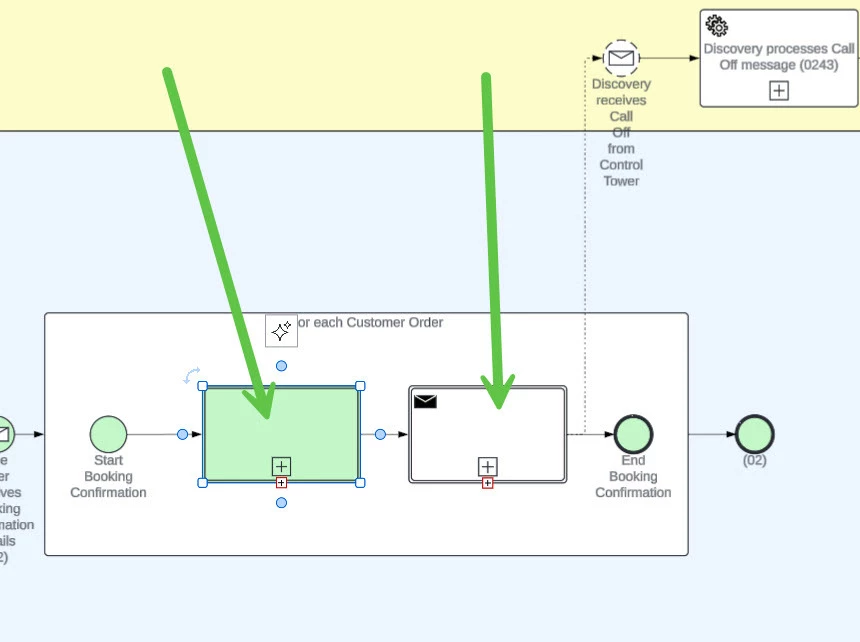
Text disappears from certain diagram shapes. There is a warning message saying ‘Auto-resize failed. There is more text in the shape than can fit on the page….”

I cannot select the text, I cannot edit it. And this is something recent.  I haven’t changed text neither diagram recently.

Text is just not visible.


Best answer by Zuzia S

@sgilbert ​@Arne Vanes ​@cth Thank you for providing the above information!

I believe you have identified a bug, and I have reported this to our development team. I apologize for any disruption this may cause, and I will update this thread with any new information about a fix. Please follow along on this thread for updates, and post any additional questions or concerns below.

I appreciate your continued help and patience!

Comments

August 18, 2026

This happened to me starting on Friday last Thursday my shapes were fine.  I also reported it but haven’t heard anything yet.  For me its on my activity shapes from BPMN 2.0 library.  My work around, for now, is to change the Activity type from “Transaction” to “Task” this at least allows me to see the original text.


August 19, 2026

This happened to me starting on Friday last Thursday my shapes were fine.  I also reported it but haven’t heard anything yet.  For me its on my activity shapes from BPMN 2.0 library.  My work around, for now, is to change the Activity type from “Transaction” to “Task” this at least allows me to see the original text.


Thank you for that tip! Hopefully someone at Lucid picks this up shortly.

Zuzia S
Lucid community team
August 20, 2026

Hi ​@Arne Vanes and ​@sgilbert, thank you for posting in the Community and I am sorry that you are experiencing this! I’ll be happy to help.

It’s possible that WebGL is causing an issue with your graphics card. Try turning WebGL off by going to View > Rendering > Use WebGL and unchecking the option.

Additionally, could you please let me know whether the issue persists if you duplicate the document, or if you open it in an incognito window? For help with opening an incognito window, please see this  community post .

If those don’t resolve the problem, can you please send a temporary Document Support PIN for this document? This will help me take a closer look at what’s going on. This PIN is safe to post in this thread because it is only accessible by members of the Lucid support staff. You can find steps for generating a Support PIN in this  Help Center article 

I appreciate your help and patience!

August 20, 2026

Hi ​@Arne Vanes and ​@sgilbert, thank you for posting in the Community and I am sorry that you are experiencing this! I’ll be happy to help.

It’s possible that WebGL is causing an issue with your graphics card. Try turning WebGL off by going to View > Rendering > Use WebGL and unchecking the option.

Additionally, could you please let me know whether the issue persists if you duplicate the document, or if you open it in an incognito window? For help with opening an incognito window, please see this  community post .

If those don’t resolve the problem, can you please send a temporary Document Support PIN for this document? This will help me take a closer look at what’s going on. This PIN is safe to post in this thread because it is only accessible by members of the Lucid support staff. You can find steps for generating a Support PIN in this  Help Center article 

I appreciate your help and patience!

Hello Zuzia, as per Lucid recommendations, I tried all these troubleshooting steps before posting. So no, none of these things help. It is starting to surface now in all my documents using BPMN. 

Pretty annoying, as we’re using jpg exports for parsing via an AI pipeline. It either has no text or, applying @sgilbert’s tip, has the wrong activity type. So for now, we’re stuck.

Here is the PIN: du0VbANkZUTZGFOuqjyucr6IZqYK0XBSrZ123698545

Thank you for your support!

Arne


August 20, 2026

Hello Zuzia, same result for me, WebGl is disabled, duplicate document made no difference, Incognito made no difference, create new document has the same issue.  As soon as I add Transaction type BPMN shape it appears with no text and the little + has a red square around.  I cannot add text to this shape type anymore.


duxpSUS1txxgSPyKHXelz43ENOOe6NrCAy166788228

August 20, 2026

Same issue happening on our corporate account. Multiple files are no longer displaying the text on the Transaction Activity type. 


Zuzia S
Zuzia SAnswer
Lucid community team
August 24, 2026

@sgilbert ​@Arne Vanes ​@cth Thank you for providing the above information!

I believe you have identified a bug, and I have reported this to our development team. I apologize for any disruption this may cause, and I will update this thread with any new information about a fix. Please follow along on this thread for updates, and post any additional questions or concerns below.

I appreciate your continued help and patience!