Answer

Black icon turns grey in a new Lucid page

  • May 22, 2025
  • 8 replies
  • 78 views

Forum|alt.badge.img+1

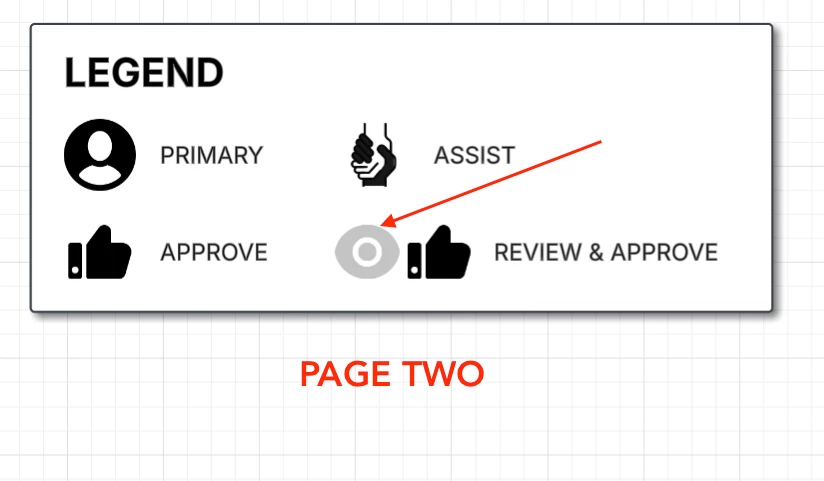
I’m using icons I found on Iconfinder through Lucidchart. All of the icons are black and white. I’m creating 4 pages with the same icons being used. I’m also copying a table from one page to the next. However, when I added the icons to the second page, it turned to gray.

This one is how the icon should look.
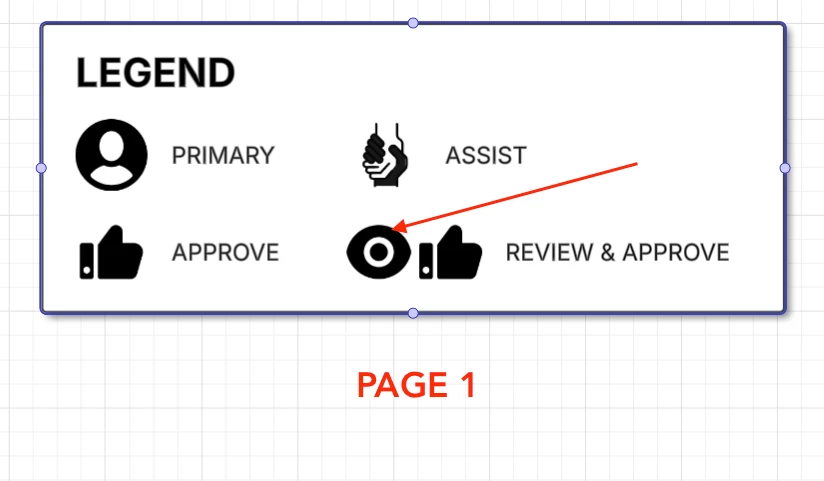
And then this happens on the second page.
Does anyone know a fix? I didn’t copy and paste. I dragged the icons to the canvas. 
Best answer by Ambar D

Hi ​@nadams, thanks for posting in the Lucid Community! Thanks for trying out ​@Paul McC’s suggestion here. I’m sorry that you’re still having trouble here and I’m happy to help. I haven’t been able to reproduce this issue on my end quite yet.

Three things to try here first - 

  1. Could you try opening your document in a private or incognito window and trying this again? For help with opening an incognito window, please see this community post.
  2. Could you also try connecting to a different network or disconnecting from your VPN (if applicable)? Sometimes account performance issues can be related to internet security/speed or browser issues. These steps will help us eliminate that possibility. 
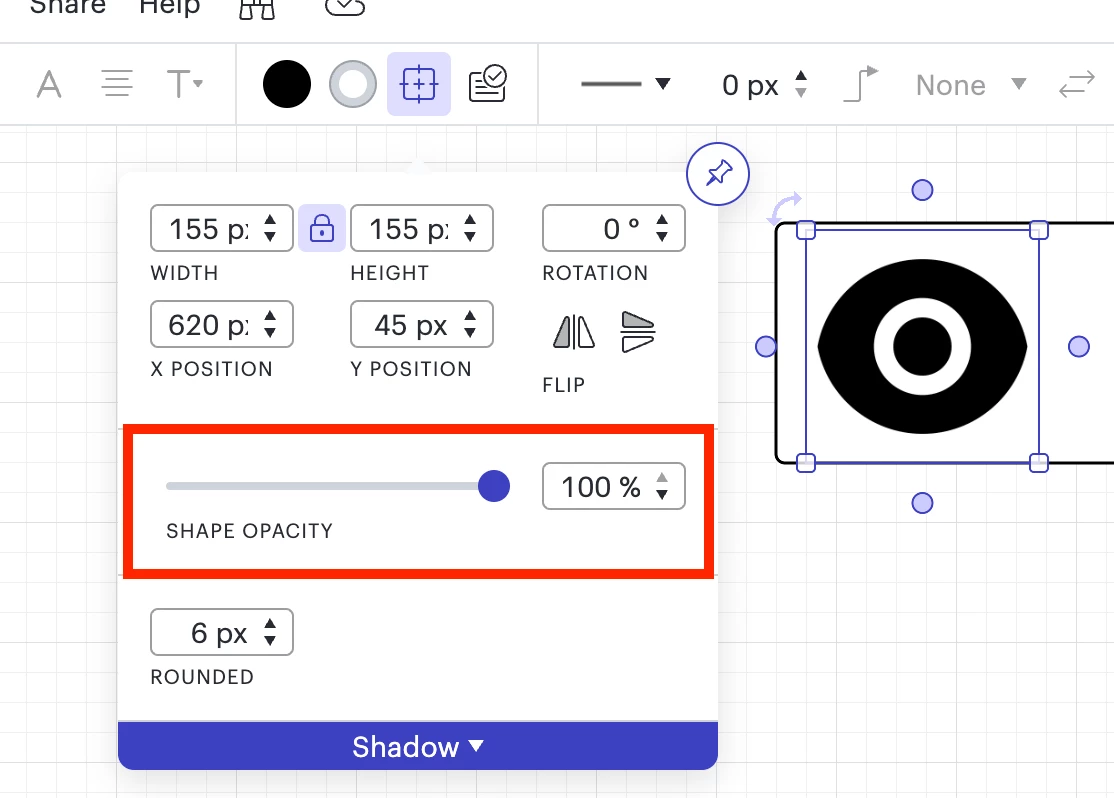
  3. In the shape options menu of your Lucidchart document, check the shape opacity to make sure it is at 100%.  


If those don’t resolve your issue, could you please provide me with the following information so I could take a closer look?

  • You mentioned dragging the icons onto the canvas. Is the file type a PNG? Can you confirm the file type of the icon that is causing problems? 
  • Would you mind confirming whether this issue is only occurring in one page within one document in your account? 
  • Can you please send a temporary Support PIN for this document? This will allow me to take a closer look at the issue you’re experiencing. To generate this pin, you can follow these steps. You can share this PIN within the thread here as it is only accessible by Lucid support teams. 

 Thank you for your help and patience!

Comments

Forum|alt.badge.img+4
  • Lucid Legend Level 3
  • May 23, 2025

okay that’s a cool issue. 

Any chance the that eye icon is ‘under’ the box layer. click on the icon and see if the color changes when you have it on the regular canvas with no background under/overlap?


Forum|alt.badge.img+4
  • Lucid Legend Level 3
  • May 24, 2025

I’d love to check this out with you. I’m a heavy user of iconfinder. Hit me on linked in and we can hop on a zoom/meet. The rest of my last name is “ollum”. I have my UXMC cert in my name as well. 


Forum|alt.badge.img+1
  • Author
  • May 27, 2025

I arranged the icon to move to the front and it was still gray. I would like to keep this from happening to other icons as well or at least find a fix.


Ambar D
Forum|alt.badge.img+10
  • Lucid community team
  • Answer
  • May 28, 2025

Hi ​@nadams, thanks for posting in the Lucid Community! Thanks for trying out ​@Paul McC’s suggestion here. I’m sorry that you’re still having trouble here and I’m happy to help. I haven’t been able to reproduce this issue on my end quite yet.

Three things to try here first - 

  1. Could you try opening your document in a private or incognito window and trying this again? For help with opening an incognito window, please see this community post.
  2. Could you also try connecting to a different network or disconnecting from your VPN (if applicable)? Sometimes account performance issues can be related to internet security/speed or browser issues. These steps will help us eliminate that possibility. 
  3. In the shape options menu of your Lucidchart document, check the shape opacity to make sure it is at 100%.  


If those don’t resolve your issue, could you please provide me with the following information so I could take a closer look?

  • You mentioned dragging the icons onto the canvas. Is the file type a PNG? Can you confirm the file type of the icon that is causing problems? 
  • Would you mind confirming whether this issue is only occurring in one page within one document in your account? 
  • Can you please send a temporary Support PIN for this document? This will allow me to take a closer look at the issue you’re experiencing. To generate this pin, you can follow these steps. You can share this PIN within the thread here as it is only accessible by Lucid support teams. 

 Thank you for your help and patience!


Forum|alt.badge.img+1
  • Author
  • May 28, 2025

It seems like the icon turns to black after I close the window and then reopen it. 

The image is from Iconfinder which I found when searching for images within the app.


Ambar D
Forum|alt.badge.img+10
  • Lucid community team
  • May 28, 2025

Hi ​@nadams, thanks for your response. You mentioned that the icon on page 2 of your document is now black. That is that the intended color here, correct? Is this issue resolved for you now that you’ve reopened the window?


Forum|alt.badge.img+1
  • Author
  • May 28, 2025

Yes, it’s been resolved. 


Ambar D
Forum|alt.badge.img+10
  • Lucid community team
  • May 28, 2025

Great to hear ​@nadams! Please let me know in this thread if you have any further trouble with this and I’d be happy to keep taking a look. 

This community is dedicated to supporting your work in Lucidchart, Lucidspark, and Lucidscale. Feel free to create a new topic if any other questions come up!