Leah W
Lucid support team
August 3, 2023

Auto-Number your Flowchart in Lucidchart

  • August 3, 2023
  • 29 replies
  • 4733 views

Looking for a way to auto-number the steps in your flowchart? Check out this post on how you can utilize conditional formatting and formulas to accomplish this!  

Please use the steps below to accomplish this on your diagram.

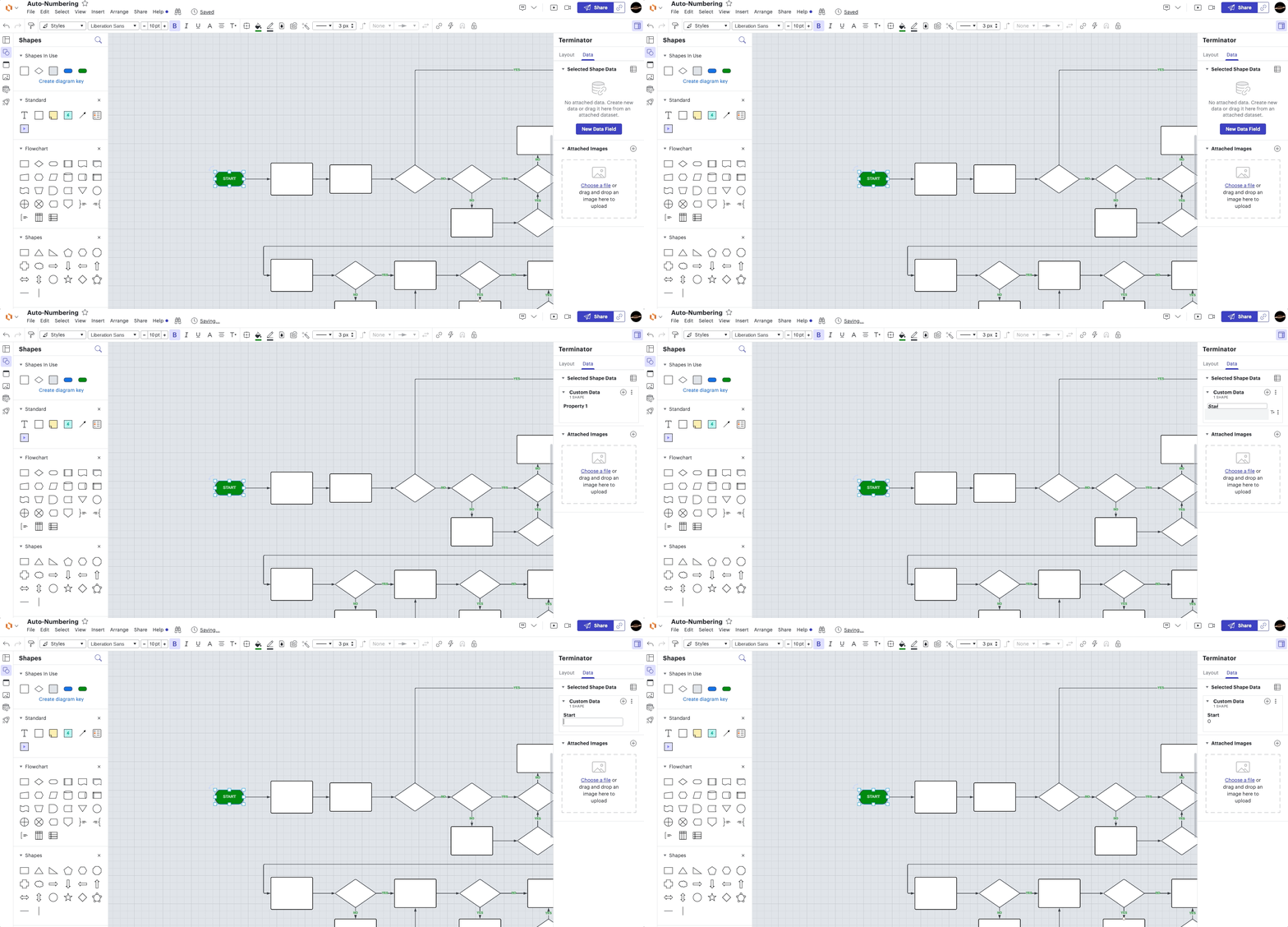
1. Add shape data "Start" to a start node with the value 0. This allows shapes connected to it to know it's part of the flow chart (as opposed to the note).WDRHIlKDibqK-4j8DRbs5A.gif
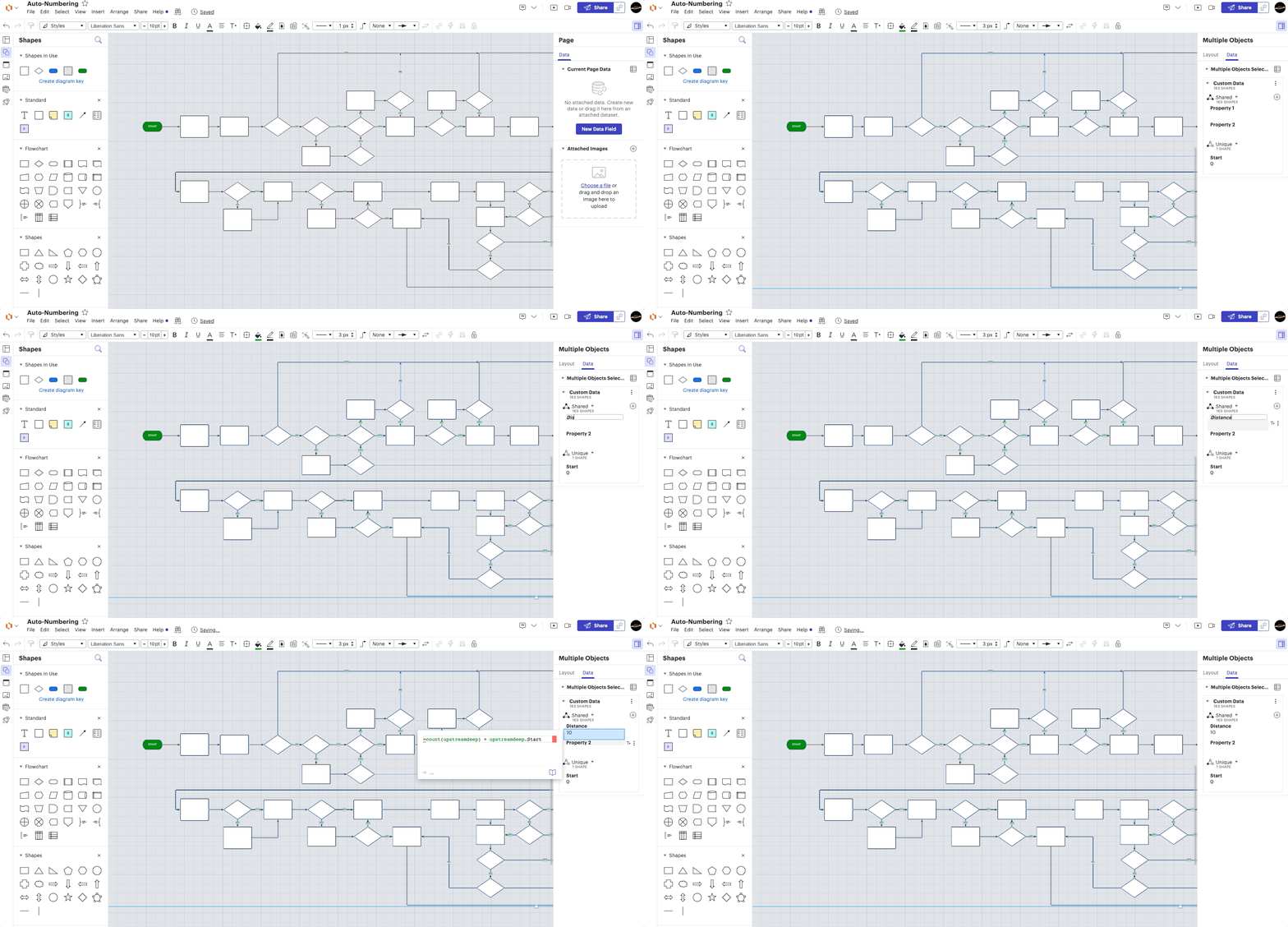
2. Add data "Distance" to all of the shapes with the formula =count(upstreamdeep) + upstreamdeep.Start. This will be defined with the distance from start or error (if the shape is not in the flow chart).
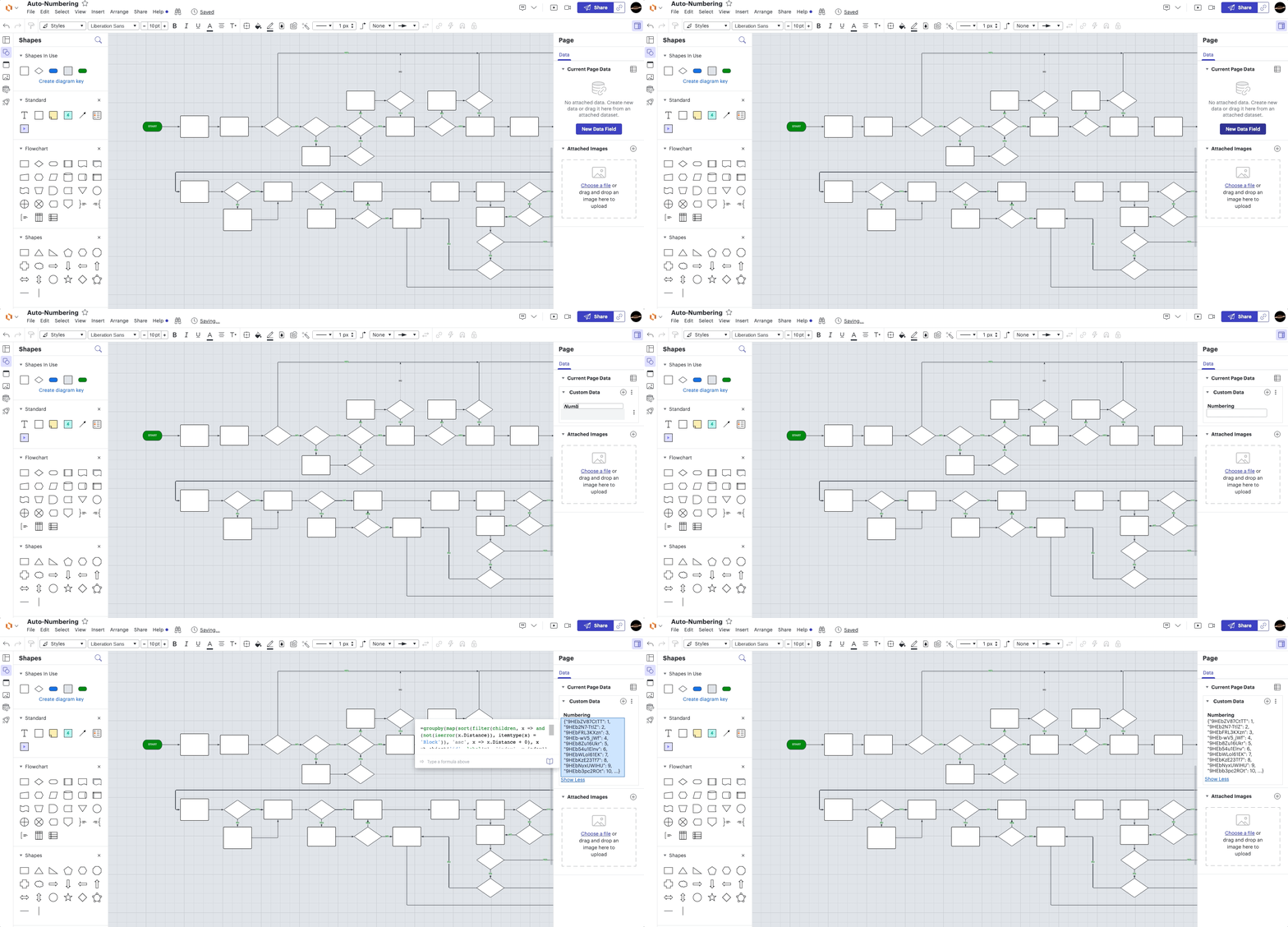
3. Add page data "Numbering" with the formula

=groupby(map(sort(filter(children, x => and(not(iserror(x.Distance)), itemtype(x) = 'Block')), 'asc', x => x.Distance + 0), x => object('id', label(x), 'index', x.index)), x => x.id, x => x.index)

. This formula sorts all blocks in the flow chart by distance and then groups them into an object where the key is the shape label (ID) and the value is the index returning in a mapping from block to unique numbering.   
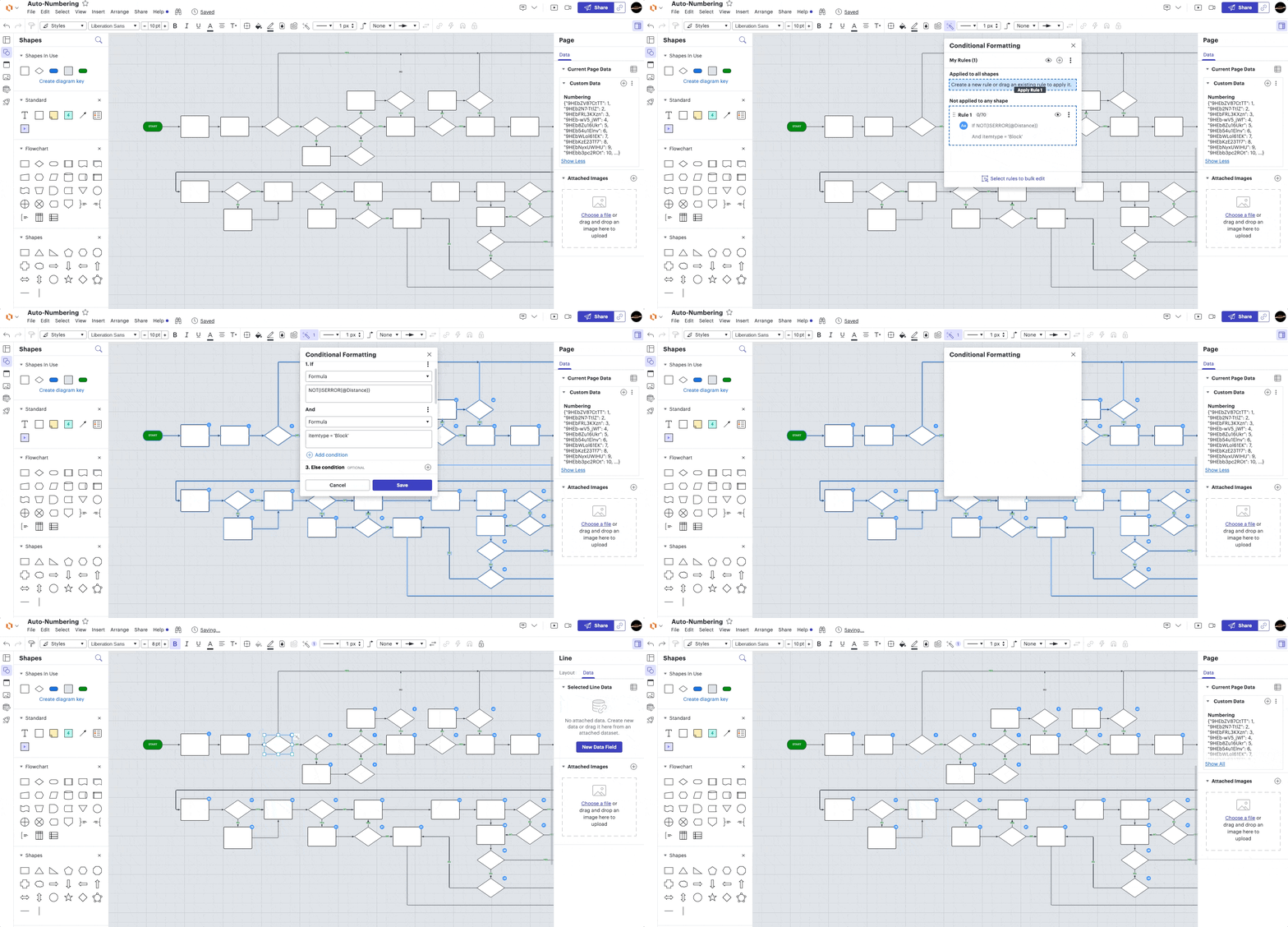
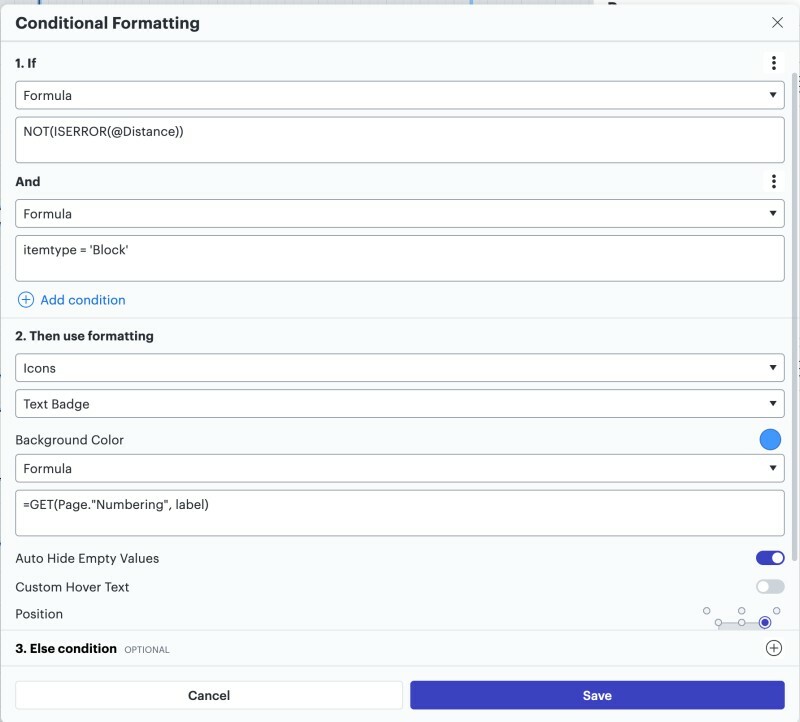
4. Lastly add a conditional formatting rule to add a badge when NOT(ISERROR(@Distance)) and itemtype = 'Block' (to prevent them from showing on lines) with the formula =GET(Page."Numbering", label) for the badge label. See screenshot for what the  conditional formatting rule should look like (no else condition needed for this).
A9lOMHf_v1HFqYD0EiH-iw.jpg

These steps will allow you to easily add and update step numbers to process flows while eliminating any duplicate numbers! 

Useful Links:

Conditional Formatting in Lucidchart 

Formulas help center article

Pinned Reply By geoffmaddox

It looks like there was an error in the original formatting of the formula in Step 3 that stripped out the commas. Here’s the corrected formula with the commas added in (the original post has been updated):


=groupby(map(sort(filter(children, x => and(not(iserror(x.Distance)), itemtype(x) = 'Block')), 'asc', x => x.Distance + 0), x => object('id', label(x), 'index', x.index)), x => x.id, x => x.index)

Comments

September 26, 2024

@Micah 

Thank you so much for your quick response. This is amazing to have such a great product support. Definitely very encouraged on continuing using Lucid Suite for our daily work! 

“Regarding export - to clarify, is your ultimate goal to have a spreadsheet with a column containing the step and another column containing the step number?”

  • Yes, I’m trying to export all these steps (numbers) into our process document narrative. Given that the process mapping is a dynamic field (the process mapping continuously being worked, I want to a quick way to update our documentation for the reference of these step numbers.) 
    Currently - the numbering custom field is only showing the formula unique strings…


Micah
Lucid community team
September 26, 2024

@ChiliC Thanks for your response - very happy to be collaborating with you in our community! Can you clarify how you’ve generated the spreadsheet above in your screenshot?

October 1, 2024

@Micah  My Spreadsheet is an export from the lucidchart. (CSV and I converted to Googlesheet)


A follow up question, if from the “Start” shape, i have multiple lines, how do i choose which line is the numbered with “1”


Micah
Lucid community team
October 1, 2024

Hi @ChiliC, thanks for getting back to me with this additional detail. 

Regarding the spreadsheet - it unfortunately isn’t currently possible to have Lucidchart arrange the export in this sort of way based on the logic of your diagram automatically, nor can you specify the arrangement manually. Right now, it’s ordered by the internal ID of the object, but I certainly understand how this sort of ability would be a helpful addition to this feature. We’d be grateful to hear more feedback on this.

Please first search the Product Feedback section of this community (with the filter Topic Type = Idea) to see if it’s already been submitted. If so, please add any additional details you’d like and upvote the request - this consolidation helps to refine feedback and properly capture the popularity of the request.

If no one has submitted this idea yet, please create one of your own and be sure to include details about your use case or what you’d like to see in this experience. This will also allow other users with similar requests to discover and upvote it, then add details of their own.

Finally, for more information on how Lucid manages feedback via this community, take a look at this post:


Regarding your follow-up question about choosing which line is “1” - do you mean within the diagram itself via the conditional formatting and formulas (which ideally would then be reflected in the exported data?)


July 28, 2025

Is there a way to renumber the boxes, when you need to insert additional boxes

Kelsey Gaag
Lucidite
July 28, 2025

Hi ​@TroyCross

Thank you for the reply! To do this, you would either need to manually renumber using the data panel or utilize our data import feature to import new data to make changes. If you have an enterprise level account you can link data to Google Sheets or Excel, this allows for automatic updates when the data is changed. 


March 20, 2026

Hi, while this works well for open flowcharts, how do I get it to work when swimlanes are used?

Leianne C
Lucid support team
March 26, 2026

Hi ​@Mario.TZ, thank you for continuing this thread. Would you mind sharing a bit more details about how you’d like the auto numbering to work with swimlanes? For example, would you like it to be different for each lane? 

This will help us take a closer look and share the best recommendations for your use-case. Thank you!

Leianne C
Lucid support team
April 23, 2026

Hi ​@Mario.TZ, just following up with some advice that our development team shared regarding numbering with swimlanes. This will depends on how the auto-numbering would be expected to work within the swimlanes.

There are likely a lot of potential ways to number a process diagram within a swimlane, all of which might be valid depending on the expected outcome. For example, if we have the attached process diagram in swimlanes, how should we number sticky note k? Should it be numbered 4 (because it's the 4th in that lane) or 11 (because it's the 11th in the entire swimlane diagram)? Or should sticky note d be numbered 1 (since it's the first in lane B) or 4 (since it's the 4th in the diagram)?

  • One approach is to include the swimlane with the label (attached picture 2) using the overall ordering (e.g. B.4).
  • Another approach is to do essentially thing as the page numbering, but for each swimlane (attached picture 3).

It is definitely possible to get the auto-numbering to interact with swimlanes. The latter approach is functionally the same as the original one, with the diagram completely connected with Start and Distance, only in this case the ordering property is on the swimlane shape itself using a formula that calculates the ordering by lane:

=map(this.$lanes, l => groupby(map(sort(filter(l.$contents, x => and(not(iserror(x.Distance)), itemtype(x) = 'Block')), 'asc', x => x.Distance + 0), x => object('id', label(x), 'index', x.index)), x => x.id, x => x.index))

and the conditional formatting references it using =containedby.LaneOrdering[this.$id] (where containedby finds the containing shape and LaneOrdering is the name of the property with the above formula)


I hope this helps. Please feel free to let us know if you have any questions!