Nd A
August 14, 2020
Solved

Adding gif to Lucidchart

  • August 14, 2020
  • 2 replies
  • 148 views

Hi 

Could you advise how do I insert gifs and videos that play automatically? 

Thank you 

Best answer by Micah

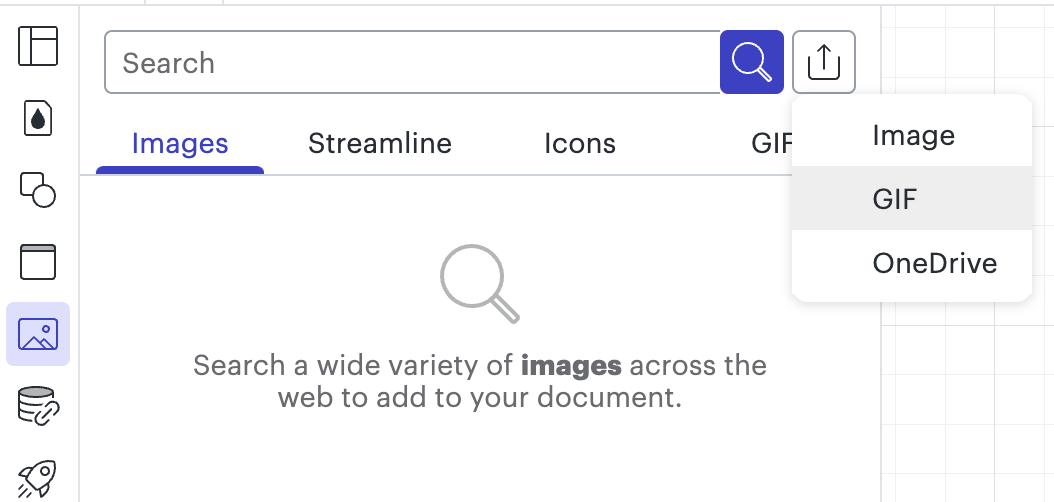
Hi wanted to share an update on this thread! We've implemented this feature request and it is now possible to insert GIFs into Lucidchart! To do so simply click on the Images Panel in the  toolbar on the left side of the editor, then click the upload icon, and choose "GIF." You'll be prompted to choose the file you'd like to add to your canvas!

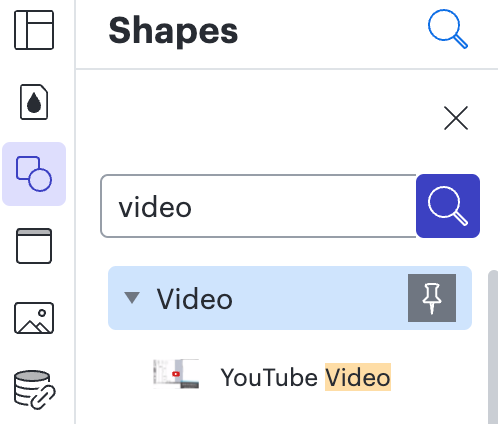
Regarding a video this is still supported - simply choose the Video option in the Shape Library manager!

For additional information on both of these options please take a look at our Shape Libraries article from the Lucidchart Help Center and post any additional questions below!


Comments

Shanna H
Lucid support team
August 14, 2020

Hi thanks for posting on the Lucidchart community!

We do not currently support the insertion of GIFs. I apologize for any inconvenience this may cause.

As a workaround I recommend inserting Youtube videos. To add a Youtube video click More Shapes > Video. Please let me know if you have any questions about this.

If this is a feature you would like to see in the future please post in our Product Feedback section. Requests submitted here will be passed on directly to our product development team and help shape future roadmaps for Lucidchart.

Micah
MicahAnswer
Lucid community team
March 2, 2022

Hi wanted to share an update on this thread! We've implemented this feature request and it is now possible to insert GIFs into Lucidchart! To do so simply click on the Images Panel in the  toolbar on the left side of the editor, then click the upload icon, and choose "GIF." You'll be prompted to choose the file you'd like to add to your canvas!

Regarding a video this is still supported - simply choose the Video option in the Shape Library manager!

For additional information on both of these options please take a look at our Shape Libraries article from the Lucidchart Help Center and post any additional questions below!