Answer

Add shape and associated layers to custom library

  • April 29, 2025
  • 1 reply
  • 10 views

Forum|alt.badge.img

Hi, As the title states, I’d like to create a custom library that includes a shape and the associated layers and toggle actions I created. Is this possible or is there some kind of workaround that would help me create a reusable shape without having to manually add layers every time I use it?

Best answer by Kelsey Gaag

Hi ​@Lisa l

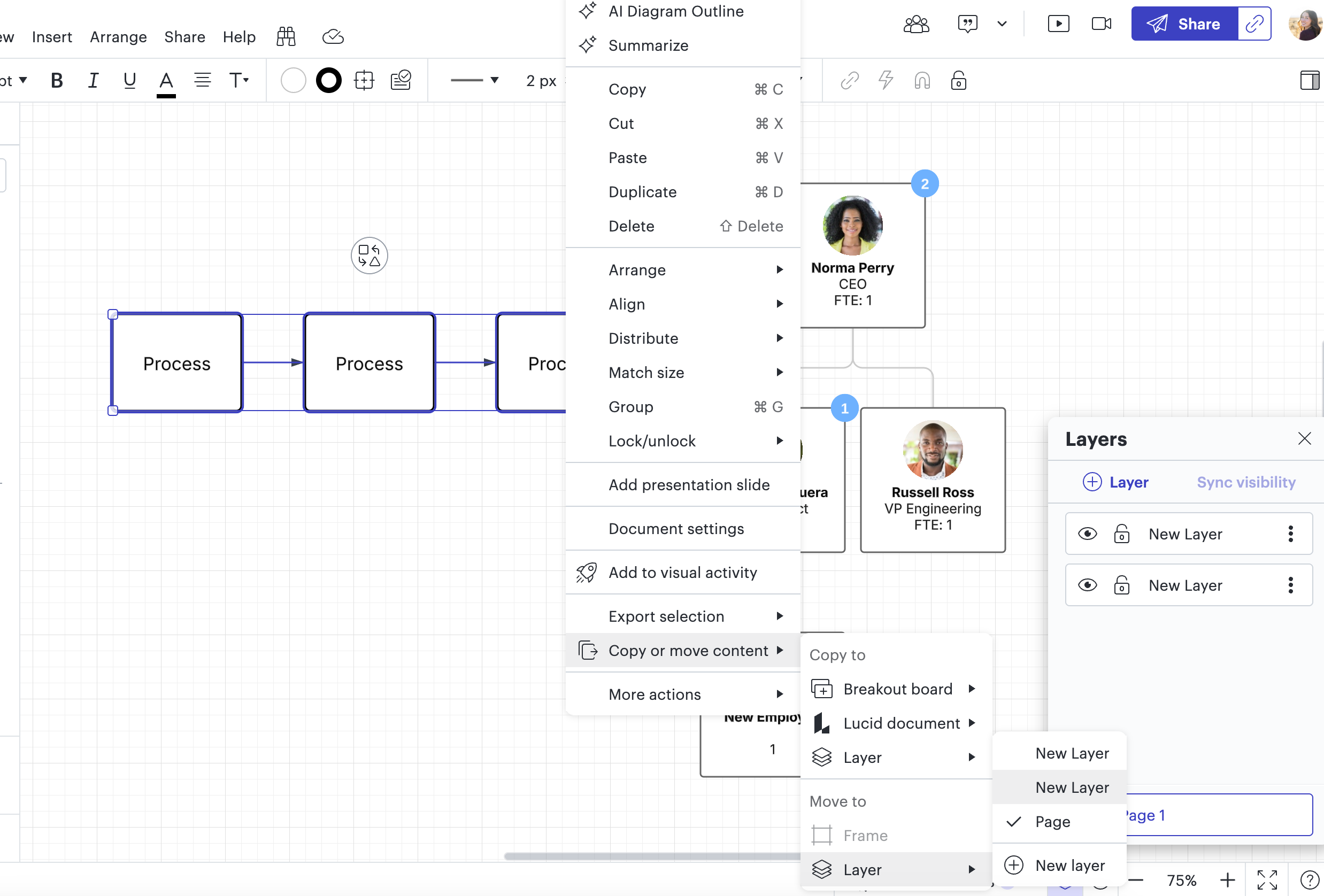
Thank you for posting in the Community! This is not feature in Lucid, however, you can bulk move shapes to a layer by selecting shapes > right clicking > Copy or Move content > Move to > Layer > Select Layer. Hope this helps!

If you would like this to be a feature, you can post this as an idea in the Product Feedback section.

Comments

Kelsey Gaag
Forum|alt.badge.img+16
  • Lucidite
  • Answer
  • May 1, 2025

Hi ​@Lisa l

Thank you for posting in the Community! This is not feature in Lucid, however, you can bulk move shapes to a layer by selecting shapes > right clicking > Copy or Move content > Move to > Layer > Select Layer. Hope this helps!

If you would like this to be a feature, you can post this as an idea in the Product Feedback section.