Elisabetta G
November 23, 2021
Delivered

Retrieve the path/location of a document

Related products:LucidchartLucidspark
  • November 23, 2021
  • 22 replies
  • 1551 views

Hi

If someone sends me the link (URL) of a diagram that we both can access how can I see in which of our shared folders the file is stored? 

Please let me know if you need more details :)

Thank you

B.
Pinned Reply By Gordon

Hi,

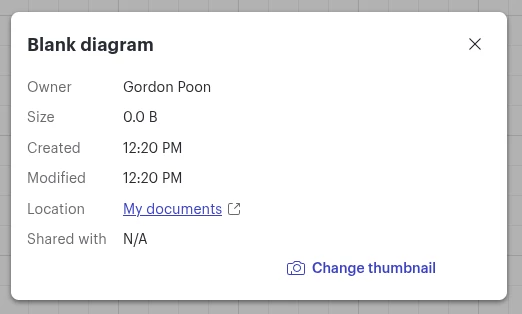
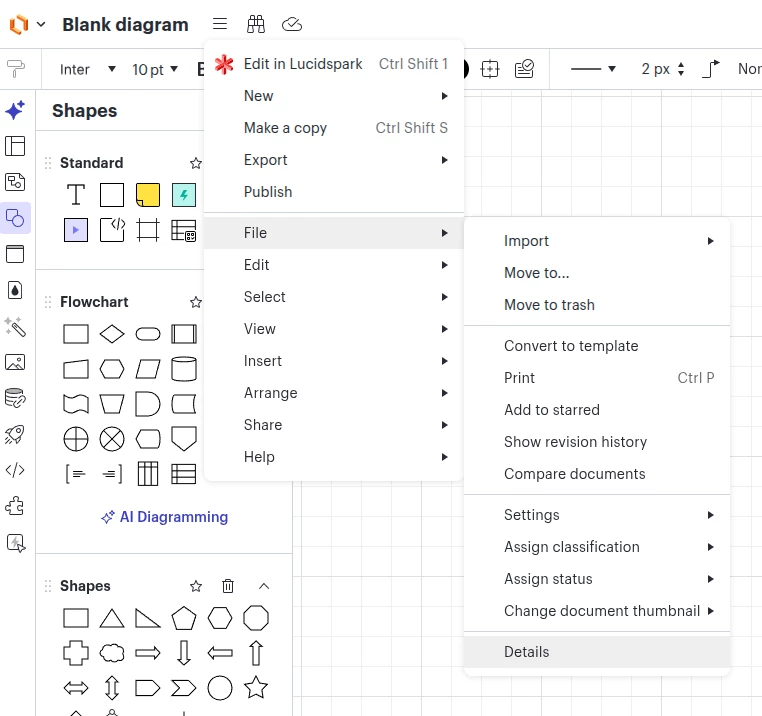
I hope this is an exciting news for you. We have recently released a new feature where you can see the details of an active document you have opened.

You can open the details dialog under the hamburger menu > file > details


In the details dialog, you could see information such as location, document size, and even change document thumbnail!


Please let me know if you have additional questions or feedback!


Cheers,

Comments

Addie
June 13, 2023

Hi Bill 

Thanks for posting your question in the Lucid Community! When using the Google Drive Integration all of your documents will appear in a folder called "Lucidchart."

Unfortunately changing the file path from within Lucid to your Google Drive is not possible. However we're always looking for ways to improve Lucidchart and your feedback is the best way for us to do that. Would you mind adding your idea to our Product Feedback space? Ideas shared here are raised with our product team as they prioritize improvements to our products. 

Let us know if you have any additional questions! 

Addie
Micah
Lucid community team
February 6, 2024
The following idea has been merged into this idea:

All the votes have been transferred into this idea.
May 17, 2024

This is a really basic feature - to know the current location of the file  you have open.   Having to search the name of the file you already have open is a a bit silly.

May 29, 2024

It’s disappointing that what would appear to be such a basic feature has not been incorporated 2 years after its absence was highlighted.

September 14, 2024

Of all the features that I want Lucid to add or improve, this is the most needed. It’s super annoying that when someone shares a Lucid document with me, there’s absolutely nowhere on the screen that I can go to find out who owns the document or where it’s located. And the workaround suggested doesn’t work at all when I’m looking at a document that might share the exact same file name with other documents (you can’t tell me that no one has ever not given the exact same title to two unrelated documents). Even if I opened every single document and looked inside to find the right document, if I’m looking at a copy of a document with the exact same name and shared with the same people, the only way I’d be able to figure out which one is which is by looking at and comparing the URLs, and that’s a horrible user experience.


In comparison, in Google Docs, Sheets, and Slides, I can find this information for any document under File > Details, or if I own the file or if it’s in a shared drive, I can also find the location to the right of the file name in Docs, Sheets, and Slides. Please implement this or something similar.

Kelsey Gaag
Lucidite
September 16, 2024

Thank you all for your additional feedback! We encourage anyone else who’s interested in this to upvote this post and share any additional details about your use case or what you’d like to see in this experience.

Freddie A
November 7, 2024

Are we any closer to being able to tell the location from the doc itself? Some of us have extensive folder structure built and being able to see the location from the link you are sent is pretty important. going back to the search function and following the steps works, but seems like alot of extra steps when it should be right there. 

Freddie Amerson
Ambar D
Lucid community team
November 12, 2024

Hi @Freddie A ! Thank you for checking in on this, unfortunately we do not have an update as of yet. Your feature requests and feedback are important to us. You can learn more about what happens to feature requests and how Lucid evaluates ideas by reviewing this Community post.

We encourage anyone else who is interested in this to upvote this post and share any additional details about your use case or what you’d like to see in this experience. 


November 15, 2024

There is actually a way to find the location of a document, when one has it open. It is not intuitive, but I found it functional.

One can click the LUCID Chart icon to open the drop down menu and click Home.

This is going to open the home view with the location containing the document preselected:

It also works for “Shared with Me” documents, but the outcome is just a bit less useful. It would be great if it auto-selected the document the view was opened from. Would spare me Ctrl+F-ing it.

The feature needs a more obvious exposure in the presentation layer.

As for the request to upvote the idea to help the Product Team select it for implementation, although clear and helpful, I’d have hoped that the Product have a vision of their own, and that this vision values highly the completeness and quality of the user experience, with attention given to the alignment with common established patterns their users will be invariably accustomed with. They should not need a crowd to tell them it is important to offer a simple way to navigate the content of the knowledge repository they are hoping people will build on their platform.

I find it surprising that this so very simple, obvious, basic, and potentially super easy to implement feature remains unaddressed after 2 years. Here is a naive proposal of addressing it in a simple way:

The underlying data structures must already incorporate the necessary information in the entity model, so no risk of any serious refactoring. It is just a pure UI rendering exercise.

And just to explain why I ended up here contributing to this conversation when I supposedly knew the answer to this question. The feature is so non-obvious that combined with some performance lags that I experienced in my environment, and compounded by the complexity of the storage structures my organization created as result to the team complexity and scale, attempting to find a folder for a doc lead me to believe that the feature has been removed. I wasted so much time chasing around that when I finally “de-confused” myself, the level of irritation made write this post.

I hope your Product will appreciate the effort and reconsider priorities on this feature without running the popularity contest. Of course, if the only way to blip something on their radar is to win the masses over (quantity) and there is no space for quality in their feedback loops, then they will not even see this and remain happy and oblivious making me feel like a right muppet for spending all this time. Well, some things cannot be helped :).

@Freddie A, you chasing this 7 day ago also contributed! Virtual high-five to a fellow sufferer :).


Kind regards,

Jaroslaw.

Astrid_G
September 4, 2025

It is frustrating that this feature still hasnt been implemented 3 years after the original suggestion.  Its basic folder/file management, that should be implicit in any document system.  Especially with the Teams/documents feature that is now available.

We are about to start a big project that needs current processes documenting and there’s going to be a lot of people creating a lot of docs, and its too easy to end up with shortcuts in a team folder rather than the documents themselves.

I tried the suggestion from ​@Jaroslaw of opening the document and going to the Home page from within it.  If a shared document it does at least show you the original owner.

It would be great to get an idea of if and when this functionality will be available.  Thanks.