Elisabetta G
November 23, 2021
Delivered

Retrieve the path/location of a document

Related products:LucidchartLucidspark
  • November 23, 2021
  • 22 replies
  • 1551 views

Hi

If someone sends me the link (URL) of a diagram that we both can access how can I see in which of our shared folders the file is stored? 

Please let me know if you need more details :)

Thank you

B.
Pinned Reply By Gordon

Hi,

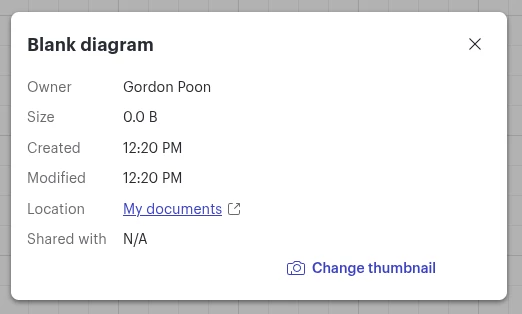
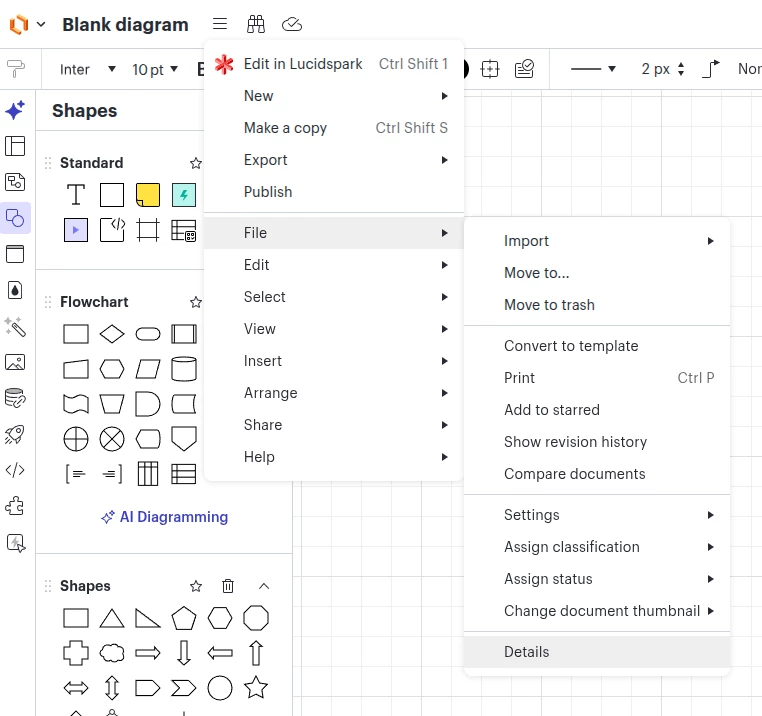
I hope this is an exciting news for you. We have recently released a new feature where you can see the details of an active document you have opened.

You can open the details dialog under the hamburger menu > file > details


In the details dialog, you could see information such as location, document size, and even change document thumbnail!


Please let me know if you have additional questions or feedback!


Cheers,

Comments

Abby S
Lucid community team
November 23, 2021

Hi Elisabetta

Thanks for reaching out to the community. Unfortunately it is not possible to see from within the document which folder it is saved in. However you can identify where it is saved by following these steps:

  1. Search the file's name from the docs list
  2. Open the More menu on the document
  3. Select Show Details
  4. In the right panel that opens you will be able to see which folder the document is saved in under Location

Hope this helps!

Elisabetta G
November 23, 2021

Hi Abby

Thank you for your prompt reply!

The workaround is a bit convoluted (just a bit) but it works. So it is good enough for me :)

Thank you very much

Abby S
Lucid community team
November 23, 2021

Hi Elisabetta

Thanks for your response. If you'd like to promote the idea of adding a more direct way to see document location please add it to our Product Feedback space. Ideas submitted here are passed on to our product development team for their consideration. Sorry for the inconvenience and thanks for your request!

Norberto S
January 17, 2022

@abby s If you don't mind posting the link to your feature request. I posted mine here Support could probably link them and mark mine as duplicate - https://lucidchart.zendesk.com/hc/en-us/community/posts/4416132856340-File-location-breadcrumbs


Abby S
Lucid community team
January 18, 2022

Hi Norberto

Thanks for continuing this thread and passing your request along! I’ve gone ahead and merged them into a single request. 

Tamara M
September 26, 2022

I have the same problem (can't find file origin folder) but the More menu on the document is locked. Is that a permission issue? 

Micah
Lucid community team
September 26, 2022

Hi Tamara thanks for continuing this thread. Can you please share a screenshot of what you're seeing where the "More" menu button is locked? Additionally can you please confirm if you own this document or is it shared with you? This will help me to better understand the situation. Thanks for your help!

Tamara M
September 27, 2022

Thanks for following up. My issue is resolved; I was able to better understand the context of the original solution solution. It was unclear to me at first that the "more" menu was the ellipses presented in the document library next to the title and share options of the lucidchart document. Depending on which view you prefer (list view or grid view) the word "more" does not always show up therefore causing a bit of confusion. 

Micah
Lucid community team
September 27, 2022

Hi Tamara thanks for the update! I'm glad that you were able to find the additional details for the document you needed. In case it helps other users I've included a screenshot of the "More" button in both list and thumbnail view below:


Please let me know if there's anything else I can do to support your work!

William Rodman S
June 13, 2023

The fiile path listed for all Lucidchart documents is "My Documents"

However that does not indicate where it is saved on my GDrive. 

How do I find where a Lucid file is saved on my GDrive?

How do indicate where I want a Lucid file saved?

Thanks 

Bill