Idea

Lock the SIZE of a shape in Lucidchart without locking the position

Related products:Lucidchart
  • April 12, 2025
  • 3 replies
  • 98 views

Forum|alt.badge.img+1

How can I lock just the size of object?

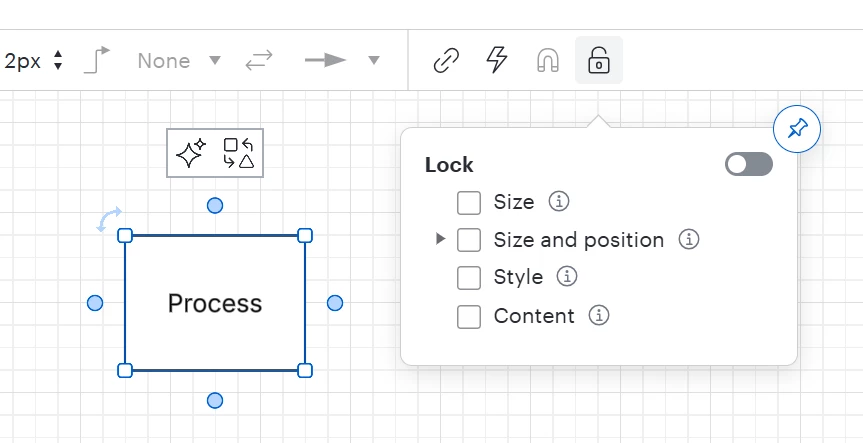
The only option I can find is to lock size AND position.  I only want to lock the size of an object and NOT the position.  What am I missing? 
April 14, 2025

Hi ​@DCB, thank you for your post! As ​@Humas1985 mentioned, the option to only lock the size of an object and not its position is unfortunately not currently supported in Lucid. 

It is possible to lock the ratio of a shape by selecting a shape then opening the ‘Shape Options panel and clicking the lock icon between width & height. However this will not lock the size of the shape and it’s still possible to resize it. 

That said, we’re very interested in your feedback and committed to continually improving our products. If you’re willing to share, we’d love to hear more details about your use case or what you’d like to see in this experience within this thread. I’ve also converted this post to an idea so that it’s visible to others within the Product Feedback section of the community - from here, they can upvote it and add details of their own.

Finally, for more information on how Lucid manages feedback via this community, take a look at this post:

Thank you for taking the time to share your feedback and ideas in the community. Please feel free to let us know if you have any questions! 

Comments

Humas1985
Lucid Legend Level 10
Forum|alt.badge.img+24
  • Lucid Legend Level 10
  • April 13, 2025

Hi ​@DCB 

Per my understanding the native option to lock only the size of an object without also locking its position.

The "Lock" feature in Lucidchart applies to both size and position, making the object fully fixed in place.

Your request for size-locking objects highlights the need for more precise control over object properties, adding to the same challenge faced when anchoring shapes to tables or preventing unintended resizing

We can also wait to know from other products experts from the community for any other suggestions.

Hope this helps - Happy to help further!!
Thank you very much and have a great one!
Warm regards


Leianne C
Forum|alt.badge.img+15
  • Lucid support team
  • April 14, 2025

Hi ​@DCB, thank you for your post! As ​@Humas1985 mentioned, the option to only lock the size of an object and not its position is unfortunately not currently supported in Lucid. 

It is possible to lock the ratio of a shape by selecting a shape then opening the ‘Shape Options panel and clicking the lock icon between width & height. However this will not lock the size of the shape and it’s still possible to resize it. 

That said, we’re very interested in your feedback and committed to continually improving our products. If you’re willing to share, we’d love to hear more details about your use case or what you’d like to see in this experience within this thread. I’ve also converted this post to an idea so that it’s visible to others within the Product Feedback section of the community - from here, they can upvote it and add details of their own.

Finally, for more information on how Lucid manages feedback via this community, take a look at this post:

Thank you for taking the time to share your feedback and ideas in the community. Please feel free to let us know if you have any questions! 


Micah
Forum|alt.badge.img+20
  • Lucid community team
  • December 1, 2025
The following idea has been merged into this idea:

All the votes have been transferred into this idea.