Katharine M
April 7, 2022
Validating

Disable contextual panel from displaying in Lucid

Related products:Lucidchart
  • April 7, 2022
  • 34 replies
  • 1073 views

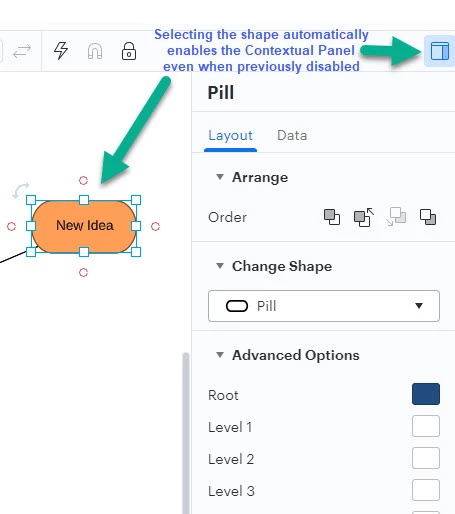
When I select a shape the Contextual Panel for that shape automatically opens up even when I've previously clicked the Contextual Panel icon to disable it (in the hopes it would stop opening each time).  This is highly inconvenient as it takes up screen space and often covers up the very shape I just clicked on with the intention of entering text.  Each time I have to click to disable the panel and then when I click the next shape it opens again.

It seems to happen on all container elements. The example is from a Mind Map but I've also seen it on Org Charts Swim Lames etc.
 

Pinned Reply By AnnieMoscon

Hi, my name is Annie and I am on the product team here at Lucid. All of the feedback mentioned in this thread is super valuable and will be noted. This is an area of our product that we are actively working to improve the usability of. If this is something you are interested in discussing further, you can leave a comment below and I can work on getting something set up to chat. We appreciate the thoughtful feedback. 

Comments

Ambar D
Lucid community team
January 8, 2026

Hi ​@ssravjee and ​@Raymundo.Villafuerte, thanks for leaving your honest feedback here. I can understand how this impacts your work, and I appreciate you letting us know how you feel about this feature.

Our product teams continue to review feedback in this space of the community as they research new features and enhancements. 

January 9, 2026

Thanks for your re-affirmation on this topic. So, when will this feature be coming live Q1 or Q2 of 2026 ?

Ambar D
Lucid community team
January 9, 2026

Hi ​@ssravjee, at this time, I don’t have an update on this specific feature but I appreciate you letting us know just how valuable this is to you.

This thread remains the best place for news on this, and we’ll update this thread with any new information!

January 15, 2026

Hi, I really enjoy lucid and have moved away from other products because it was so good but I don’t understand how this feature seems to evade the product team for 3 years. Especially when the fix seems incredibly simple, provide a toggle setting “Disable automatic contextual panel” and if this is ticked just don’t open the panel.

What really baffles me is that you get basically everything else right providing a great easy to use tool that looks clean and doesn’t have noise a lot of other tools have but then the panel keeps opening. Like what’s the product mindset here, “Lucid knows you need the panel so it has to open”.

This has been frustrating me for months and seeing that this has been known for 3 years and little more than a band-aid has been applied doesn’t fill me with confidence. Anyway like I said the product is great and I hope you can fix this minor but very frustrating issue, it’s especially egregious when working on smaller screens. 

Ambar D
Lucid community team
January 16, 2026

Hi ​@Wouter, thank you for your honest and detailed feedback. I can certainly understand your frustration and how it would impact your experience, and I appreciate you adding the context for this for our product teams to review. 

February 10, 2026

Hi, when can we expect this irritating Contextual Panel hide &seek will continue. Almost everyone I work with getting frustrated with this behavior of lucid diagram.

Ambar D
Lucid community team
February 10, 2026

Thanks for checking in on this thread and letting us know about your experience ​@ChandanPatra. I certainly understand your feedback here. Unfortunately at this time, I don’t have a specific timeline or update to provide, but we appreciate you sharing your honest insights in this thread.

Rest assured that your feedback is heard, and our product development team continues to use this feedback as they research new features and product enhancements.


For anyone else who comes across this thread, the best way to show your desire to see this implemented is to upvote this post and leave details on your use case or what you’d like to see

If you’d like additional information about how we manage feedback in this community, check out this post:


AnnieMoscon
Lucid product team
February 17, 2026

Hi, my name is Annie and I am on the product team here at Lucid. All of the feedback mentioned in this thread is super valuable and will be noted. This is an area of our product that we are actively working to improve the usability of. If this is something you are interested in discussing further, you can leave a comment below and I can work on getting something set up to chat. We appreciate the thoughtful feedback. 

Micah
Lucid community team
February 17, 2026
IdeaValidating
March 4, 2026

When working with large charts containing many elements, this contextual popup became so annoying that I disabled it by adding "lucid.app##body lucid-editor-gui-right-column" and “lucid.app##.right-column-spacer” to my ad blocker filter list.

Hopefully, the toggle for enabling/disabling this functionality in the standard way will be implemented.

UPD: updated filters - forgot about the spacer.