Idea

Align text along arrows / lines in Lucidchart

Related products:Lucidchart
  • May 11, 2020
  • 3 replies
  • 816 views

tori

Hi In Lucidchart I have this arrow in red and I have some text I want to add to this arrow. screen shot. (A)
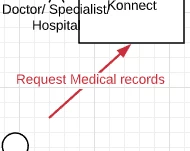
DYOkv4o_rZuLmz4ZwKRyUg.png

This is what I would like to see the text doing where the text to aligns with the arrow (the below is a screen shot of visio (B))
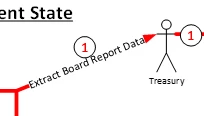
TLSONfAGp6Zc8nqDXQ8LbA.png

 Is it possible to align the text as in screenshot B?

Thx

Comments

Eric R
Forum|alt.badge.img+7
  • Lucid support team
  • May 12, 2020

Hi Tori thanks for posting in the Lucidchart Community. Unfortunately what you are trying to do is not currently supported in Lucidchart.

We’re very interested in your feedback and committed to continually improving our products. If you’re willing to share, we’d love to hear more details about your use case or what you’d like to see in this experience within this thread. I’ve also converted this post to an idea so that it’s visible to others within the Product Feedback section of the community - from here, they can upvote it and add details of their own.

Finally, for more information on how Lucid manages feedback via this community, take a look at this post.


Dax D
  • June 22, 2020

Align text on a line:

When a line is drawn and text added need a way to align the text as required. May this alignment be horizontally vertically cross etc.

Please let know if this will be possible in future?


Regards

Dax.


Eric R
Forum|alt.badge.img+7
  • Lucid support team
  • June 22, 2020

Hi Dax thanks for posting. There is currently no timeline for this feature to be implemented, but please upvote the request and add details of your use case/screenshots of your diagram in the thread to help build the case for this feature. Thanks!
