Solved

Can't upload images in Lucid documents

  • January 22, 2026
  • 6 replies
  • 18 views

Forum|alt.badge.img+1

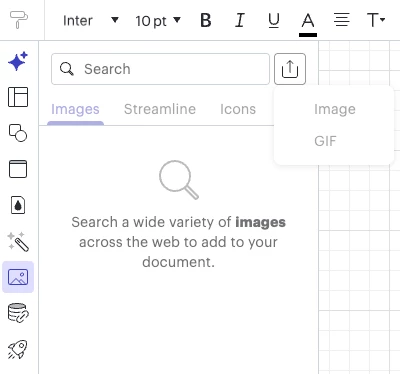
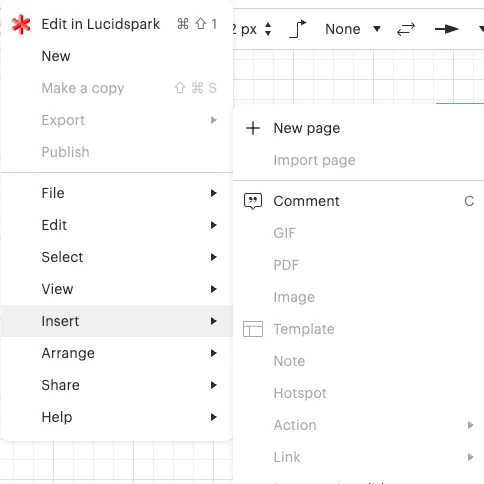
So all my ways of adding images are now greyed out and I can’t click them. I have two paid accounts, one personal and one for work and both are not allowing me to upload images.


What do I need to do to get this feature back?
 

Best answer by Becca G

@EmeraldLynn, is this issue occurring for all your documents? Can you confirm you have edit permissions on the documents you’re attempting to insert an image to?

I have not been able to replicate this experience in your recent documents. Can you send a screenshot of the associated Javascript Console output when you attempt to pull up the insert image option? You can open your Javascript Console by pressing Ctrl + Shift + J (if your computer is a Windows / Linux) OR Cmd + Opt + J (if your computer is a Mac).

Comments

Humas1985
Lucid Legend Level 10
Forum|alt.badge.img+24
  • Lucid Legend Level 10
  • January 22, 2026

Hi ​@EmeraldLynn 

Tried on my side and it looks like this might be specific to your user setup. Could you try again from an incognito/private browser window and let me know what happens?


Hope this helps - Happy to help further!!
Thank you very much and have a great one!
Warm regards


Forum|alt.badge.img+1
  • Author
  • January 22, 2026

Hi there, thank you for the reply. Yep tried incognito and cannot insert or upload there either. Same thing- greyed out.


Becca G
Forum|alt.badge.img+3
  • Lucid support team
  • January 22, 2026

Hi ​@EmeraldLynn, could you share a Technical Support PIN for your account? This will help me take a closer look at what’s going on. This PIN is safe to post in this thread because it is only accessible by members of the Lucid support staff. You can find steps for generating a Support PIN in this Lucid Help Center article: Generate a Lucid Support PIN.


Forum|alt.badge.img+1
  • Author
  • January 22, 2026

@Becca G yes - here’s the PIN iuG330TjQFp2g6TZxtHRQROdeWbc5vPhot178602724


Thank you!


Becca G
Forum|alt.badge.img+3
  • Lucid support team
  • Answer
  • January 22, 2026

@EmeraldLynn, is this issue occurring for all your documents? Can you confirm you have edit permissions on the documents you’re attempting to insert an image to?

I have not been able to replicate this experience in your recent documents. Can you send a screenshot of the associated Javascript Console output when you attempt to pull up the insert image option? You can open your Javascript Console by pressing Ctrl + Shift + J (if your computer is a Windows / Linux) OR Cmd + Opt + J (if your computer is a Mac).


Forum|alt.badge.img+1
  • Author
  • January 26, 2026

Hi! I am not sure what changed but I now have the option to upload/insert images again. 


:)