October 2, 2025
Solved

Why am I unable to save Virtual Activities in Lucidspark?
  • October 2, 2025
  • 3 replies
  • 75 views
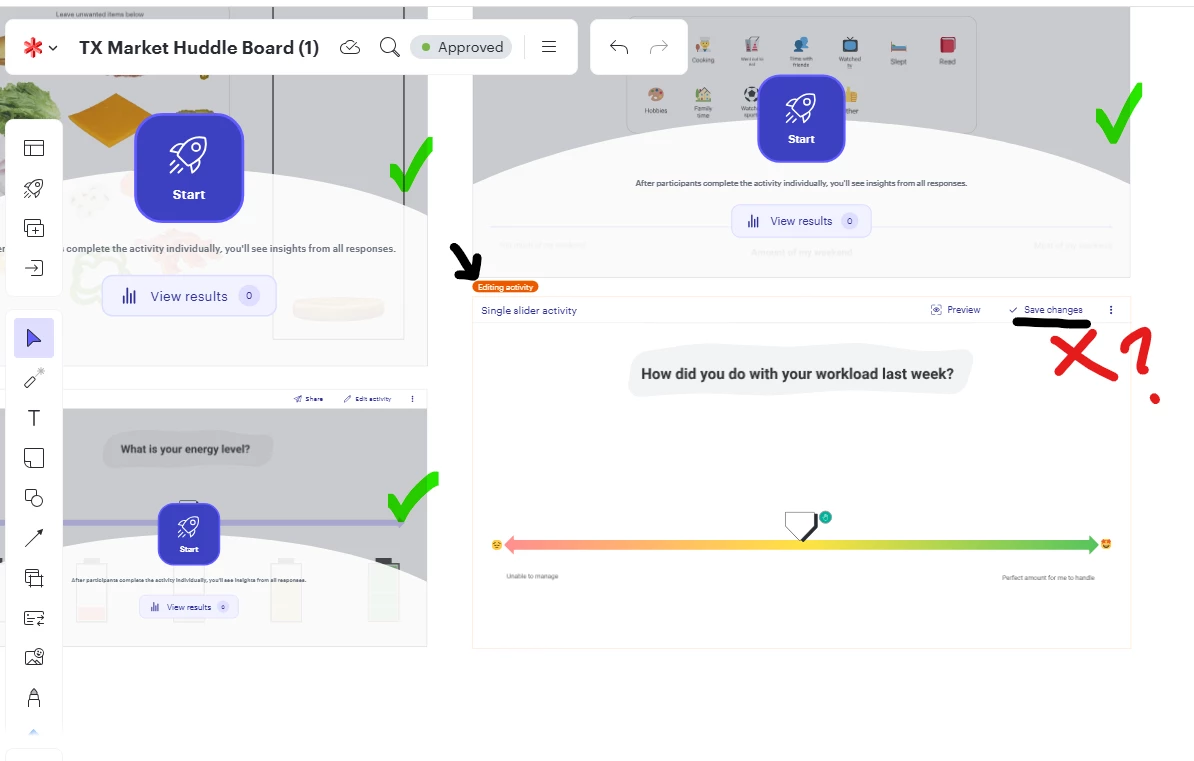
I have input four different activities for my team to use. Three of the four I did not need to edit. The fourth “Single slider activity” I have edited to fit my teams needs. However, I am unable to save changes, and appear to be stuck in the editing activity. What am I missing here? 


Best answer by aparrish

@Kaylynn Giordano I might be wrong, but this seems to me like a browser or permissions issue.

What type of browser do you use? Have you emptied the cache? Have you tried incognito?

What type of account do you have? Is there an administrator you can reach out to?

Comments

aparrish
Lucid Legend Level 8
aparrishLucid Legend Level 8Answer
Lucid Legend Level 8
October 3, 2025

@Kaylynn Giordano I might be wrong, but this seems to me like a browser or permissions issue.

What type of browser do you use? Have you emptied the cache? Have you tried incognito?

What type of account do you have? Is there an administrator you can reach out to?

October 6, 2025

Google Chrome is the browser I am in. How would we go about getting the permissions corrected with Lucid? (My director is unable to save the changes as well.) 


I can try emptying in the cache. We (my director and I) believe I have an account that should allow me to perform this function. I have a Lucid license, and seem to be able to perform all other  functions in Lucidchart/spark. How should we double check if I have the privileges?                                 


October 6, 2025

Clearing the cache worked. Thank you so much!