Nov 12, 2026 4:51 PM UTC
Solved

White line endings look transparent

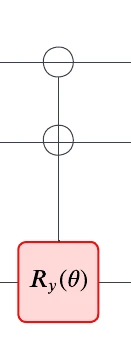
I’ve been using the white circle line endings in order to draw circuit diagrams and today I went on and all the line endings are transparents so any lines I had passing through them are now visable.

Is there is a way to change the opacity of the line endings so you can’t see the lines passing through them?


Lucid support team
Nov 13, 2026 11:23 PM UTC

Hi ​@Lizzie6652, thank you for posting in the community! I’m happy to take a closer look at the issue you’re experiencing. 

Can you please let me know when you noticed this change? Do you have an example screenshot of what your diagrams looked like previously? 

I believe you have identified a bug, and I have reported this to our development team. I apologize for any disruption this may cause, and I will update this thread with any new information about a fix. Please follow along on this thread for updates, and post any additional questions or concerns below.

In the meantime, I have a few suggestions for workarounds:

  • Check out the “Circuit Diagrams” Shape library, if you haven’t already. You can use the opaque circle shape under “Miscellaneous” from this library, or a standard Circle shape to cover these lines.
  • Add lines to the other side of the endpoint instead of passing through/underneath. Rather than running a line continuously underneath a terminal circle, split the line into two segments that terminate right at opposite edges of the circle.
  • Switch to the solid circle endpoint. If your diagram allows for a filled dot instead of an open terminal, select the solid circle option in the endpoint dropdown - it will display with your opaque line color all the way through.


I’m also sharing this article from our Help Center with more information on editing lines: Add and style lines in Lucidchart

Hope this helps!

Comments

Lucid support team
Nov 13, 2026 11:23 PM UTC

Hi ​@Lizzie6652, thank you for posting in the community! I’m happy to take a closer look at the issue you’re experiencing. 

Can you please let me know when you noticed this change? Do you have an example screenshot of what your diagrams looked like previously? 

I believe you have identified a bug, and I have reported this to our development team. I apologize for any disruption this may cause, and I will update this thread with any new information about a fix. Please follow along on this thread for updates, and post any additional questions or concerns below.

In the meantime, I have a few suggestions for workarounds:

  • Check out the “Circuit Diagrams” Shape library, if you haven’t already. You can use the opaque circle shape under “Miscellaneous” from this library, or a standard Circle shape to cover these lines.
  • Add lines to the other side of the endpoint instead of passing through/underneath. Rather than running a line continuously underneath a terminal circle, split the line into two segments that terminate right at opposite edges of the circle.
  • Switch to the solid circle endpoint. If your diagram allows for a filled dot instead of an open terminal, select the solid circle option in the endpoint dropdown - it will display with your opaque line color all the way through.


I’m also sharing this article from our Help Center with more information on editing lines: Add and style lines in Lucidchart

Hope this helps!
Translate
Paul W102
Nov 17, 2026 10:42 PM UTC

It’s the same with formerly “white” arrow ends. Ruins all my documents! Please fix.

Translate
Nov 18, 2026 4:44 AM UTC

I’m having the same issue. I can’t export my UML class diagrams because of it. Please fix this regression.

Translate
Lucid support team
Nov 18, 2026 10:12 PM UTC

Hi ​@CheeseBall, could you please share more context on the issue you’re having with exporting your UML class diagrams? I wasn’t able to recreate the issue you’re describing. A few additional questions:

  • Did you manually create the UML or did you generate it with markup?
  • Are you trying to export the entire document or just the diagram?
  • What happens when you try to export?

Thanks for your help here!

Translate
Nov 24, 2026 1:47 AM UTC

I created my UMLs manually. It’s not a problem with exporting, what I meant was that it was preventing me from exporting them because they look bad.
To reproduce the issue simply create a blank document, put a background with some color, then add an arrow on top with the arrowhead set to one of the ones that are supposed to have white fill. You’ll notice that it’s not white, it’s transparent and you’ll see the color of your background instead of white. It goes against the conventions of UML class diagrams and it’s a regression when compared to how it worked before.

Translate
Nov 18, 2026 2:10 PM UTC

Thanks for responding!

To answer you’re questions I believe I noticed it for the first time on the 12th of November, I use Lucidchart quite frequently so I believe this change occured very recently.

If this is a bug as you have suggested then please look into it as some of my circle diagrams use hundreds of these line endings and so it would be very time consuming to have to re draw these diagrams.

I have attached a diagram showing how the line ends previously appeared.

Thank you.


Translate
Lucid support team
Nov 18, 2026 5:54 PM UTC

Hi ​@Paul W102 and ​@CheeseBall, thank you for commenting on this post! I’m sorry to hear that you are also experiencing this issue.

​@Lizzie6652, I appreciate your response and additional context. I can confirm that our development team is investigating this issue and will provide an update as soon as possible.

Thank you for your patience!

Translate