Answer

Where is the content toolbar in Lucid?

  • December 6, 2023
  • 5 replies
  • 1120 views

Forum|alt.badge.img+1

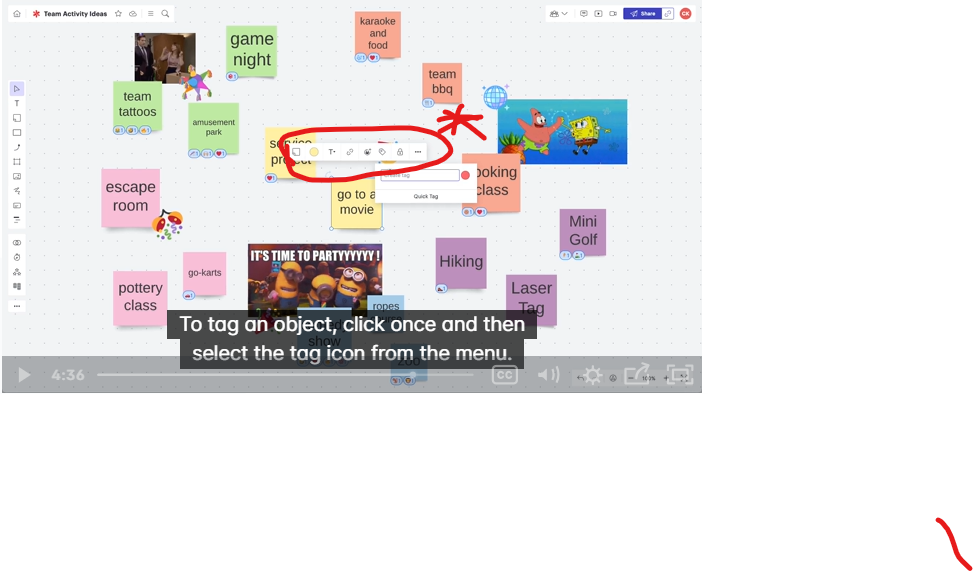
When I select the shape of my flowchart, I cannot see the content tool bar (the one in the photo below).
I wonder why this is the case. How can I fix it?

With this issue, I can’t add tag to my object.
 

Best answer by Leah W

Hi Akri,

Thanks for contacting Lucid Support! Unfortunately, I am unable to reproduce the issue on my end. As a first step I would recommend following these  troubleshooting instructions:

  • Try to editing your document with the content bar in a Chrome Incognito browsing session. An Incognito Window is a private browser that allows you to sign into Lucid without any outside interference. It is a way for us to determine what may be causing the error you are seeing. 
  • Sometimes issues like this can be related to internet connection speed or network security. Please try again on another network, ensuring that you are on a strong, stable connection.
  • If applicable, could you please try disconnecting from your VPN to see if that resolves your issue?

If these steps do not resolve the issue, please let me know and provide a description of the objects you are attempting to tag.

Comments

Leah W
Forum|alt.badge.img+9
  • Lucid support team
  • Answer
  • December 6, 2023

Hi Akri,

Thanks for contacting Lucid Support! Unfortunately, I am unable to reproduce the issue on my end. As a first step I would recommend following these  troubleshooting instructions:

  • Try to editing your document with the content bar in a Chrome Incognito browsing session. An Incognito Window is a private browser that allows you to sign into Lucid without any outside interference. It is a way for us to determine what may be causing the error you are seeing. 
  • Sometimes issues like this can be related to internet connection speed or network security. Please try again on another network, ensuring that you are on a strong, stable connection.
  • If applicable, could you please try disconnecting from your VPN to see if that resolves your issue?

If these steps do not resolve the issue, please let me know and provide a description of the objects you are attempting to tag.


Forum|alt.badge.img+1
  • Author
  • December 22, 2023

Hi Leah,

Thank you very much for your quick reply and sorry for my late reply. I’ve already tried opening in incognito mode and different network. However, the issue still persist. 

At the same time, I also found that my different chart doesn’t have the same issue. Below is what I mean by that.

(1)


(2)


I can see that there is a content tool bar in (2), but not (1). Why was it like that?
Do I need to create the board via Lucidspark to get a content bar?
If that’s a case, how should I transfer the (1) to Lucidspark board? I want to tag the square in (1).

Thank you in advance & Merry Christmas!


Phillip W
Forum|alt.badge.img+16
  • Lucid support team
  • December 22, 2023

Hey @akri -- so, yes, it does look like you are working in Lucidspark in the below and Lucidchart in the above. These are 2 different products and have 2 separate toolbars. I would recommend you copy and paste your content from Chart to Spark if this is the toolbar you’d like to work in.

Hope this helps!


Forum|alt.badge.img
  • May 22, 2025

I was having a similar issue but realised that my board was in private mode and that was deactivating the content toolbar option. Once I deselected it, I was able to see the content toolbar again.


Leianne C
Forum|alt.badge.img+15
  • Lucid support team
  • May 23, 2025

Hi ​@seanbrown, thank you for continuing this thread and sharing your experience. Private mode shouldn’t disable the content toolbar option but I’m glad to hear the issue resolved itself.

Please feel free to let us know if the issue comes back or if you have any questions!