August 26, 2025
Solved

Where is layout style in Lucid Org Charts?

  • August 26, 2025
  • 3 replies
  • 72 views

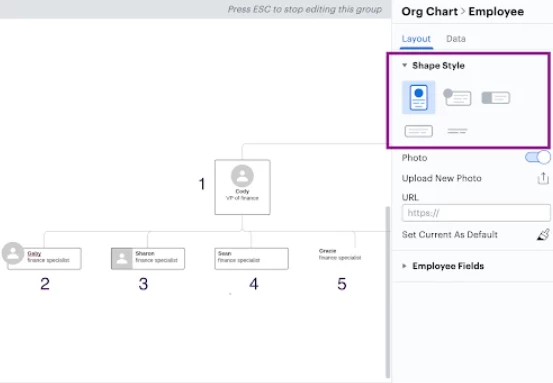
I cannot find Layout Style that includes Spacing in my toolbox.  Is that restricted to a larger subscription?  I only see Shape Style, Employee Fields and Reporting. 

Best answer by Humas1985

Hi ​@Jerilyn Gandara 

Do you want to explore a layout style like the one shown below?

 Make sure you're working with a diagram type that supports these features, like an organizational chart

Please post any specific questions you may have.

To learn more on Layout Styles - Customizing style and layout of org chart in Lucidchart | Community

Hope this helps - Happy to help further!!
Thank you very much and have a great one!
Warm regards

Comments

Humas1985
Lucid Legend Level 10
Humas1985Lucid Legend Level 10Answer
Lucid Legend Level 10
August 26, 2025

Hi ​@Jerilyn Gandara 

Do you want to explore a layout style like the one shown below?

 Make sure you're working with a diagram type that supports these features, like an organizational chart

Please post any specific questions you may have.

To learn more on Layout Styles - Customizing style and layout of org chart in Lucidchart | Community

Hope this helps - Happy to help further!!
Thank you very much and have a great one!
Warm regards

Huma || Lucid Legend
August 26, 2025

Thank you, and yes, that is it.  What is difficult now is allowing spacing for all those reporting to the manager - I can’t get that to work. 

Humas1985
Lucid Legend Level 10
August 26, 2025

Hi ​@Jerilyn Gandara 

To adjust spacing for all employees reporting to a manager, use the "Layout" panel by clicking a blank space on the org chart canvas. There you can increase horizontal and vertical spacing sliders to spread out the boxes evenly without disrupting reporting lines.

Consider - individual manual dragging can affect hierarchy or box size, so spacing is best controlled through these layout settings. If more custom positioning is needed, breaking the auto-layout and repositioning manually might be necessary.

Refer to this for more help - Resizing organisational Chart | Community

Regards

Huma || Lucid Legend