Answer

Where can I find the location and folder where my document is stored?

  • March 4, 2025
  • 5 replies
  • 264 views

Forum|alt.badge.img+1

Can anyone help me - where can I find the location of a lucidchart - my folder path that it is stored in?

Best answer by Rickajr

Solange,

Select the File → Move to… and it will show you where that file is currently located.
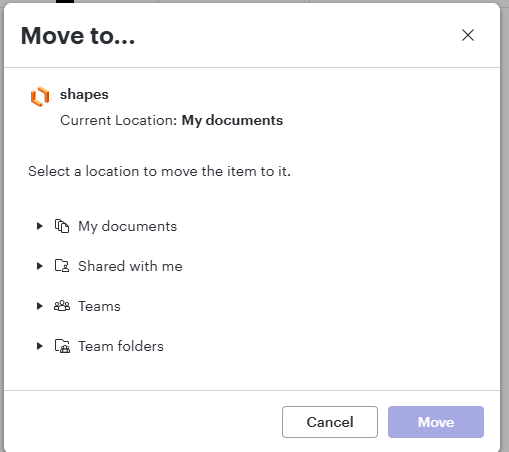
 

Hopefully that is what you’re wanting.

Thanks,

Rick

Comments

Ria S
Lucid Legend Level 8
Forum|alt.badge.img+19
  • Lucid Legend Level 8
  • March 4, 2025

Hi ​@Solange 

Lucidchart documents are cloud-based, so they are not stored in a traditional folder structure like local files on your computer. However, you can find your document's location within Lucidchart by following these steps:

1️⃣ Check "My Documents" in Lucidchart

  • Click on the Lucidchart Home Dashboard (lucid.app).
  • Navigate to "My Documents" on the left sidebar.
  • Use the search bar at the top to locate your file by name.

2️⃣ Check Shared Folders

  • If the document was shared with you, go to "Shared with Me" in the left sidebar.
  • If it belongs to a specific team folder, check under Team Documents.

3️⃣ View Recent Documents

  • If you recently opened the document, go to "Recents" on the dashboard for quick access.

Since Lucidchart stores everything online, you won’t see a traditional "folder path," but you can create custom folders in your My Documents section to organize your files.

Let me know if this helps!


Forum|alt.badge.img+1
  • Author
  • March 4, 2025

Thanks Ria. Yes I understand that my folders in My Documents is just labelling but whilst I can find the chart I want by searching I‘m trying to find (remember) where I “stored” it within my “folders”. You used to be able to see the path in one of the File menu options.


Rickajr
Lucid Legend Level 4
Forum|alt.badge.img+11
  • Lucid Legend Level 4
  • Answer
  • March 5, 2025

Solange,

Select the File → Move to… and it will show you where that file is currently located.


Hopefully that is what you’re wanting.

Thanks,

Rick


Ria S
Lucid Legend Level 8
Forum|alt.badge.img+19
  • Lucid Legend Level 8
  • March 5, 2025

Hi ​@Solange 

Thanks for the clarification. ​@Rickajr ‘s screenshot above should solve your issue. Thanks ​@Rickajr .


Forum|alt.badge.img+1
  • Author
  • March 5, 2025

Thank you Rick and Ria - this is exactly what I was looking for! 😄