
For the past few months, my group has been uploading and converting our designs from Visio. Just today, someone in my team reported that when they are converting a file, some shapes on the existing design show up as broken or missing. I tried uploading the same file from my computer, as well as different Visio designs for different clients and got the same issue. I even went as far as uploading an old design that I successfully uploaded 2 days ago (to then modify) and I was experiencing the same issue that I did not have prior. For example:
When I uploaded the design on the 20th, one shape showed properly (first), but when I uploaded the old design again today, same file--untouched since September 2025--it gives the missing image (second):
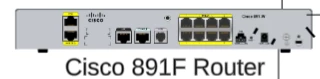
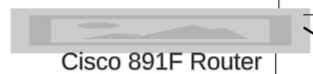
At this time I did check the status.lucid.co and it shows “All Systems Operational”. I’m not sure what else to try, but since this happens on multiple files, on multiple PCs/Accounts, this feels like an issue with Lucid or something regarding the conversion process that changed suddenly.
Has anyone experienced this before? Was there a way to resolve it on your side?
 Your privacy choices


