Answer

What does the "Smart Search" option do within the Find box?

  • June 20, 2019
  • 5 replies
  • 109 views

Jack H

As the title says.  I cannot seem to find any information on this feature.

Best answer by Maison W

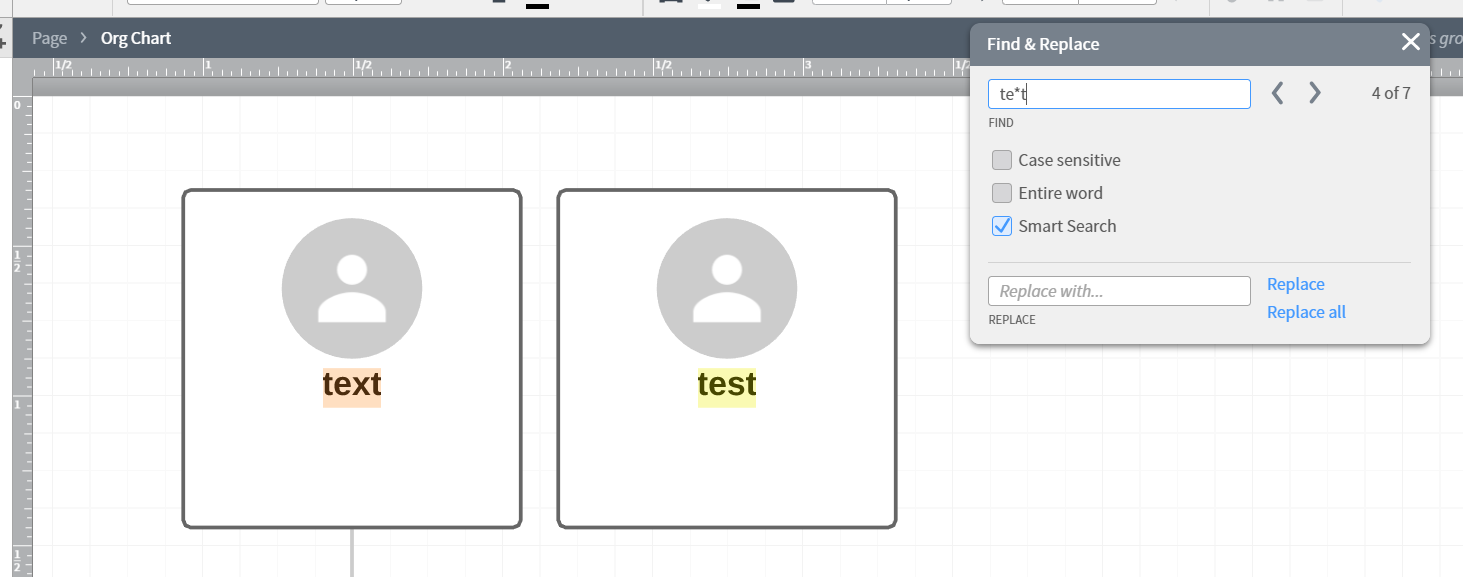
Hi Jack! Thanks for posting. With smart search on any punctuation or regular expression items are replaced with wildcard expressions meaning anything will match them. For example with smart search on if you searched for "te*t" the smart search would bring up any word that had those letters in that order with any letter replacing the asterisk: text test etc. Hope this helps!

Comments

Maison W
Forum|alt.badge.img+7
  • Lucid support team
  • Answer
  • June 20, 2019

Hi Jack! Thanks for posting. With smart search on any punctuation or regular expression items are replaced with wildcard expressions meaning anything will match them. For example with smart search on if you searched for "te*t" the smart search would bring up any word that had those letters in that order with any letter replacing the asterisk: text test etc. Hope this helps!


lucid J
Forum|alt.badge.img+4
  • October 18, 2022

Thanks for this reply @maison w   however i cant find any documentation on the Smart Search feature  so im hoping you can help:

how "far" does smart search take regex?  does it ONLY allow for wildcards -  ( also it seems that  . (a period) also works as wildcard single character  along with *   as well.

ie im trying to get a logical OR to work   and cant seem to  (or i dont know the syntax lucid's smartSearch is looking for).

(2c|6c)5d........

(hoping it will match any starting with:    2c OR 6c  and  wildcards...

i have tried several variations (the instant match feature is very nice for this btw).

tks


Micah
Forum|alt.badge.img+20
  • Lucid community team
  • October 18, 2022

@lucid j Thanks for continuing this thread! Unfortunately our Smart Search tool doesn't support Boolean operators like "or".  Maison's response above describes the extent of its functionality. However I certainly understand how this sort of advanced searching ability would expand how you're able to use the tool - great idea! I've logged it for review by our development team. Thank you for taking the time to share more great feedback with us! Apologies for any inconvenience this causes - please let me know if there's anything else I can do to help. 


Forum|alt.badge.img+3
  • May 1, 2024

It would be helpful if @Maison W’s original explanation was made available from the Find dialog box.


Micah
Forum|alt.badge.img+20
  • Lucid community team
  • May 1, 2024

Hi @Romuel, thanks for this feedback! We’re committed to continually improving our products and want to log this feedback. Please first search the Product Feedback section of this community (with the filter Topic Type = Idea) to see if it’s already been submitted. If so, please add any additional details you’d like and upvote the request - this consolidation helps to refine feedback and properly capture the popularity of the request.

If no one has submitted this idea yet, please create one of your own and be sure to include details about your use case or what you’d like to see in this experience. This will also allow other users with similar requests to discover and upvote it, then add details of their own.

Finally, for more information on how Lucid manages feedback via this community, take a look at this post: