
Solved
Unpublish shared link in Lucid
After sharing multiple documents with a client by sharing a pdf image file, is there a way to deactivate those url’s? I may have sent a whole businesses process maps to the wrong client.
After sharing multiple documents with a client by sharing a pdf image file, is there a way to deactivate those url’s? I may have sent a whole businesses process maps to the wrong client.
To unpublish a document, please head to the hamburger menu > Publish, and in the publishing panel, click on the trash icon to remove the publishing link. As such:
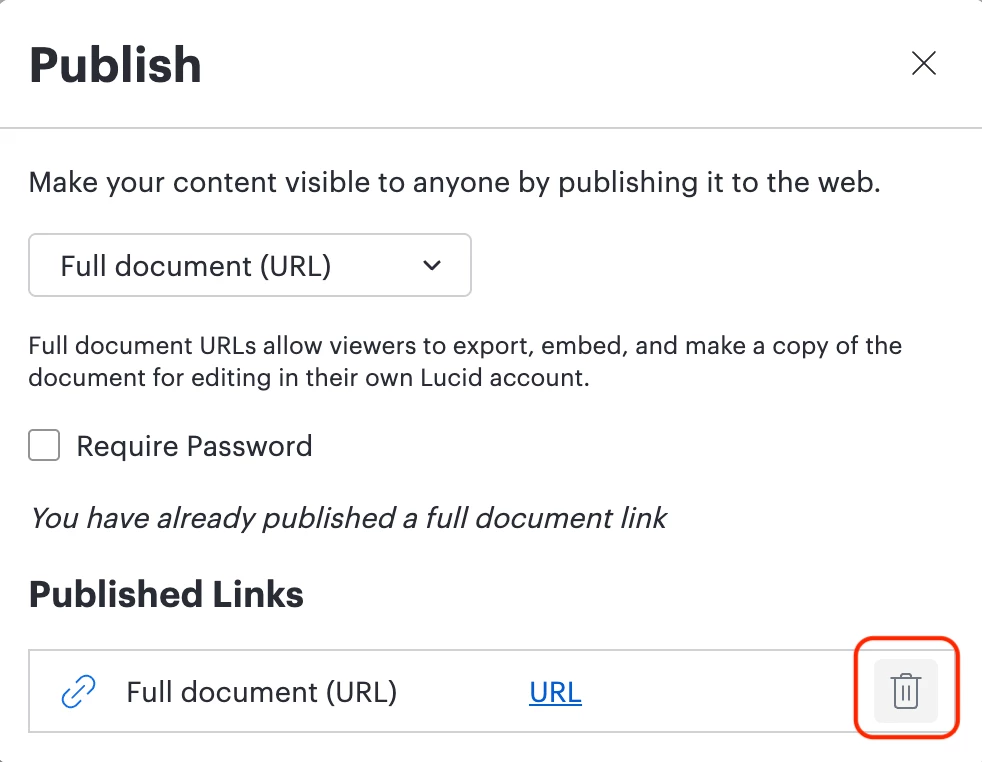
You can also find these steps in our Help Center article on Publishing and embedding.
Please let me know if this helps!
A Lucid or airfocus account is required to interact with the Community, and your participation is subject to the Supplemental Lucid Community Terms. You may not participate in the Community if you are under 18. You will be redirected to the Lucid or airfocus app to log in.
A Lucid or airfocus account is required to interact with the Community, and your participation is subject to the Supplemental Lucid Community Terms. You may not participate in the Community if you are under 18. You will be redirected to the Lucid or airfocus app to log in.
Enter your E-mail address. We'll send you an e-mail with instructions to reset your password.
 Your privacy choices


