Answer

Unit of measure malfunction

  • July 12, 2025
  • 1 reply
  • 24 views

Forum|alt.badge.img

Hello,

my unit of measure changed from inches (feet and inches) to meters/metric… and i cannot change it back.

Please advise. Nothing I try is working. I have already tried to make the change in document settings.

Best answer by Ria S

Hi ​@arvcan 

If your unit of measure has switched to metric and you're unable to change it back to inches or feet and inches through Document Settings, you can try these steps:

  1. Confirm your document settings by opening your Lucidchart document, then go to:
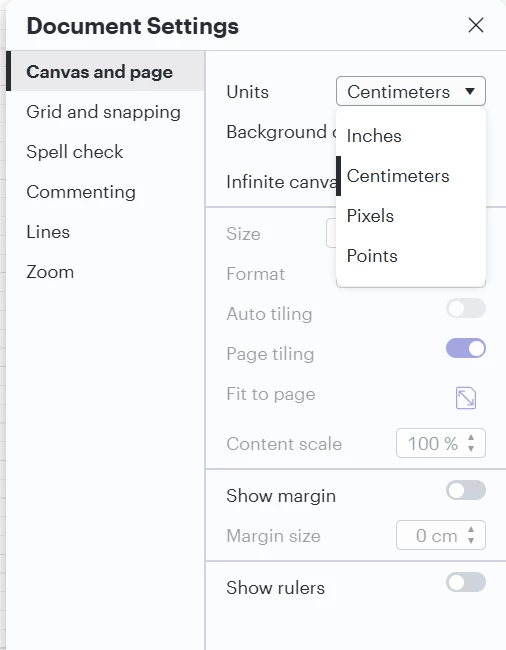
    File > Document Settings > Units. From there, select Inches or Feet & Inches from the dropdown menu. Be sure to click Save or Apply if that option appears. See screenshot below:

  2. After making the change, try refreshing your browser or closing and reopening the document to ensure the new setting takes effect.

  3. If it’s affecting all new documents, go to your Account Settings > Preferences and check if the default unit has been changed at the account level. Changing it there can help for future documents.

  4. Browser extensions or cached data can sometimes interfere with Lucidchart. Try switching to a different browser or opening an incognito/private window to test this.

Please let us know how it goes. Hope you get this sorted

Comments

Ria S
Lucid Legend Level 8
Forum|alt.badge.img+19
  • Lucid Legend Level 8
  • Answer
  • July 13, 2025

Hi ​@arvcan 

If your unit of measure has switched to metric and you're unable to change it back to inches or feet and inches through Document Settings, you can try these steps:

  1. Confirm your document settings by opening your Lucidchart document, then go to:
    File > Document Settings > Units. From there, select Inches or Feet & Inches from the dropdown menu. Be sure to click Save or Apply if that option appears. See screenshot below:

  2. After making the change, try refreshing your browser or closing and reopening the document to ensure the new setting takes effect.

  3. If it’s affecting all new documents, go to your Account Settings > Preferences and check if the default unit has been changed at the account level. Changing it there can help for future documents.

  4. Browser extensions or cached data can sometimes interfere with Lucidchart. Try switching to a different browser or opening an incognito/private window to test this.

Please let us know how it goes. Hope you get this sorted