Solved

Unable to Lock Shapes in Lucidchart

  • February 25, 2021
  • 3 replies
  • 130 views

Jon S

Do you know how to fix this?

Best answer by Emma D

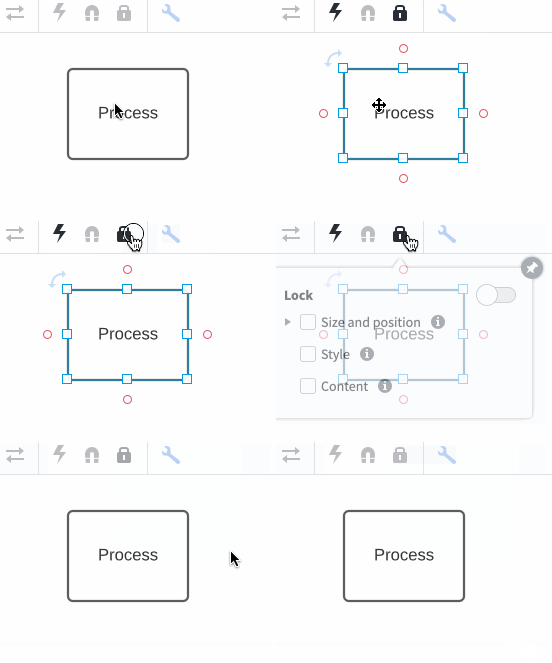
Hi Jon thanks for posting. Are you referring to the lock icon in the top menu bar above your canvas? If so you will need to select an object (or multiple objects) on your canvas first. Please see the below GIF for a demonstration.

This feature allows you to lock style formatting or size/position changes to aspects of your diagram rather than the whole document. We do have a separate content locking feature that allows you to set your document status to locked and prevent any further changes- please see this section of our Manage Document Status article for more information. Please note that this is only available to users on Enterprise accounts. Feel free to let me know if you have any further questions. 

Comments

Emma D
Forum|alt.badge.img+7
  • Lucid support team
  • Answer
  • February 25, 2021

Hi Jon thanks for posting. Are you referring to the lock icon in the top menu bar above your canvas? If so you will need to select an object (or multiple objects) on your canvas first. Please see the below GIF for a demonstration.

This feature allows you to lock style formatting or size/position changes to aspects of your diagram rather than the whole document. We do have a separate content locking feature that allows you to set your document status to locked and prevent any further changes- please see this section of our Manage Document Status article for more information. Please note that this is only available to users on Enterprise accounts. Feel free to let me know if you have any further questions. 


Forum|alt.badge.img
  • March 30, 2026

Hi - I can click on the lock option but all the options below it are grayed out and I cannot select those. Why is that? Thanks!


Leianne C
Forum|alt.badge.img+15
  • Lucid support team
  • April 1, 2026

Hi ​@mbcdefg27, thank you for continuing this post. Would you mind sharing the following information to help us take a closer look at the issue?

  • Do you have edit permissions in the document where you are trying to lock an object? 
  • Can you please share a brief description of the object you are trying to lock? (Shape, container, swimlane etc.) 
  • Is this only happening in a specific document  or specific shapes?
  • Are you able to lock if you copy/paste the object you are trying to lock? 

If the issue persists, could you share a temporary Document Support PIN for this document? This will help me take a closer look at what’s going on. This PIN is safe to post in this thread because it is only accessible by members of the Lucid support staff. You can find steps for generating a Support PIN in this Help Center article

Thank you for your help and patience. Please let us know if you have any questions!