December 28, 2023
Solved

Unable to link Lucidchart workflow documents to one another

  • December 28, 2023
  • 14 replies
  • 339 views

I am trying to link several workflow documents together, but the connection cannot be made.  I am guessing that there may be some functionality attached to subscription levels but there is no indication that this is the case.  I have tried layering but this is problematic for workflows that are still developing or evolving.

Any insight would be great.

Best answer by Phillip W

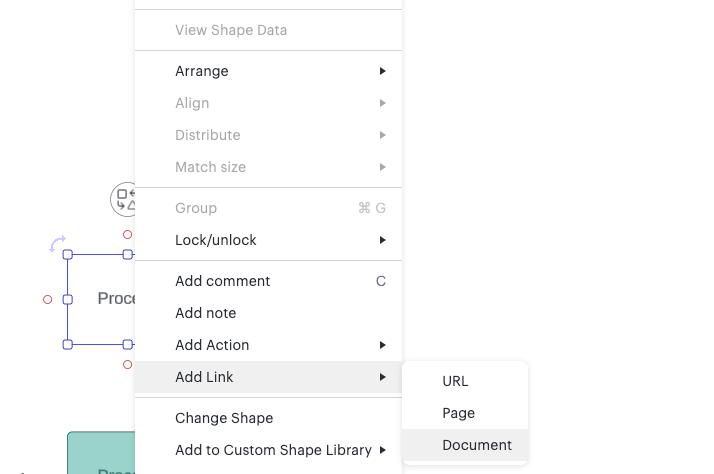
Hey @darby0707 -- thanks so much for the reply, and sorry for the back and forth here! So, if you wouldn’t mind to try clicking the shape, right click, and navigate to add link from there, this seems to work on my end when the page is collapsed and should be a good workaround. 

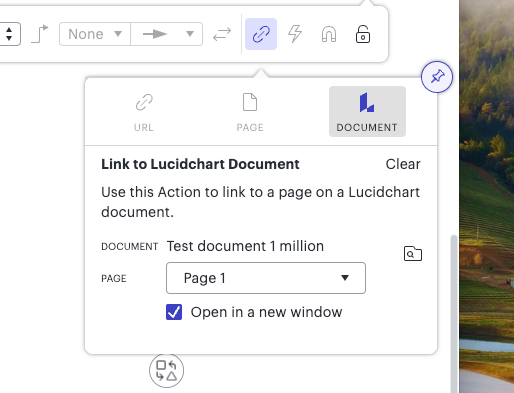
If this still does not work on your end would you mind trying to pin the toolbar by clicking the thumbtack. It will look like this: 


This will most likely pull up 2 separate pinned boxes (which is part of the buggy behavior here) and you’ll want to work with the box on the left. Click through like normal, document → browse → select and let me know if that does the trick. 🤔

Comments

Phillip W
Lucid support team
December 28, 2023

No problem at all @darby0707 -- thank YOU for sticking it out with ME! This is definitely not expected behavior for this feature and I do apologize for this “janky” workaround, but I’m so glad to hear this is working for you. Please reach out anytime with questions! 

December 2, 2024

I was just about to open up a bug on this same issue, “unable to link to Lucidchart document”. 

Context:

  • I use Arc Browser, which is a fork from Chromium, so I’d expect 100% compatibility with Chrome
  • Same exact symptoms as Darby
    • Did not work:
      • Linking via toolbar did not work
      • Linking via right-click → Link did not work
    • Did work
      • Pinning the Link dialog to the screen, linking to other Lucidchart document
Zuzia S
Lucid community team
December 4, 2024

Hi ​@Craig H, thanks for your post! Could you please let us know whether linking via toolbar or right-click > pasting URL does work for you?

Indeed, the functionality to directly link a Document is currently investigated by our development team due to a bug. I apologize for any disruption this may cause, and I will update this thread with any new information about a fix. Please follow along on this thread for updates, and post any additional questions or concerns below.

Best!

Ambar D
Lucid community team
December 13, 2024

Hi ​@Craig H, jumping in to let you know that this bug has now been resolved! Linking to Lucid documents is working as expected now. You should be able to link to Lucid documents using the ‘Browse Documents’ button as shown below.

Please let us know if you have any further questions or concerns!