
Question

unable to import properly a jira ticket

  • July 22, 2026
  • 5 replies
  • 27 views

Forum|alt.badge.img+1
any tips on how to get the jira cards to fully update?


Comments

Humas1985
Lucid Legend Level 10
Forum|alt.badge.img+24
  • Lucid Legend Level 10
  • July 22, 2026

Hi ​@BA'd 

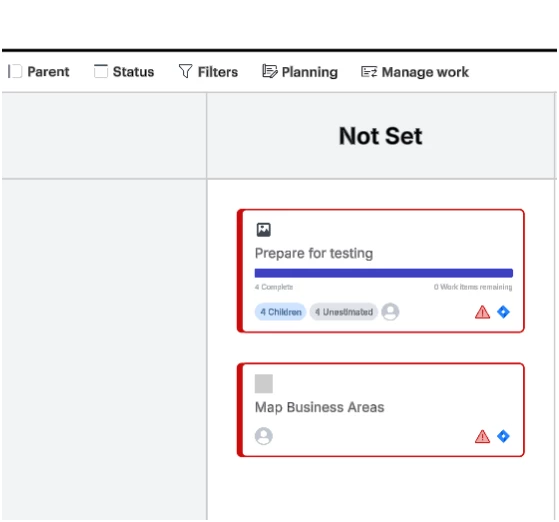
The cards are showing up in a grouped lane labeled Not Set. That typically happens when the target Jira field used for grouping is blank, unmapped, or not available on those issues

  • The issues appear under the "Not Set" lane because the Jira field being used for grouping is likely empty, unmapped, or unavailable. Please verify which Jira field is selected for grouping, ensure that field is populated on the Jira issues, and try grouping by a standard field (such as Status or Assignee). After updating the grouping field, re-save or refresh the import in Lucidchart.

To learn more - Integrate Lucid Cards with Jira – Lucid

Hope this helps !!


Forum|alt.badge.img+1
  • Author
  • July 22, 2026

Thanks, the rest are all fine its just these two.

Any suggestions how I can determine what might have corrupted between the integration?


Forum|alt.badge.img+1
  • Author
  • July 22, 2026

These cards are filtered under status and parent in the table. Both tickets in Jira are showing a parent and a status.


Forum|alt.badge.img+1
  • Author
  • July 22, 2026

Turns out something must have  blipped in the parent linking as the cards were integrated. When the parent was removed and replaced it worked


Humas1985
Lucid Legend Level 10
Forum|alt.badge.img+24
  • Lucid Legend Level 10
  • July 22, 2026

Thanks ​@BA'd for the note, it sounds like the issue was caused by a temporary problem with the parent link during integration, and recreating the parent fixed it.