Question

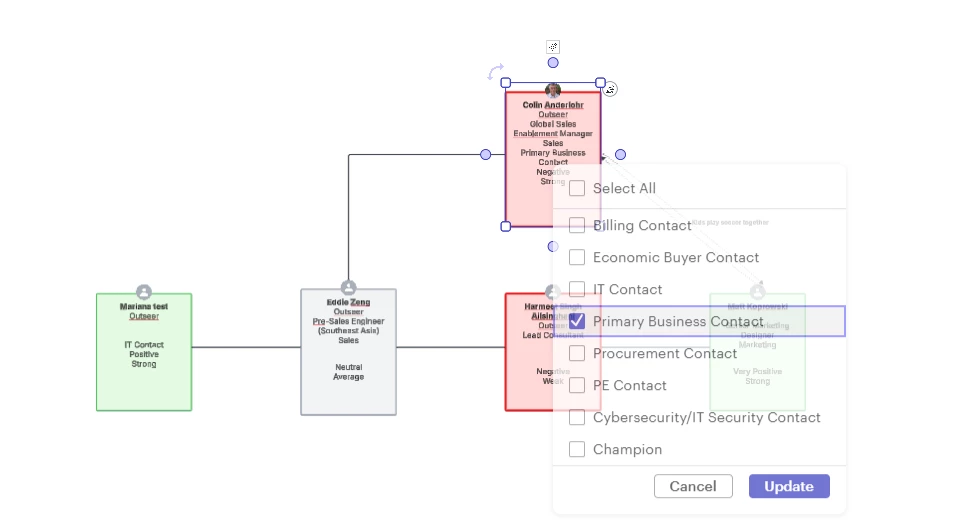
Unable to click and change contact shape data field

  • May 5, 2026
  • 4 replies
  • 13 views

Forum|alt.badge.img+1

When clicking on a contact card which was from Salesforce Data, I am unable to change the dropdown data on the contact shape.  It only flashes for a second and then goes away.  This is only for dropdown selection categories of data fields on the contact shape.  If Text, I can change it on the contact shape. 

I know I can change it on the Contact Details in the right panel but this looks like it should be able to be changed on the contact shape.  

Thx

Comments

Humas1985
Lucid Legend Level 10
Forum|alt.badge.img+24
  • Lucid Legend Level 10
  • May 6, 2026

Hi ​@colin.anderlohr 

Dropdown fields on Salesforce-based contact shapes are typically synced fields, so they may not be editable directly on the shape. Please update the value in the Contact Details panel or in Salesforce, then refresh the Lucidchart data connection.

To learn more - Salesforce account mapping integration for Lucidchart – Lucid

Hope this helps !!


Leianne C
Forum|alt.badge.img+15
  • Lucid support team
  • May 8, 2026

Hi ​@colin.anderlohr, thank you for posting in the community! Just chiming in to assist with further troubleshooting. To confirm, is this happening in a new document or an existing document with contacts shapes?

  • If you are having trouble creating an account map or updating the info in your account map, please try this again in a Chrome Incognito browsing session. This often improves performance by clearing your cache and cookies and disabling your extensions.

If the issue persists, please send the following information:

  • A screenshot of the issue - please feel free to censor any important information. 
  • A screenshot of the associated Javascript Console output after reproducing the issue. You can open your Javascript Console by pressing Ctrl+Shift+J (if your computer is a Windows/Linux) OR Cmd+Opt+J (if your computer is a Mac).
  • Can you please send a temporary Support PIN for this document? This will allow me to take a closer look at the issue you’re experiencing. This PIN is safe to post in this thread because it is only accessible by members of the Lucid support staff. You can find steps for generating a Support PIN in this Lucid Help Center article: Generate a Lucid Support PIN.

Feel free to let me know if you have any further questions. Thanks for your help and patience!


Forum|alt.badge.img+1

Hi ​@colin.anderlohr 

Dropdown fields on Salesforce-based contact shapes are typically synced fields, so they may not be editable directly on the shape. Please update the value in the Contact Details panel or in Salesforce, then refresh the Lucidchart data connection.

To learn more - Salesforce account mapping integration for Lucidchart – Lucid

Hope this helps !!

Thank you Humas1985.  Thank you for the advice.  It is odd though that I can edit the text fields on the shape though.  Thx


Forum|alt.badge.img+1

Hi ​@colin.anderlohr, thank you for posting in the community! Just chiming in to assist with further troubleshooting. To confirm, is this happening in a new document or an existing document with contacts shapes?

  • If you are having trouble creating an account map or updating the info in your account map, please try this again in a Chrome Incognito browsing session. This often improves performance by clearing your cache and cookies and disabling your extensions.

If the issue persists, please send the following information:

  • A screenshot of the issue - please feel free to censor any important information. 
  • A screenshot of the associated Javascript Console output after reproducing the issue. You can open your Javascript Console by pressing Ctrl+Shift+J (if your computer is a Windows/Linux) OR Cmd+Opt+J (if your computer is a Mac).
  • Can you please send a temporary Support PIN for this document? This will allow me to take a closer look at the issue you’re experiencing. This PIN is safe to post in this thread because it is only accessible by members of the Lucid support staff. You can find steps for generating a Support PIN in this Lucid Help Center article: Generate a Lucid Support PIN.

Feel free to let me know if you have any further questions. Thanks for your help and patience!

Thanks Leianne,


Please see screen shot of the issue displaying the temporary flash of choice panel (and then it disappears) and below temp pin: duv1ENNvJ3pTKYG4LnqJ8HdSzyBZnkKHzv220286321


We are a Microsoft Edge shop and do not use Chrome.


I am not noticing if I double click on the dropdown and multiselect, it will stay open allowing me to choose it, but only most of the time.  This may be a workaround for now but would still like to see if this is the intentional design.