Question

Unable to adjust number of inputs on NAND gate in Lucid

  • January 28, 2026
  • 2 replies
  • 16 views

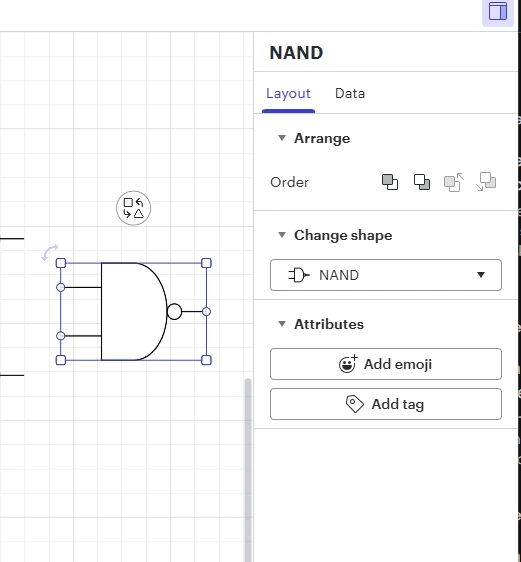
I am trying to change number of inputs on gates from the “Logic Gates” shape group.  My specific example is a NAND gate.  I have read instructions that indicates there should be a property that can be adjusted in the contextual panel.  I am not seeing this in the panel.  Please see below.  Is something needed to be done to enable this option or does it not exist anymore? 


Comments

aparrish
Lucid Legend Level 7
Forum|alt.badge.img+15
  • Lucid Legend Level 7
  • January 31, 2026

@dan11one can you provide a link to those instructions? No — there isn’t a hidden setting you need to enable. The default NAND gate in Lucid’s Logic Gates library does not have an adjustable number of inputs, so you won’t see that property in the panel. It used to be possible to adjust the number of inputs on certain logic gate shapes in Lucid, but that option isn’t always available anymore depending on which shape you’re using.


Zuzia S
Forum|alt.badge.img+8
  • Lucid community team
  • February 3, 2026

Hi ​@dan11one, thank you for posting in the Community and thank you ​@aparrish for chiming in!

It is not currently possible to create default connection points on shapes in Lucid. 

We would love to hear more about how this specific feature would be useful to your work if you’re willing to share more via the following thread, which we also highly recommend to upvote:

However, it is possible to position your line connection point anywhere on your shape simply by clicking and dragging the line endpoint along the shape border wherever you’d like it!

An additional workaround involves importing a Visio diagram containing shapes with pre-added connection points, as Lucid's high-fidelity Visio integration often retains these points and allows lines to be glued to them.

For more information about how we manage feedback in this community, please take a look at this post:

Cheers!