
Text shape formula reference to "parent" object issue
I’m attempting to create a very simple, but reusable indicator object, constructed inside a container and rendering a couple of important data values in a certain way that might be applicable to multiple chart diagrams (that is, it needs to be reusable, copy/paste from document 1 to document 2, potentially with more than one instance in each document).
I have a container and have added a custom data property to it, Complexity. This is one of several which will be displayed in the container content shapes in various ways:
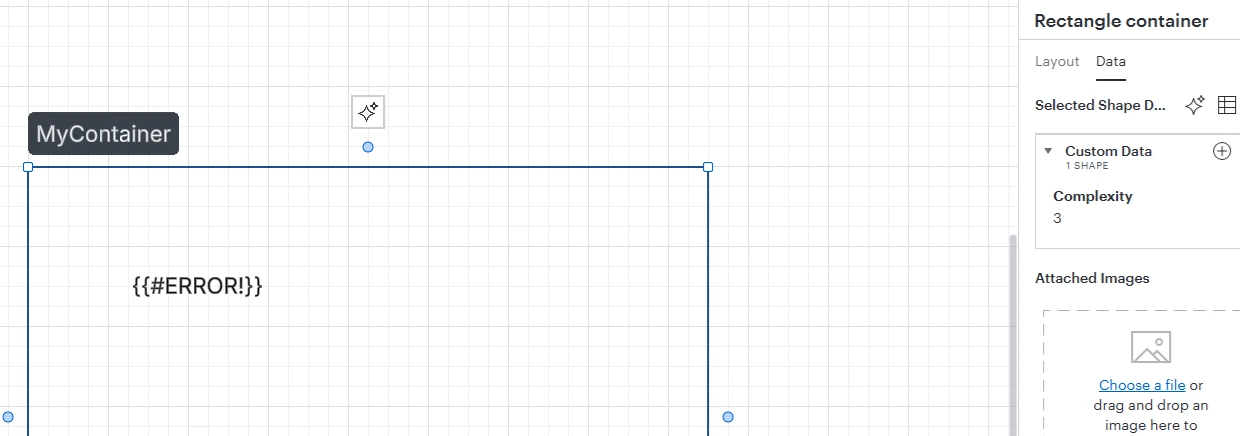
So in the example above, I expect to be able to render “3” somehow. For the test case, I’m just wanting to display the value in a Text shape as the content or maybe with some static text wrapped around it. As you can see above, not working. When entering the formula, here’s what I see:
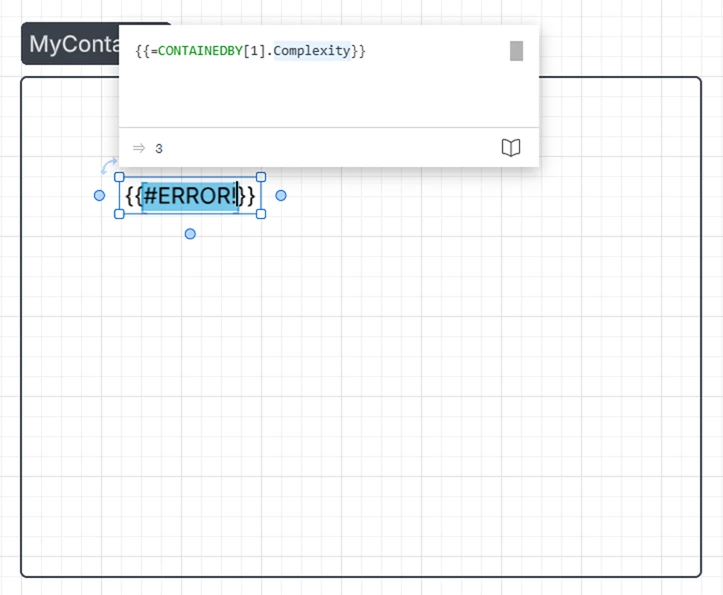
Formula editor is able to edit the formula without issue and even previews the correct value. However, accepting the formula fails as shown. I’ve tried numerous variants of the formula above,
{{=CONTAINEDBY[1].”Complexity”}}
{{=CONTAINEDBY[1].Complexity}}
{{=CONTAINEDBY[1].@Complexity}}
{{=CONTAINEDBY.Complexity}}
{{=CONTAINEDBY.Complexity}}
etc. Many variants evaluate correctly in the formula editor but none generate the expected output. I’ve attempted the same with ANCESTORS, but that seems the wrong choice for me since I have a known container and I don’t want to limit the potential use-cases for this general object.
Note that there is no data linking here; just references to custom data of closely related objects.
 Your privacy choices


