Why does the color of the text turn black when modifying text or after backspace?
So I have existing text, when I edit this text and use backspace or I select a portion of the text and overwrite it, the text color of the new text changes to black, where the old text is default (gray).
This is very annoying when you make a typo and use backspace to correct it, since all new text is then black.
Best answer by Zuzia S
@SebastiaanG I will be happy to help you further here. I am currently investigating the issue with your document and will get back to you as soon as possible.
@Dane Willis Thank you for chiming into this thread and I am sorry that you are experiencing something similar! Could you share a temporary Document Support PIN for this document? This will help me take a closer look. This PIN is safe to post in this thread because it is only accessible by members of the Lucid support staff. You can find steps for generating a Support PIN in this Help Center article.
Hello @SebastiaanG, thank you for posting in the Lucid Community! I would be happy to help with the issue you’re having with text color resetting.
To narrow the cause, could you please first try a few quick troubleshooting steps?
Try opening the document in an Incognito window. Please also try disconnecting from any VPNs.
To help us isolate the cause, could you tell me if this happens in every document you open, or only in this specific one?
If you create a brand new, blank document and type some text, does the same thing happen when you backspace?
If you use a different font or size, does the issue persist?
If nothing changes after trying all these steps, please proceed to send the following:
A screenshot/screen recording of the issue.
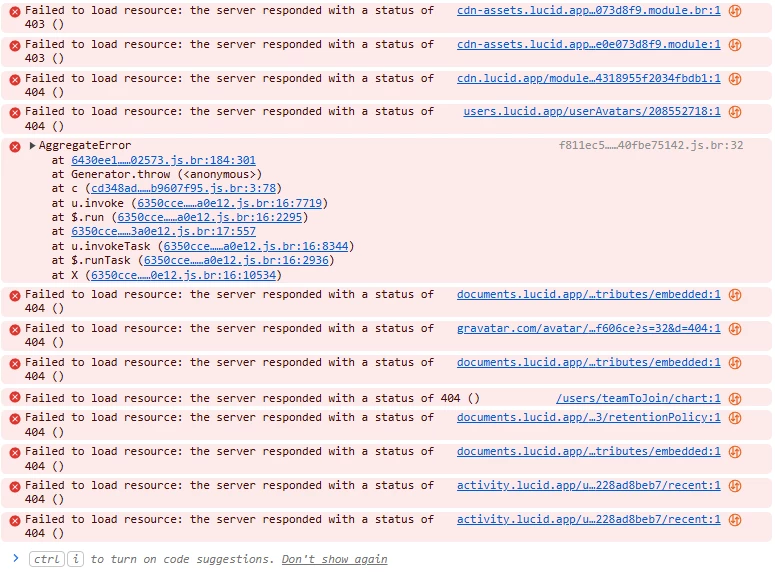
A screenshot of the associated Javascript Console output after reproducing the issue. You can open your Javascript Console by pressing Ctrl+Shift+J (if your computer is a Windows/Linux) OR Cmd+Opt+J (if your computer is a Mac).
Can you please send a temporary Support PIN for this document? This will allow me to take a closer look at the issue you’re experiencing. For more information on generating a Support PIN, check out this Help Center article.
To narrow the cause, could you please first try a few quick troubleshooting steps?
Try opening the document in an Incognito window. Please also try disconnecting from any VPNs. » I'm not using VPN, incognito window does not help.
To help us isolate the cause, could you tell me if this happens in every document you open, or only in this specific one? » Only in a specific document.
If you create a brand new, blank document and type some text, does the same thing happen when you backspace? » No problem then
If you use a different font or size, does the issue persist? » yes
I've saved shapes, when I use these I have the problem. I created 2 saved shapes based on the UML Class Diagram - Class
When I use the original shape, the same problem occurs
Hello again @SebastiaanG, and thank you for providing this information.
I tried recreating this issue on my account but wasn’t able to. Can you please send a temporary Support PIN for this document? This will allow me to take a closer look at the issue you’re experiencing. For more information on generating a Support PIN, check out this Help Center article.
As a workaround, since you mentioned this issue only occurs in that specific document, you can copy all of the content of your document and paste it on a blank one.
I have the exact same issue with one of my old documents. It is driving me crazy. I have many tabs and I don’t feel like copying all of them one by one to a new document. Making a copy of the entire document doesn’t help.
Strangely, even typing a few characters in an existing shape makes all the new characters black. UGH!
FYI, dragging new shapes does not cause the same issue (in my case). It is only editing an old shape or copying one of them and then editing them that causes newly entered text to be black, regardless of the color set in the shape.
Hello again @SebastiaanG, and thank you for providing this information.
I tried recreating this issue on my account but wasn’t able to. Can you please send a temporary Support PIN for this document? This will allow me to take a closer look at the issue you’re experiencing. For more information on generating a Support PIN, check out this Help Center article.
As a workaround, since you mentioned this issue only occurs in that specific document, you can copy all of the content of your document and paste it on a blank one.
@SebastiaanG I will be happy to help you further here. I am currently investigating the issue with your document and will get back to you as soon as possible.
@Dane Willis Thank you for chiming into this thread and I am sorry that you are experiencing something similar! Could you share a temporary Document Support PIN for this document? This will help me take a closer look. This PIN is safe to post in this thread because it is only accessible by members of the Lucid support staff. You can find steps for generating a Support PIN in this Help Center article.
A Lucid or airfocus account is required to interact with the Community, and your participation is subject to the
Supplemental Lucid Community Terms.
You may not participate in the Community if you are under 18. You will be redirected to the Lucid or airfocus app to log in.
A Lucid or airfocus account is required to interact with the Community, and your participation is subject to the
Supplemental Lucid Community Terms.
You may not participate in the Community if you are under 18. You will be redirected to the Lucid or airfocus app to log in.






 Your privacy choices


