Question

Swimlanes missing when exporting to Visio (.vsdx and .vsd)

  • January 9, 2026
  • 4 replies
  • 25 views

Forum|alt.badge.img+1

Hello,

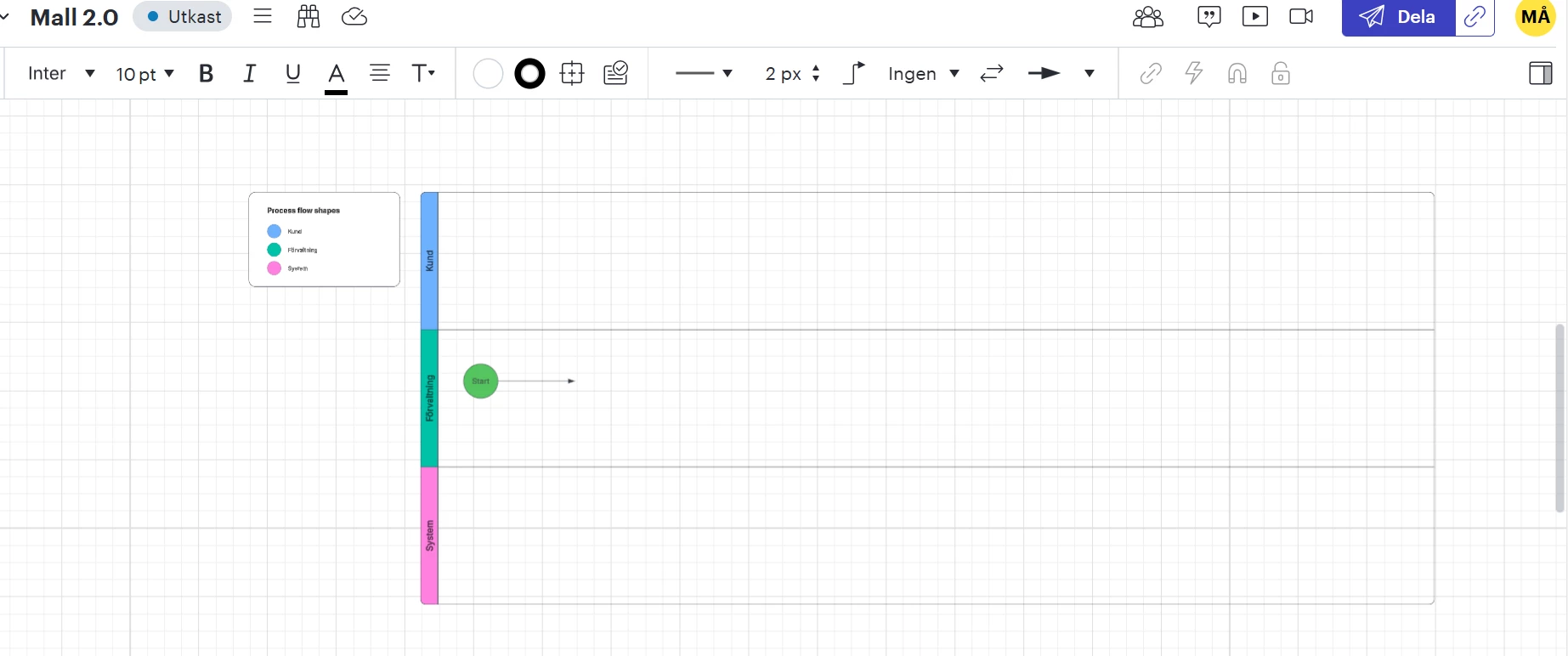
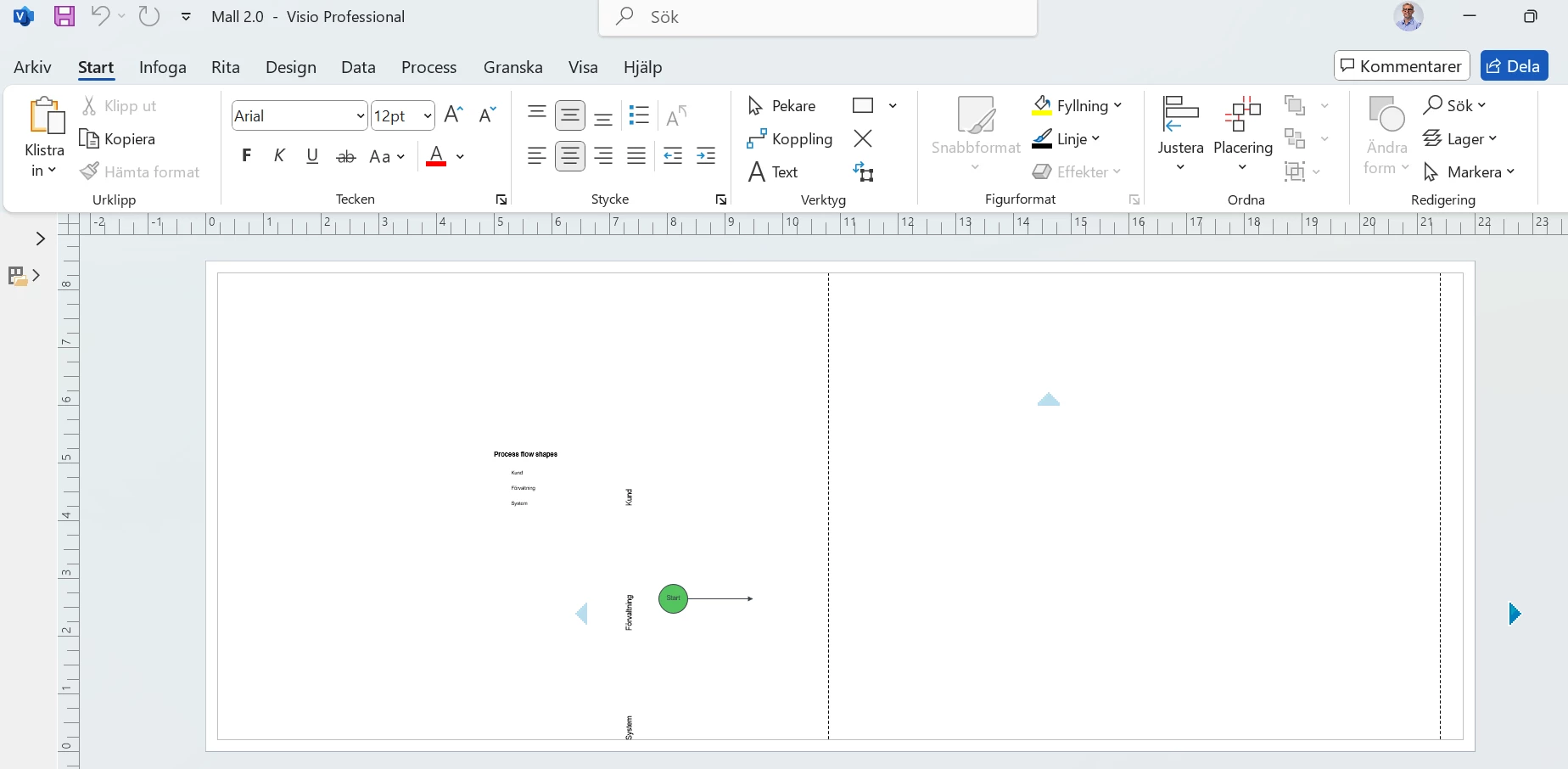
I’m experiencing an issue when exporting process diagrams with swimlanes from Lucid to Visio (both .vdx and .vsdx). When opening the file in Visio, all swimlanes are missing, while the process shapes inside the lanes are still present. 

As late as Dec 22nd I exported similar diagrams from Lucid where the swimlanes did follow into Visio. In those cases, the swimlanes were not editable in Visio, which was perfectly fine for my use case — but they were visually present. However I can´t recall the exact procedure I used to make it work and this time I have tried all kinds of settings but I can´t get it to work.
​​​​​

Could you please help clarify:

  • Has the Visio export behavior for swimlanes changed recently?
  • If not, can you please guide me how to force swimlanes to be included as static shapes in Visio?
  • Additionally, if possible, I would also appreciate any guidance on how to export swimlanes so that they remain editable in Visio. I understand this may be more complex, but it would be an even better outcome if supported.

I’m happy to provide a sample document or exported file if that helps.
 

Thank you in advance for your help.


Best regards

Magnus



Comments

Humas1985
Lucid Legend Level 10
Forum|alt.badge.img+24
  • Lucid Legend Level 10
  • January 10, 2026

Hi ​@magnus.astrom 

Lucidchart, swimlanes are treated as container/layout constructs, not as individual Visio-native shapes

Lucidchart does not export swimlanes as fully editable, native Visio swimlane objects. Visio and Lucid use different underlying swimlane models, and there is no one to one conversion.

Hope this helps - Happy to help further!!
Thank you very much and have a great one!
Warm regards


Forum|alt.badge.img+1

Hi,

Thank you ​@Humas1985 for the clarification regarding editable swimlanes in Visio, I appreciate the explanation.

Any comments on my other questions?

Best regards


Ambar D
Forum|alt.badge.img+10
  • Lucid community team
  • January 12, 2026

Hi ​@magnus.astrom, thanks for posting in the Lucid Community! Sorry to hear that you’re having trouble with this, but I’m happy to help. 

A few specific items to try here first:

  1. Try the export in a Chrome Incognito browsing session. This often improves performance by clearing your cache and cookies and disabling your extensions.
  2. Please try the export again on another network, ensuring that you are on a strong, stable connection. Sometimes issues like this can be related to internet connection speed or network security.
  3. Try copying content to another document and re-attempting from that document.

If none of these tips help, would you mind sending me the following details so I can take a closer look at the issue?

  • A screenshot of what you’d expect your diagram to look like and what it actually looks like in Visio after export.
  • A temporary Document Support PIN for this document. This will help me take a closer look at what’s going on. This PIN is safe to post in this thread because it is only accessible by members of the Lucid support staff. You can find steps for generating a Support PIN in this Lucid Help Center article: Generate a Lucid Support PIN.

Thank you for your help and patience!


Forum|alt.badge.img+1

Hi again,

I´ve tried all three suggestions but still can´t get it to work unfortunately. Would really appreciate more help with this issue. Below you find a temporary document support PIN and also two screenshots - one that shows how it looks in Lucidchart and one how it looks when I open up the exported Visio-file (.vsdx) in the desktop-version of Visio Professional.

PIN: duMvhYgrupPNN9tBGSKCPRYFXIYcL1MRjF207336428

Best regards

Magnus