Amy P
August 19, 2022
Solved

SVG Import was working fine but now every import is a mess.

  • August 19, 2022
  • 14 replies
  • 914 views

I've been creating process flow diagrams for my employer which include custom icons for the various tools and individual department roles. The icons are SVGs that I've been importing into Lucidchart. 

For months now the import has occasionally been buggy but mostly fine. However in the last 2 weeks every SVG I import regardless of source (made in-house by our designer downloaded from a paid icon library service freebie found on Google) has come in looking like an absolute mess. It's as though any curves or circles just don't work right.  It doesn't matter if they are solid shapes or just outlines. 

What I expect:

What I get:
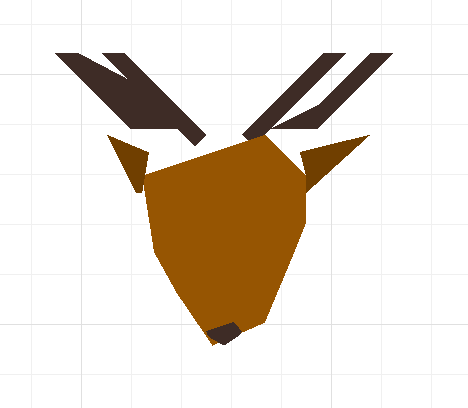
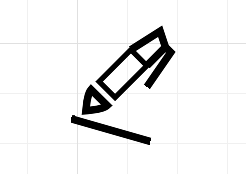
I know the import isn't perfect but considering that I am suddenly unable to import them at all without a problem I'm wondering if I've done something wrong (though I haven't done anything differently that I know of) or if perhaps there was something in a recent update to Lucidchart itself that has created a fun new bug in the SVG import. 

Am I alone in having this issue suddenly start recently? Is there a way I can fix it myself or am I doomed to find a work-around until the bug is fixed on the Lucidchart end?

Thanks!

Best answer by Phillip W

Hey Colm

Thank you for taking the time to post in the Lucid Community and keep this thread going! Yes this is a limitation of dragging and dropping the SVG onto the canvas. I will most certainly pass this thread along to our dev team and ensure that your voice is heard on this issue. 

Again thanks for the post and giving us the opportunity to help with your workflow--Cheers! 

Comments

August 15, 2024

Is there an ETA for the fix? Using JPEG or PNG is not a feasible workaround

Kelsey Gaag
Lucidite
August 15, 2024

Hi @mstardavid

Thank you for the reply! I currently do not have an ETA for this bug. However, you can check out this post for another possible workaround in the meantime: 

I apologize for any disruption this may cause, and I will update this thread with any new information about a fix. Please follow along on this thread for updates, and post any additional questions or concerns below.

October 8, 2024

Having a similar issue, but in my case it converts to a pixelated image after importing the vector


Kelsey Gaag
Lucidite
October 8, 2024

Hi @Ed Russo

Thank you for your reply! I apologize that you are encountering a similar issue. This is a bug currently in our system that impacts the import of SVG shapes. I would recommend checking out the workaround in the post below. 

Hi @mstardavid

Thank you for the reply! I currently do not have an ETA for this bug. However, you can check out this post for another possible workaround in the meantime: 


I will update this thread with any new information about a fix. Please follow along on this thread for updates, and post any additional questions or concerns below.