Solved

Snap to object unstoppable

  • June 23, 2026
  • 5 replies
  • 299 views

Forum|alt.badge.img+1

I am using Lucid for process mapping. What I am trying to achieve is a label in the right top corner of process steps which shows the system where that activity will happen. However, the app keeps rearranging shapes, so when I try to drop a little shape on top of the other, it will pull them apart. I tried to switch this function off, but I am unable to switch off and it prevents overlapping all together.

FYI I have followed the instructions from Lucid AI, but this feature still dominant. Please advise or fix. Thanks!

Best answer by Leianne C

Hi ​@Janos.Leier, thank you for sharing the document PIN. To help me reproduce the described behaviour, would you mind sharing a brief description of how you are trying to add the label? Is it in the top corner within the swim lane

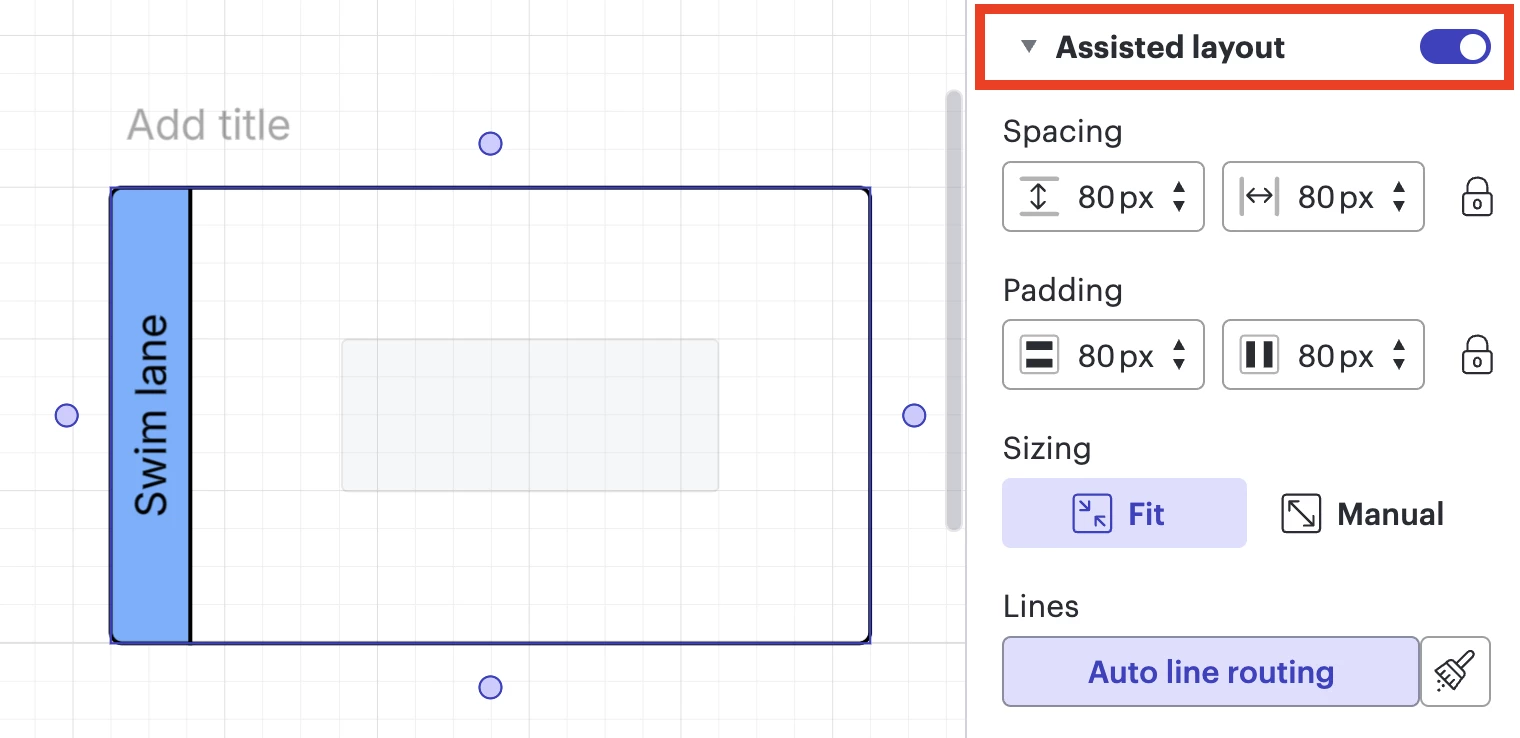
In the meantime, you should be able to toggle Assisted layout on/off by selecting the frame of the Frame, Container, or swim lane on the canvas. In the Contextual Panel to the right of the canvas. there should be the option to Toggle “Assisted layout” on/off. Please see this Help Center article for more details about this feature. 

Thank you in advance for your help and patience. Please let me know if you have any questions! 

Comments

Leianne C
Forum|alt.badge.img+15
  • Lucid support team
  • June 24, 2026

Hi ​@Janos.Leier, thank you for posting in the community! To help me better understand what is happening, would you mind sharing an example screenshot of the issue? Please feel free to censor any important information. 

Could you please also share a temporary Document Support PIN for this document? This will help me take a closer look at what’s going on. This PIN is safe to post in this thread because it is only accessible by members of the Lucid support staff. You can find steps for generating a Support PIN in this Lucid Help Center article: Generate a Lucid Support PIN.

Thank you for your help and patience! Please let me know if you have any questions. 


Forum|alt.badge.img+1
  • Author
  • June 25, 2026

duDsa0VXCFCVFatsDbTX40Hsc0CFhot9KQ209315046


Leianne C
Forum|alt.badge.img+15
  • Lucid support team
  • Answer
  • June 29, 2026

Hi ​@Janos.Leier, thank you for sharing the document PIN. To help me reproduce the described behaviour, would you mind sharing a brief description of how you are trying to add the label? Is it in the top corner within the swim lane

In the meantime, you should be able to toggle Assisted layout on/off by selecting the frame of the Frame, Container, or swim lane on the canvas. In the Contextual Panel to the right of the canvas. there should be the option to Toggle “Assisted layout” on/off. Please see this Help Center article for more details about this feature. 

Thank you in advance for your help and patience. Please let me know if you have any questions! 


Forum|alt.badge.img+1

Thanks, that helped!


Leianne C
Forum|alt.badge.img+15
  • Lucid support team
  • July 8, 2026

Hi ​@Janos.Leier , thank you for the update! I’m glad to hear that helped. Please feel free to let me know if there is anything else I can assist with. Cheers!