Solved

Smart Table filters not working as expected

  • November 13, 2025
  • 3 replies
  • 29 views

Forum|alt.badge.img+2

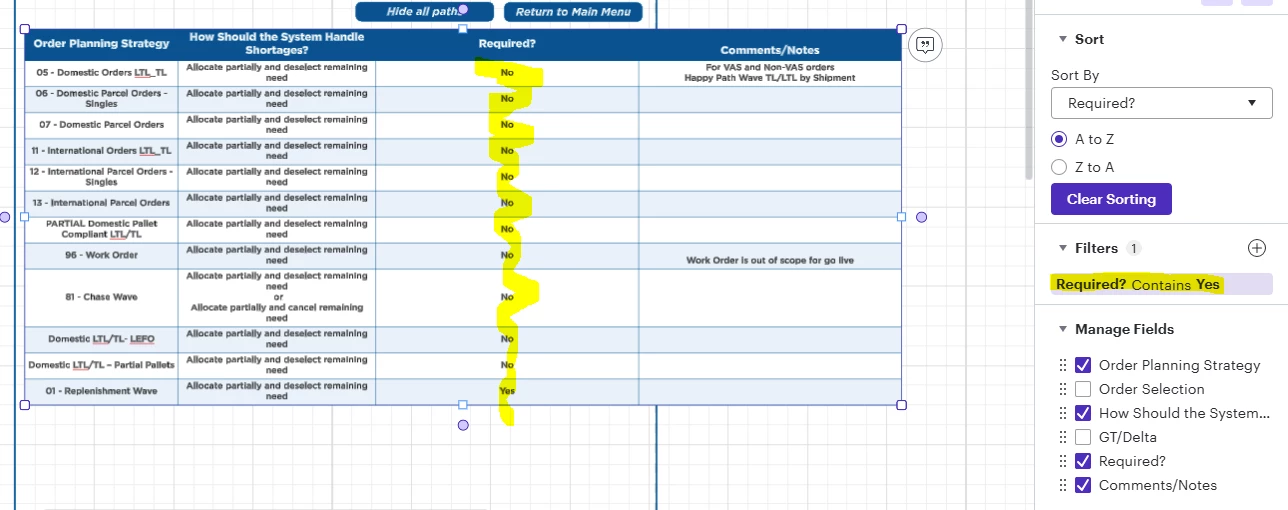
When displaying a smart table within a lucid chart, my team filtered on a “Required” field that has two values: Yes and No. When the filter says Contains “Yes”, nothing was filtered out. Two separate users attempted this filter with no success.

 

Best answer by Ambar D

Hi ​@Brittany Clarke, thanks for posting in the Lucid Community. Sorry you’re having trouble here. I’m happy to help!

Would you mind confirming what file type/data source you are using for your smart table?

Comments

Ambar D
Forum|alt.badge.img+10
  • Lucid community team
  • Answer
  • November 14, 2025

Hi ​@Brittany Clarke, thanks for posting in the Lucid Community. Sorry you’re having trouble here. I’m happy to help!

Would you mind confirming what file type/data source you are using for your smart table?


Forum|alt.badge.img+2

hi ​@Ambar D, the data source was Google Sheets. Thanks!


Ambar D
Forum|alt.badge.img+10
  • Lucid community team
  • November 17, 2025

@Brittany Clarke Could you share a temporary Document Support PIN for this document? This will help me take a closer look at what’s going on. This PIN is safe to post in this thread because it is only accessible by members of the Lucid support staff. You can find steps for generating a Support PIN in this Lucid Help Center article: Generate a Lucid Support PIN.