Solved

Smart Container with a roadmap (usage of cross-container)

  • April 11, 2024
  • 3 replies
  • 99 views

Forum|alt.badge.img+1

I am working on a 2 years multi-product roadmap, and each container represents a quarter of a specific year.

How can I show development of a specific product that cover multiple containers?

Product 1 → Start in 2024-Q2 and be completed in 2024-Q4
Product 2 → Start in 2024-Q3 and be completed in 2025-Q1
Product 3 → Start in 2025-Q1 and be completed in 2023-Q4


 I would like to see a line that cover multiple containers, instead of a shape in a single container.

Best answer by Addie

Hi @l1u2c3i4d5, thanks for the response and additional information!

There is not currently a native way to have a smart container expand to multiple rows, but I can certainly see how this could be useful. If you have feedback on how we can improve smart containers or our product to better meet your use case, please feel free to share your idea with us in the product feedback section of the community.

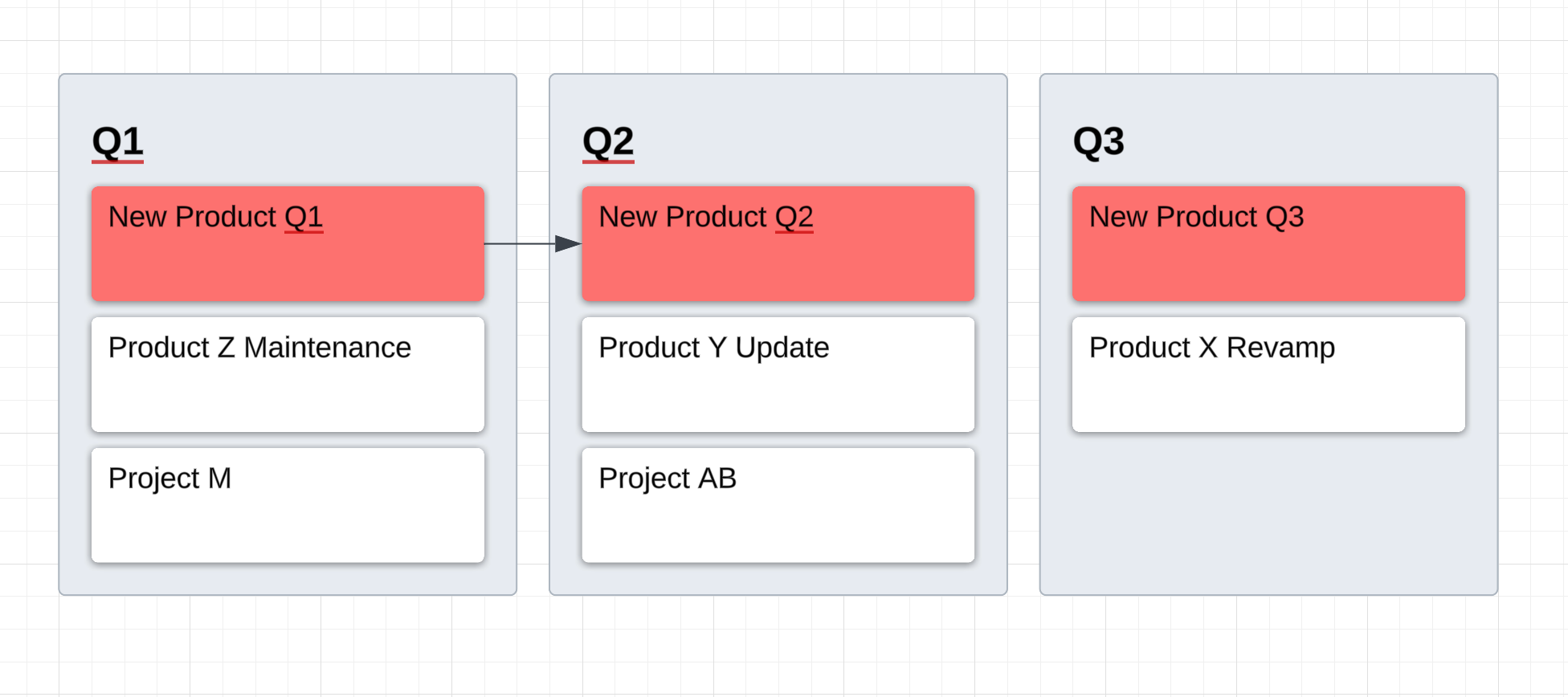
Something you could try to visually associate the same product or project across multiple quarters could be to use color coding or even a line, as seen below. 


We have a couple of templates that could provide alternative ideas and hopefully serve as inspiration on how to use smart containers for a product roadmap:

You can search for many more template types here, in our template library!

For more information on the functionality of smart containers, please review this help center article

Comments

Addie
Forum|alt.badge.img+23
  • April 11, 2024

Hi @l1u2c3i4d5, thanks for posting your question and use case in the community! I’m not totally sure on what you’re describing -- do you mind sharing a screenshot of your work so far along with a bit more information of what you’re trying to do?


Forum|alt.badge.img+1
  • Author
  • April 12, 2024

Hi @Addie ,

I am trying to create a dynamic roadmap by using the smart container.

Below it’s just an example on how it should look like.
Group by: Timeline (such as month, quarter, year and so on)

I think that if I want to do a multi-product roadmap, I should create multiple smart containers, but how to show a task/activity that cover 2 lanes? Should I, in some way, split that task to fit the specific lane? Such as Prod 1-1 in 2024-Q3 and Prod 1-2 in 2024-Q4?


Addie
Forum|alt.badge.img+23
  • Answer
  • April 12, 2024

Hi @l1u2c3i4d5, thanks for the response and additional information!

There is not currently a native way to have a smart container expand to multiple rows, but I can certainly see how this could be useful. If you have feedback on how we can improve smart containers or our product to better meet your use case, please feel free to share your idea with us in the product feedback section of the community.

Something you could try to visually associate the same product or project across multiple quarters could be to use color coding or even a line, as seen below. 


We have a couple of templates that could provide alternative ideas and hopefully serve as inspiration on how to use smart containers for a product roadmap:

You can search for many more template types here, in our template library!

For more information on the functionality of smart containers, please review this help center article