Solved

Setting to show authors is on but names don't appear on sticky notes

  • November 14, 2025
  • 3 replies
  • 36 views

Forum|alt.badge.img+1

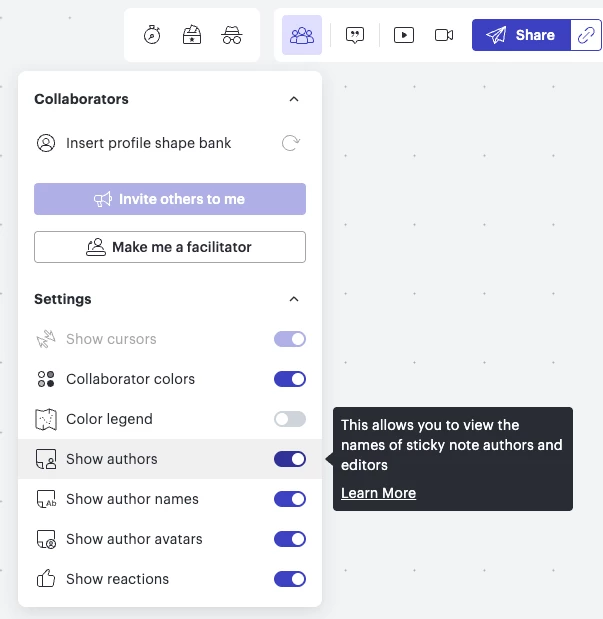
Hey there, I sent out a LucidSpark to a large group of stakeholders, and had Show authors and Show author names toggled on for collaboration and am still getting sticky notes with no names associated.

How do I figure out who wrote these stickies without manually writing all of my stakeholders and asking someone to claim them? How do I ensure no stickies get made without name association when I’ve already turned on all these settings and the LucidSpark is only available for people within our org?

Best answer by Ambar D

Hi ​@chrlee, thanks for posting in the Lucid Community! I’m happy to help. 

Thank you ​@asafferoz for these recommendations! 

First, I recommend toggling off show authors, then toggling it back on.

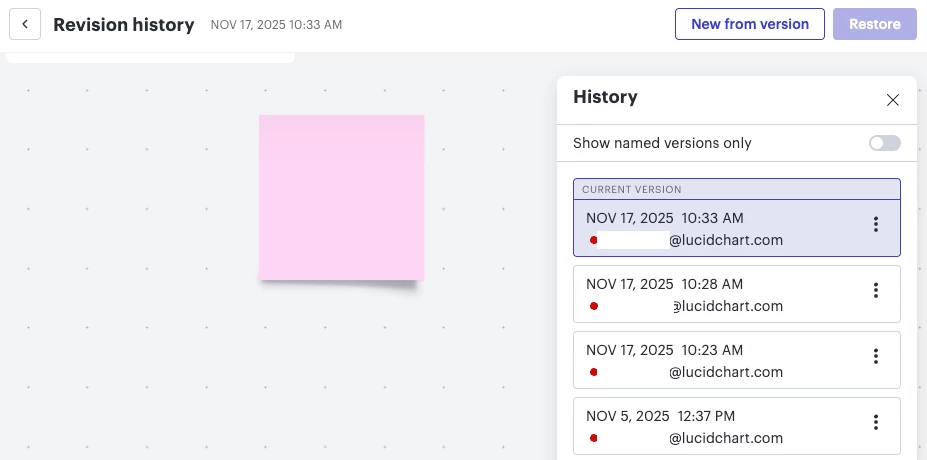
If you’re still having a hard time seeing who made the sticky note contributions, I recommend checking your revision history. As shown below, you’ll be able to look through the changes within your document and the email associated with the person who made the changes. To learn more about revision history and how to access it, I recommend reading through this resource: Revision history in Lucid article from the Lucid Help Center


Let me know if you have any other questions here! Happy to help further!

Comments

asafferoz
Lucid Legend Level 1
Forum|alt.badge.img+1
  • Lucid Legend Level 1
  • November 16, 2025

Hi Chrlee,

You can try using the Sticky Note Bank from the Quick Tools panel. This lets you create pre-labeled or color-coded sticky note sets for each team or team member. You can add multiple Sticky Note Banks, customize colors, and assign each bank to different groups so their contributions are easy to identify.

While this doesn’t retroactively identify unnamed stickies, it helps ensure all new sticky notes are clearly associated with the right person or team—even if author names don’t appear.

Hope this solve your query.

Aasaf


Forum|alt.badge.img+1
  • Author
  • November 17, 2025

Hi! I already had that turned on. So I’m not sure what the issue is. 


Ambar D
Forum|alt.badge.img+10
  • Lucid community team
  • Answer
  • November 17, 2025

Hi ​@chrlee, thanks for posting in the Lucid Community! I’m happy to help. 

Thank you ​@asafferoz for these recommendations! 

First, I recommend toggling off show authors, then toggling it back on.

If you’re still having a hard time seeing who made the sticky note contributions, I recommend checking your revision history. As shown below, you’ll be able to look through the changes within your document and the email associated with the person who made the changes. To learn more about revision history and how to access it, I recommend reading through this resource: Revision history in Lucid article from the Lucid Help Center


Let me know if you have any other questions here! Happy to help further!