Hi All
I have worked out how to import a single page PDF into Lucid Chart (but it would be much better if one could import the whole document).
In other programs (like Adobe and PDF Expert) I can then scale the PDF. In other words, I can take a “known” measurement and/or object and use a Scaling Tool to scale the ENTIRE document. Can Lucid Chart do this?
I would prefer to draw in Lucid Chart, but without that particular feature if makes it different to import Floor Plans/Building Site Plans and then work on them as without Scaling the process is much less useful.
If it is not a current feature, can it be given serious consideration to add it soon?
Thanks.
Scale a PDF import in Lucidchart
Best answer by Leianne C
Hi

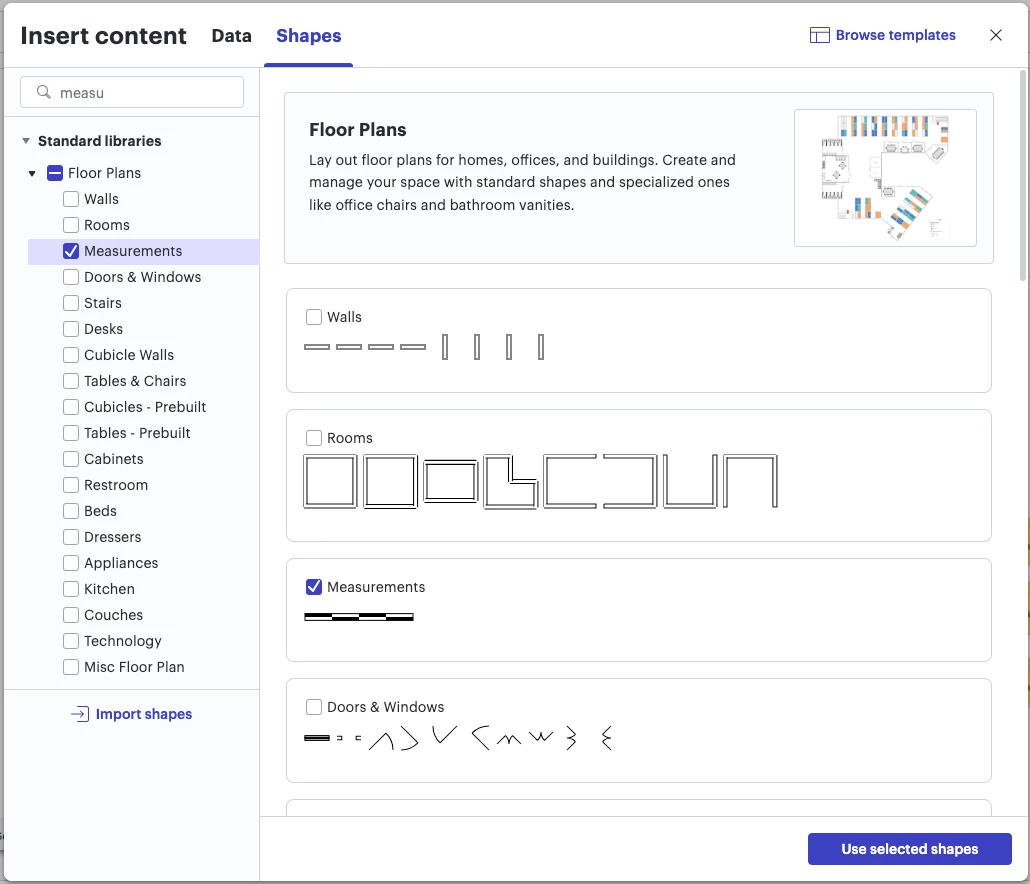
When you open one or more of the available floor plan shape libraries, a scale tool will also automatically appears in the bottom-left of the workspace. This Help Center article has more information about the scale tools.

I also recommend checking out the following community post for more tips on working with our floor plan shapes:
Please feel free to let me know if you have any trouble with this functionality or if you have any questions!
Create an account in the community
A Lucid or airfocus account is required to interact with the Community, and your participation is subject to the Supplemental Lucid Community Terms. You may not participate in the Community if you are under 18. You will be redirected to the Lucid or airfocus app to log in.
Log in to the community
A Lucid or airfocus account is required to interact with the Community, and your participation is subject to the Supplemental Lucid Community Terms. You may not participate in the Community if you are under 18. You will be redirected to the Lucid or airfocus app to log in.
Log in with Lucid Log in with airfocus
Enter your E-mail address. We'll send you an e-mail with instructions to reset your password.