Answer

Right click to copy a document

  • July 21, 2025
  • 1 reply
  • 44 views

Mark E
Forum|alt.badge.img+4

Earlier in 2025, I was able to right-click on a document and select copy. Similarly I was able to use the “...” menu to do the same. there was a COPY option. I do this daily to copy what amounts to a template so I can save that copy in a folder organized by client name and project. Lucid seems to have taken away these copy options. 

Is there a configuration that returns that ability. No “save as” is not a proper solution. I do seem to be able to ctrl-c but its easier for some users to right-click and select copy.

Best answer by Catherine Fahidin

Hello ​@Mark E ,


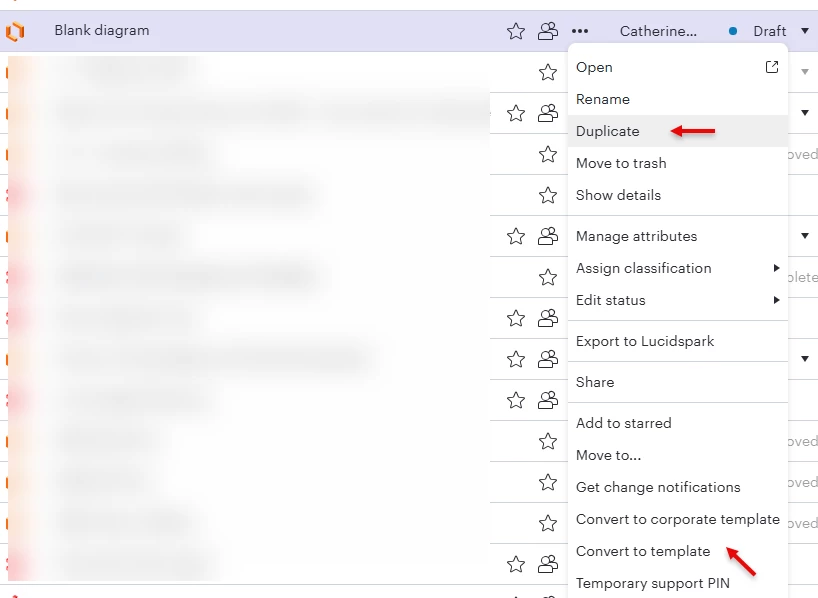
Are you looking for the copy functionality of the whole document, which is ‘Duplicate’, or a functionality to make that document as a template?

Both of these are available when you double click or choose More Option (“...”) function.

Options after double click/More Option


The Duplicate option is the same as copy, when you choose the Duplicate, Lucid will provide the option to provide a new file name, and then you can find your document from the link that will be shown at the bottom right of the screen like this:

Usually the new copy will be created in your personal document folder, and then you can move that to the appropriate folder.

Please let me know if you need something else.

Catherine

Comments

Catherine Fahidin
Lucid Legend Level 4
Forum|alt.badge.img+11

Hello ​@Mark E ,


Are you looking for the copy functionality of the whole document, which is ‘Duplicate’, or a functionality to make that document as a template?

Both of these are available when you double click or choose More Option (“...”) function.

Options after double click/More Option


The Duplicate option is the same as copy, when you choose the Duplicate, Lucid will provide the option to provide a new file name, and then you can find your document from the link that will be shown at the bottom right of the screen like this:

Usually the new copy will be created in your personal document folder, and then you can move that to the appropriate folder.

Please let me know if you need something else.

Catherine
