Answer

Replace Smartsheet cards integration in Lucidspark

  • August 8, 2025
  • 4 replies
  • 21 views

Forum|alt.badge.img+1

After linking a LucidSpark board to a Smartsheet document, is it possible to replace or remove that integration? 

Best answer by Leianne C

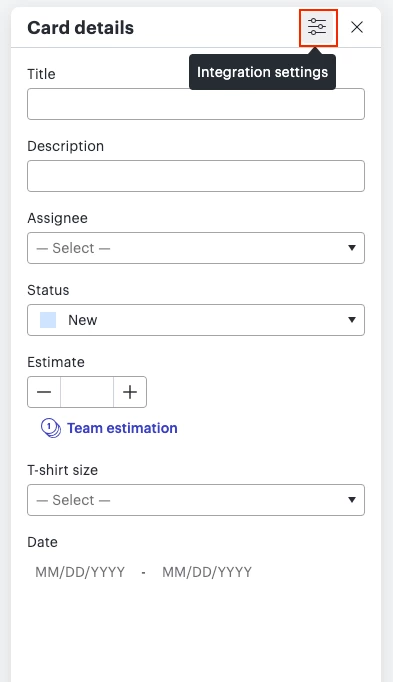
Hi ​@charlotte, thank you for following up and apologies for any confusion! The settings icon was updated and it’s currently the following icon instead. Would you mind giving this a try and let me know if you experience issues or if you have any questions? Thanks! 


Comments

Humas1985
Lucid Legend Level 10
Forum|alt.badge.img+24
  • Lucid Legend Level 10
  • August 8, 2025

Hi ​@charlotte 

Yes—you can unlink or reconfigure third-party connections through the Lucid Cards settings panel

To learn more - Lucid Cards Overview

Hope this helps - Happy to help further!!
Thank you very much and have a great one!
Warm regards


Leianne C
Forum|alt.badge.img+15
  • Lucid support team
  • August 11, 2025

Hi ​@charlotte, thank you for posting in the community! Just to add to the information our Lucid Legend Huma shared above, I recommend checking this Integrate Lucid Cards with Smartsheet article from the Lucid Help Center. Specifically the Connect a different Smartsheet account section of that article. 

Please note that boards linked to a previous Smartsheet account will remain linked to the original Smartsheet but the sync will no longer work because the credentials are now authenticated with a different account.

I hope this helps! Please let me know if you have any questions. 


Forum|alt.badge.img+1
  • Author
  • August 11, 2025

Thank you both -- unfortunately, when I click on the pencil icon of a SmartsheetCard, no gear icon appears in the Card Details. The same is true of the LucidCard. When I click on the pencil icon of a LucidCard, no gear icon appears in the Card Details panel. 


Leianne C
Forum|alt.badge.img+15
  • Lucid support team
  • Answer
  • August 12, 2025

Hi ​@charlotte, thank you for following up and apologies for any confusion! The settings icon was updated and it’s currently the following icon instead. Would you mind giving this a try and let me know if you experience issues or if you have any questions? Thanks!