Sep 30, 2026 12:29 AM UTC
Solved

Recover deleted Flowchart Tools shape library

I accidentally deleted the ‘Flowchart Tools’ subsection from the ‘Flowchart’ section in the Shapes menu. How do I recover it?

Morgan
MorganAnswer
Lucid product team
Oct 6, 2026 7:56 PM UTC

​@wongtzeying Thanks for the details! You can re-pin that Flowchart Tools shape group to your panel by following the instructions in this help center article. 

  1. Open your Lucidchart document.
  2. Click More shapes at the bottom of the Shape menu. This is the black button toward the bottom of the shapes panel in your screenshot.   
    • You can also press the “M” key on your keyboard.
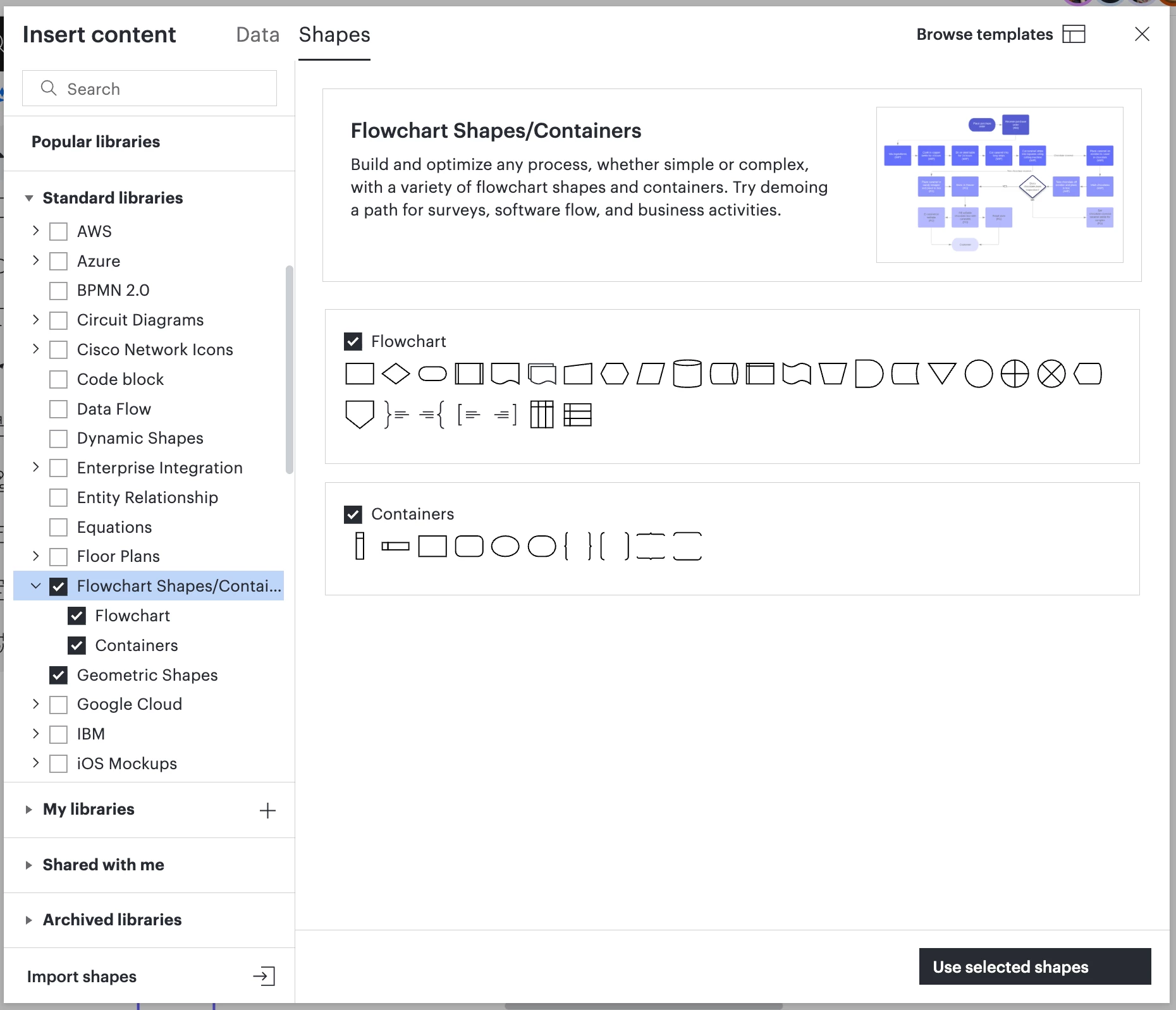
  3. In the “Shapes” tab of the modal that appears, find the shape library you want to use. See my screenshot. In this case, search or scroll to “Flowchart shapes/containers”.
  4. Check the boxes and click Use Selected Shapes.

Then the shape group should be available to you again. You can access all enabled shape libraries from the Shape menu on the left side of your document's workspace.


Comments

Sylvia X
Lucid support team
Oct 1, 2026 5:30 AM UTC

Hi ​@wongtzeying, thanks for posting in the Community! Unfortunately, restoring a deleted subsection from the Flowchart section of the Shapes menu is currently not supported in Lucid. However, we’re very interested in your feedback and committed to continually improving our products.

We encourage anyone else who’s interested in this to upvote this post and share any additional details about your use case or what you’d like to see in this experience. 

For more information about how we manage feedback in this community, please take a look at this post:


Translate
Oct 1, 2026 7:29 AM UTC

Hi Sylvia,

Thank you for your prompt reply! I would really appreciate it if your team could make deleted subsections recoverable or, at the very least, add a confirmation dialog that appears when a user clicks the “Delete” button to confirm the user’s intent, since it is quite easy to click the button accidentally.

Translate
Morgan
Lucid product team
Oct 5, 2026 7:19 PM UTC

Hi ​@wongtzeying! Morgan here from Product at Lucid. Can you give me more details, perhaps screenshots, showing the steps you took to delete this shape tool from your Lucidchart editor? 

Translate
Oct 6, 2026 5:22 AM UTC

Hi Morgan! 
 

It only took one step to delete the ‘Flowchart Tools’ subsection. I merely went to the ‘Flowchart’ section of the Shapes menu and clicked the ‘trashcan’ symbol beside the title ‘Flowchart Tools’. I cannot show you the screenshot because I did not take any, but I will use the ‘Flowchart templates’ as an example.


Translate
Morgan
MorganAnswer
Lucid product team
Oct 6, 2026 7:56 PM UTC

​@wongtzeying Thanks for the details! You can re-pin that Flowchart Tools shape group to your panel by following the instructions in this help center article. 

  1. Open your Lucidchart document.
  2. Click More shapes at the bottom of the Shape menu. This is the black button toward the bottom of the shapes panel in your screenshot.   
    • You can also press the “M” key on your keyboard.
  3. In the “Shapes” tab of the modal that appears, find the shape library you want to use. See my screenshot. In this case, search or scroll to “Flowchart shapes/containers”.
  4. Check the boxes and click Use Selected Shapes.

Then the shape group should be available to you again. You can access all enabled shape libraries from the Shape menu on the left side of your document's workspace.


Translate
Oct 9, 2026 12:11 AM UTC

Hi Morgan, 

Unfortunately, performing these steps did not restore the ‘Flowchart Tools’ subsection under the ‘Flowchart’ section on my side (not even after hiding the entire ‘Flowchart’ section and adding it back by following these steps). I would appreciate it if your team could find a way to solve this problem. Thank you very much!

Translate