Hi all...i am very, very new to Lucid & was hoping to get some guidance in regards to Org. Charts. I have taken some of the training, but am not finding the assistance I am looking for.
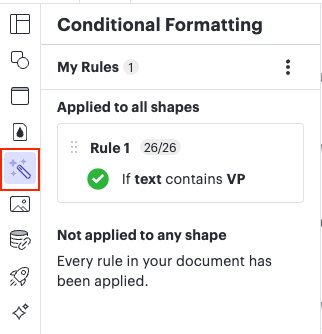
If you’re managing/changing conditional formatting rules that have previously been created, you can find the list of rules by clicking the wand icon, which opens the conditional formatting menu and displays all previously created rules. (as shown below)
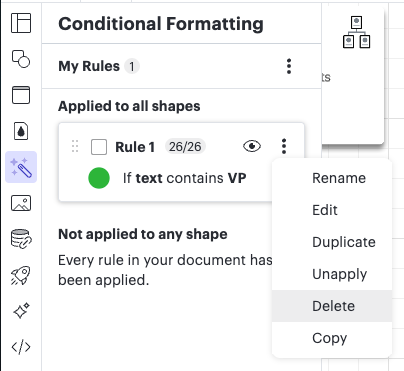
You can then Rename, Edit, Duplicate, or Delete rules by clicking on the three dots to the right of the rule and selecting from the options. You can also Unapply the rule from here, which will keep the rule in the list to use/reapply again if desired, but unapply it from shapes in the document.
If you want to start over and create new conditional formatting rules, I recommend unapplying or deleting the rules. I then recommend using the steps in my message above to create new conditional formatting rules.
I hope this helps apply your needed changes! Let me know if you run into any trouble when going through these steps and I’d be happy to look at your document.
Taking a look at your TriMet org chart document, it looks like several conditional formatting rules are applied. I am seeing that the ‘if’ condition of shape data is applied. If a specific position name is in a shape, the conditional formatting is set up to apply a custom shape style.
You can change the custom shape style within the conditional formatting menu. Is there a specific change you’re having trouble with or a specific question you have about conditional formatting for this document?
Looking in your other document, I am not seeing any conditional formatting rules. Are you having trouble adding those? Would you mind describing what you are hoping to achieve?
Hi @GerlingL, I’m sorry you’re still experiencing trouble with this.
I’d be happy to continue taking a look at your document and providing more details. Would you mind describing in detail what issues you’re encountering, and what you are hoping to achieve? This will help me take a closer look.
A Lucid or airfocus account is required to interact with the Community, and your participation is subject to the
Supplemental Lucid Community Terms.
You may not participate in the Community if you are under 18. You will be redirected to the Lucid or airfocus app to log in.
A Lucid or airfocus account is required to interact with the Community, and your participation is subject to the
Supplemental Lucid Community Terms.
You may not participate in the Community if you are under 18. You will be redirected to the Lucid or airfocus app to log in.


 Your privacy choices


