Solved

Progress bar shapes in Lucidchart

  • June 26, 2024
  • 2 replies
  • 535 views

Forum|alt.badge.img+1

I’m wondering if anyone can help. I’ve managed to create option 1 via shape data, conditional formatting and dynamic shapes. But I really want it to look like option 2. where the whole shape is filled depending on the progress added to the shape data.


Any ideas greatly welcomed!


Thanks

Polly

 

Best answer by Chris Kropp

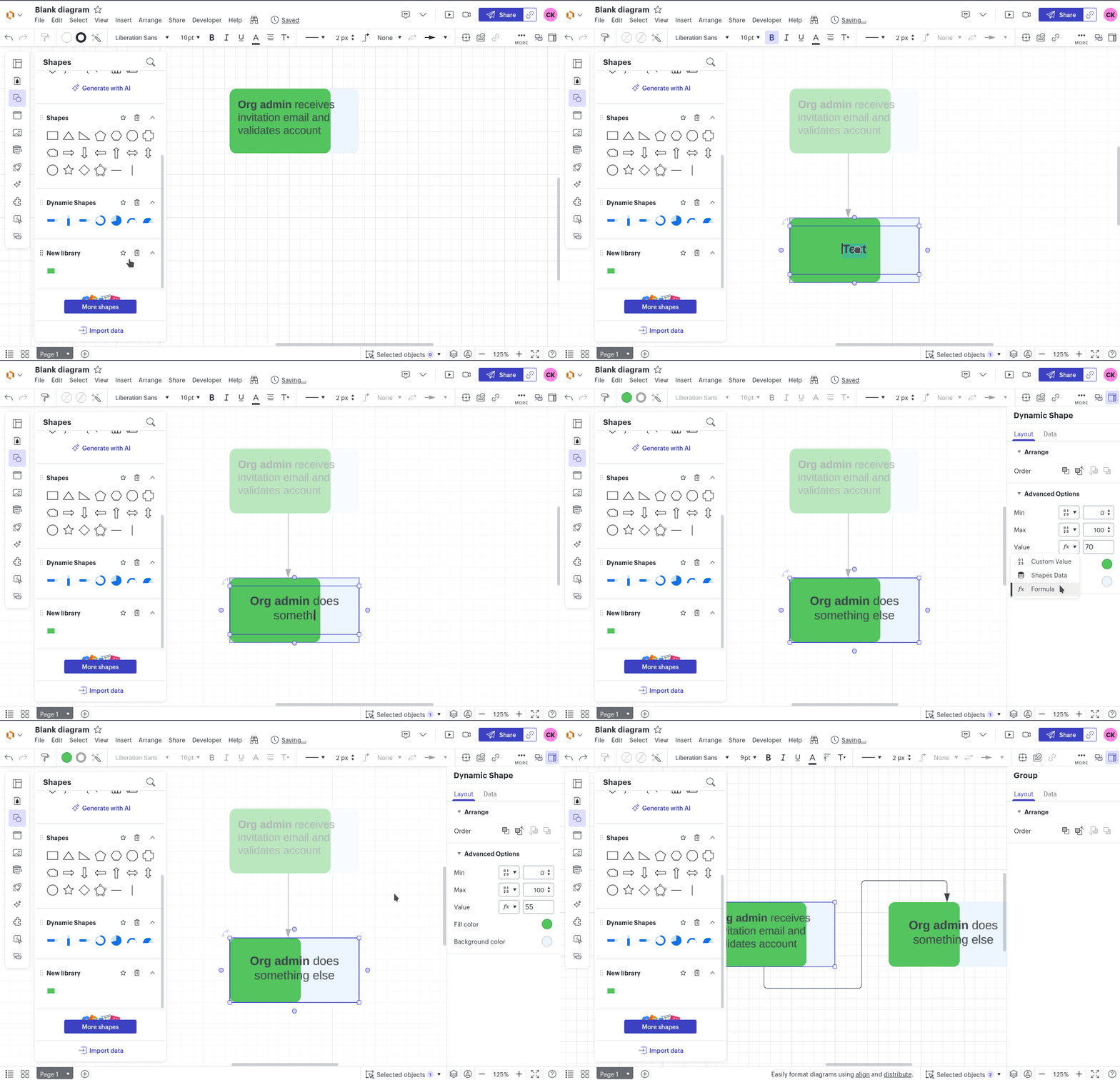
The best way I can think of would probably be to use a progress bar from the dynamic shapes library and add a text shape on top of it.


If you group them and it to a custom shape library, it should behave similarly to any other shape.


Comments

Forum|alt.badge.img
  • Lucid product team
  • Answer
  • June 26, 2024

The best way I can think of would probably be to use a progress bar from the dynamic shapes library and add a text shape on top of it.


If you group them and it to a custom shape library, it should behave similarly to any other shape.


Forum|alt.badge.img+1
  • Author
  • July 2, 2024

I’ll give this a go - thank you!!!