Solved

Problem with spacing between words after exporting document from Lucid

  • January 21, 2026
  • 1 reply
  • 19 views

Forum|alt.badge.img

Hi, 
 

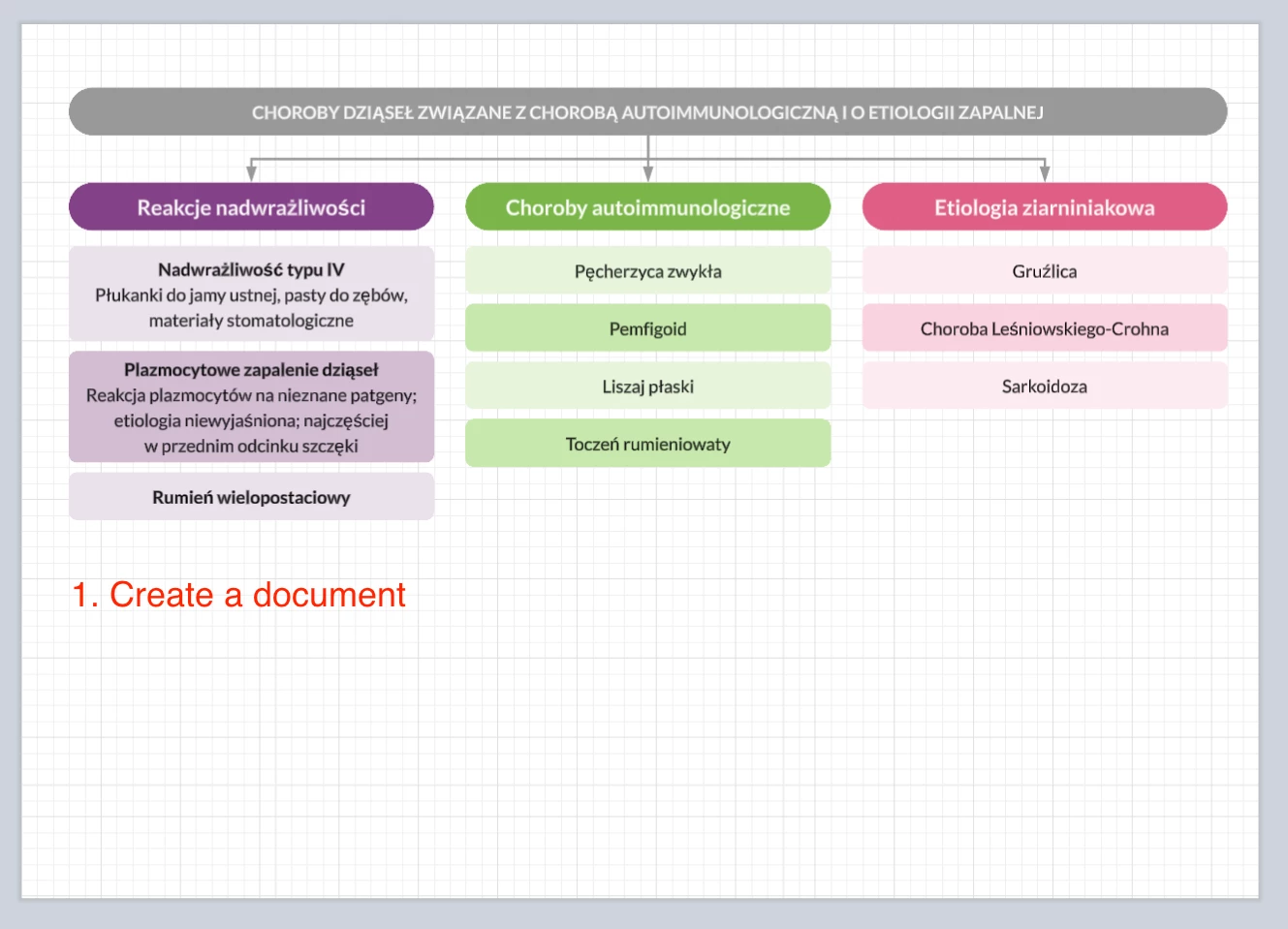
I am reporting a significant discrepancy between the editor view in Lucid and the final exported document. While everything looks perfectly aligned within the app, the text formatting breaks down after generation.

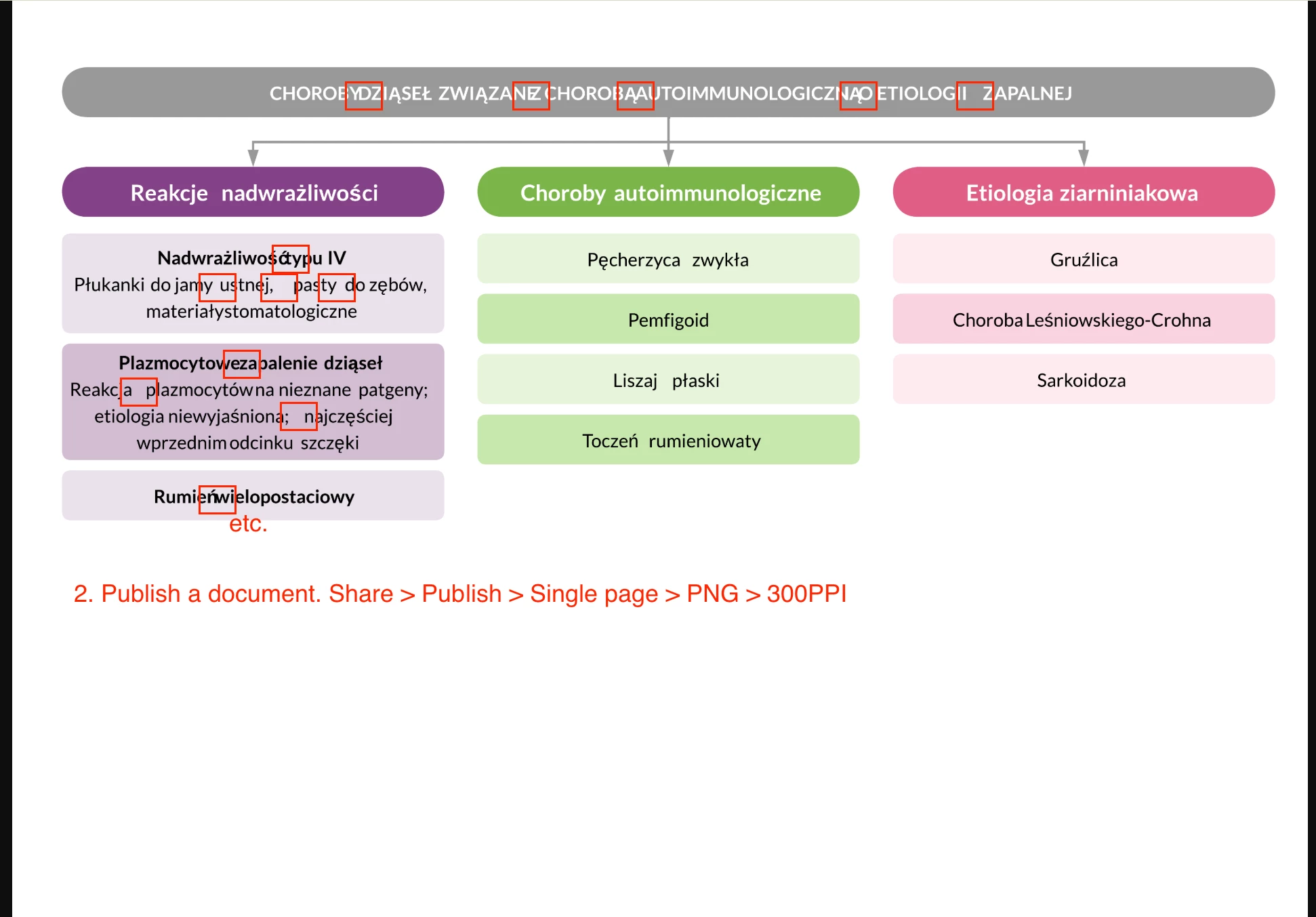
Problem Description: In the Lucid editor (Screenshot 1), all text elements, spacing, and Polish characters are displayed correctly. However, after using the publication tool (Share > Publish > Single page > PNG > 300 DPI), the resulting file (Screenshot 2) contains several rendering artifact:

  • Character Overlapping: Letters are crashing into each other, making words difficult to read (e.g., in "dziąseł", "nadwrażliwości").

  • Erratic Kerning: The spacing between individual characters is inconsistent and uneven across various text boxes.

Crucially, this issue persists regardless of the method used:

  • It occurs when exporting the document directly via the Lucid website.
  • It also occurs when using the API to generate the export.

I have attached two screenshots: one showing the correct layout in the editor and another highlighting the rendering errors in the published file.
 

Regards,

Przemek Ferkaluk

Best answer by alison cheney

Hi ​@Przemek Ferkaluk,

Thanks for posting in the Lucid Community!


Just to make sure that we are on the same page, please review our Export or print a Lucid document article from the Lucidchart Help Center. Let me know if you have any questions about how downloading/exporting your document should work.

Once you have reviewed this article, here are some specific things to check when exporting your document:

  •  Try the export in a Chrome Incognito browsing session. This often improves performance by clearing your cache and cookies and disabling your extensions.

  • Sometimes issues like this can be related to internet connection speed or network security. Please try the export again on another network, ensuring that you are on a strong, stable connection.

  • Is the page that you are trying to export a Master Page? If so, it will be omitted from the downloaded version of your document and you will need to convert it into a page before exporting. To do this, left-click on your Master Page tab and select "Convert to Page". 


Could you share a temporary Document Support PIN for this document? This will help me take a closer look at what’s going on. This PIN is safe to post in this thread because it is only accessible by members of the Lucid support staff. You can find steps for generating a Support PIN in this Lucid Help Center article: Generate a Lucid Support PIN.


 Feel free to let me know if you have any further questions. Thanks for your help and patience!

Comments

alison cheney
Forum|alt.badge.img+3
  • Lucid community team
  • Answer
  • January 21, 2026

Hi ​@Przemek Ferkaluk,

Thanks for posting in the Lucid Community!


Just to make sure that we are on the same page, please review our Export or print a Lucid document article from the Lucidchart Help Center. Let me know if you have any questions about how downloading/exporting your document should work.

Once you have reviewed this article, here are some specific things to check when exporting your document:

  •  Try the export in a Chrome Incognito browsing session. This often improves performance by clearing your cache and cookies and disabling your extensions.

  • Sometimes issues like this can be related to internet connection speed or network security. Please try the export again on another network, ensuring that you are on a strong, stable connection.

  • Is the page that you are trying to export a Master Page? If so, it will be omitted from the downloaded version of your document and you will need to convert it into a page before exporting. To do this, left-click on your Master Page tab and select "Convert to Page". 


Could you share a temporary Document Support PIN for this document? This will help me take a closer look at what’s going on. This PIN is safe to post in this thread because it is only accessible by members of the Lucid support staff. You can find steps for generating a Support PIN in this Lucid Help Center article: Generate a Lucid Support PIN.


 Feel free to let me know if you have any further questions. Thanks for your help and patience!