jorge.barron
September 2, 2021
Solved

Open a chart without changing modified date

  • September 2, 2021
  • 17 replies
  • 289 views

I have edit permissions on all the lucid charts in my organization so whenever I open a chart just for viewing(!) lucid chart creates a new version. This is misleading because now it looks like I was the last person making changes to the chart and the modified date is updated to the last time I viewed(!) the chart. Is there any way to avoid this?

Best answer by Micah

Hi Ronan and Jorge! Ronan thanks for continuing this thread and Jorge thanks for sharing your workaround of using document status to "finalize" the document and prevent further edits. 

I wanted to mention one additional option which may help you bring additional clarity to which versions are official or contain edits. Within the Revision History menu you can choose to rename any specific version to something that indicates to you the status or changes present there. To do so simply choose the three-dot menu on the right side of that version and choose "Name this version."
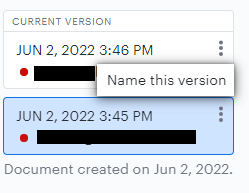
Then after applying a name you can toggle on "Show named versions only" which will hide any that you have not uniquely named. This can allow you to filter out less relevant versions such as those generated by simply viewing the document. See an example of this below where I've named a version "Final Version" and hid the rest.
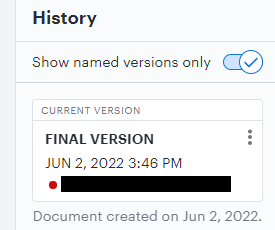
While it doesn't prevent the new version from viewing the document from being generated entirely hopefully this might allow you to bring additional clarity to what each version contains. 


Let me know if you have additional questions!

Comments

Micah
Lucid community team
September 8, 2022

@larry w Thanks for continuing this thread and apologies for the frustration!

Just to make sure we are on the same page I want to clarify that you do not have to make a copy of your document every time that you want to review what's in it. You can absolutely open it up and take a peek without duplicating it then deleting. Phillip's recommendation above for duplicating the document as a whole was to "reset" the Revision History for the document and start fresh there so that the Revision History of the main original document doesn't become cluttered with versions in which no changes were made and someone simply viewed the document. 

However we certainly understand how a more elegant solution or a different behavior for creating new versions as Robert described above would be useful. I've logged your feedback and will pass it along to our development team. Please let me know if you have additional questions!

Kimber M
March 15, 2023

This functionality is annoying. We have process documents that people go back to for reference and as a department new to Lucid we were not aware of this behavior. The result is a super long list of versions that are not actually new versions.

Here's my work-around.

1. Identify the documents that we want to manage.

2. Change Status to 'Complete.'

    2.a)  If the doc will go through an approval process add that information in a prominent text field where people can easily see it. Change status to 'Approved' when that is true.

Either state will prevent new versions just from opening the document. Chart or Spark. 

OR -

2. Change permissions for collaborators so that they can only view or comment on a chart or board. 

Take away:  the application assumes that we are actively managing charts and boards not only creating them for ad hoc collaboration. The Status and Collaborator Management functions offer key features for chart and board management.

Have fun!

Leianne C
Lucid support team
March 16, 2023

Hi @kimber m thank you for continuing this thread and sharing your workaround - this is so valuable! 

Guillaume D
May 17, 2023

Can someone explain how the Status Approved/Completed prevent the Modified Date to be updated on opening the chart ?

I'm still quite frustrated by the fact the "ModifedDate" is updated each time I'm opening a chart just for viewing. I don't get how this has not been fixed since the time this has been going on.

I tried changing the Status to Approved/Completed first but when I open such a chart the "ModifiedDate" still get updated... Can someone explain how this workaround is supposed to well work ? I'm getting confused ^^

Thanks in advance

Whittney C
Lucidite
May 17, 2023

Hi Guillaume Thanks for continuing this thread and we appreciate the feedback. Another option you might want to try is File> Assign Status> Locked Status (Approved). This will ultimately turn it into a view only document with no "Modified Date" updates when being opened. Hope this helps!

Guillaume D
May 18, 2023

Thanks for the reply 

1) I see you are referring to a custom document status might have been helpful to mentioned that. This is not available to me by default but need to be set up by an admin.

"Note: In order to use content locking you must be on an Enterprise account and an admin on your account must have created custom statuses that allow locking." (from this page)


2) Once available does setting the Locked Custom Status from the dashboard will still update the "ModifiedDate" ? The idea is to lock all existing charts so their "ModifiedDate" won't be changed by viewing them. So if the change of status update the last "ModifiedDate" it would not be as useful for this use case.

3) Is there a way to delete a version in the history ? I wanted to delete the versions created by just viewing but could not see the option just naming the version. The idea is to delete the "view" versions to get make to the original last "ModifedDate" in the dashboard view.

Thank in advance


Whittney C
Lucidite
May 18, 2023

Hi Guillaume sorry for the confusion. After selecting the Locked Custom Status no viewing history is saved. The Revision history is not available for view unless the Locked Custom Status is removed. Unfortunately deleting previous versions is not currently supported in Lucidchart. However we're always looking for ways to improve Lucidchart and your feedback is the best way for us to do that. Would you mind adding your idea to our feature request form? Ideas submitted to this form are passed on to the product development team for their consideration. We'd love to hear about why this feature is important for you and your team.