Solved

Mindmap document corrupted upon open

  • June 2, 2026
  • 8 replies
  • 38 views

Forum|alt.badge.img+1

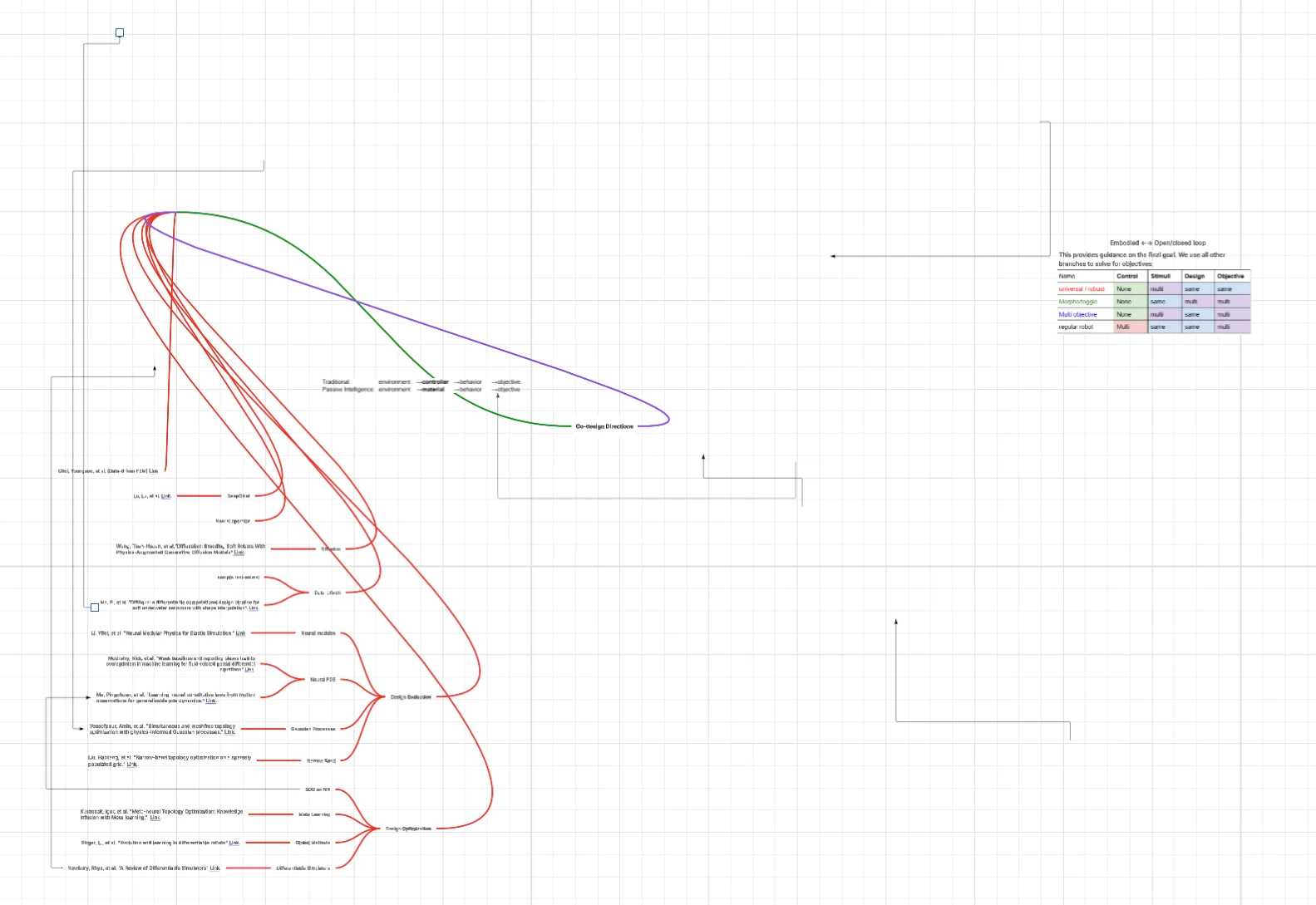
The document showed up corrupted like this every time I reopened it. I need to restore an older file from version history every time, for the chart to display correctly again. However, the version history is a paid feature (I’m currently on the free trial). I think it is extremely unfair that I am forced to PAY to retain access to my mind map, which I have spent countless hours working on. I think this is a serious bug and I wish it could be resolved so more members of the community won’t have to suffer from this in the future. I appreciate the help of the community team on this. 

Best answer by Ambar D

Thank you both ​@Ben_H and ​@timeguo for providing that additional information. I have good news! As it seems you’ve both discovered which I’m happy to hear, our development team has let me know that this issue should not be resolved. 

Once again, I’m sincerely sorry for the inconvenience this has caused. I appreciate you both for your patience and help as the team urgently tackled this today. 

If you’re still seeing the issue or have any other questions, please let me know in this thread.

Comments

Ambar D
Forum|alt.badge.img+12
  • Lucid community team
  • June 2, 2026

Hi ​@timeguo, I believe you have identified a bug, and I have reported this to our development team.

I sincerely apologize for any disruption, and certainly understand how important this is. I will update this thread with any new information about a fix. Please follow along on this thread for updates, and post any additional questions or concerns below.


In the meantime, would you mind providing me with the following information? This will be helpful for us to take a closer look.

  • Are you experiencing any error codes when opening your document, or error codes on your document home page? If yes, would you mind providing me with a screenshot of the error code?
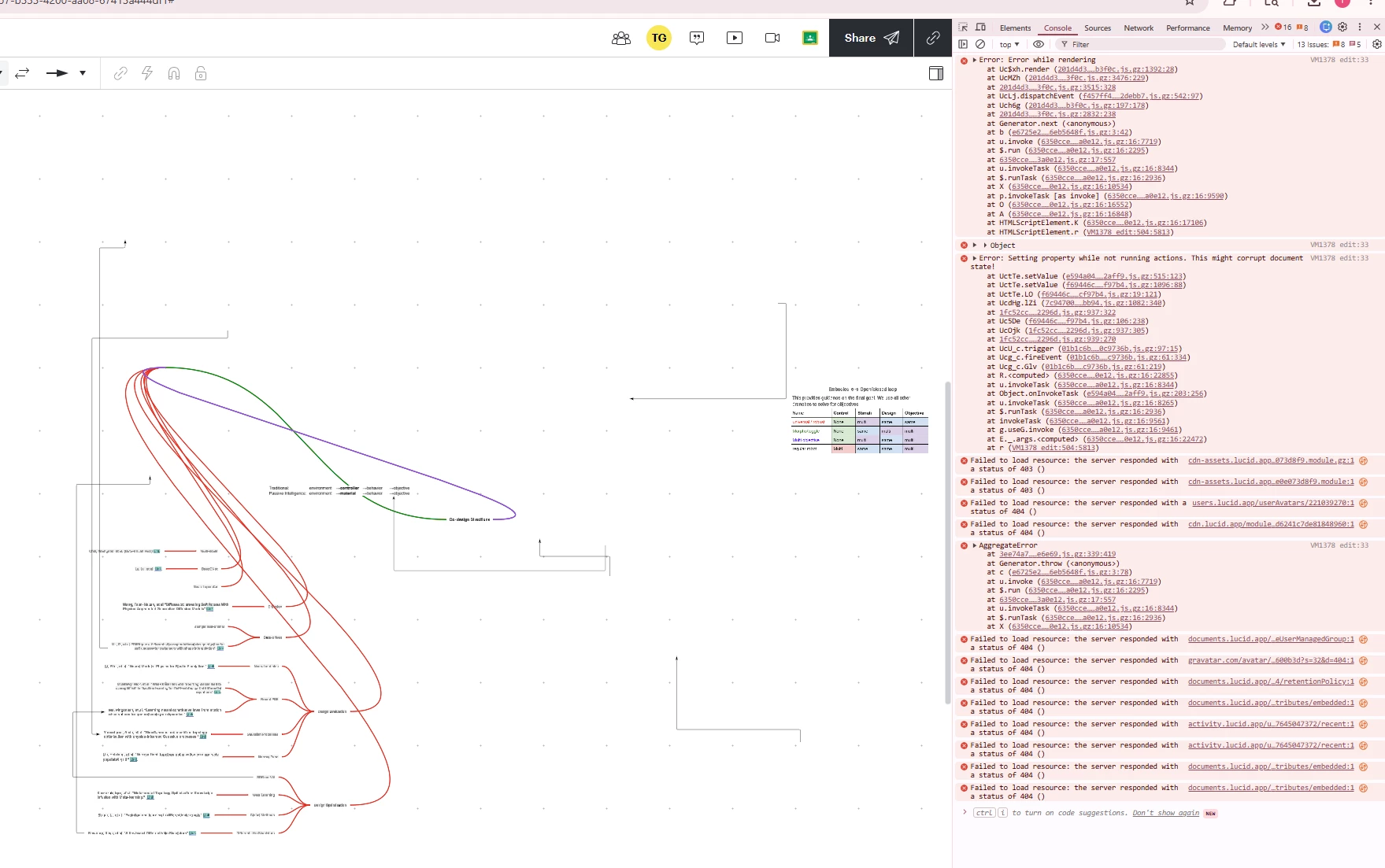
  • Can you please provide a screenshot of the associated Javascript Console output after reproducing the issue? You can open your Javascript Console by pressing Ctrl+Shift+J (if your computer is a Windows/Linux) OR Cmd+Opt+J (if your computer is a Mac).
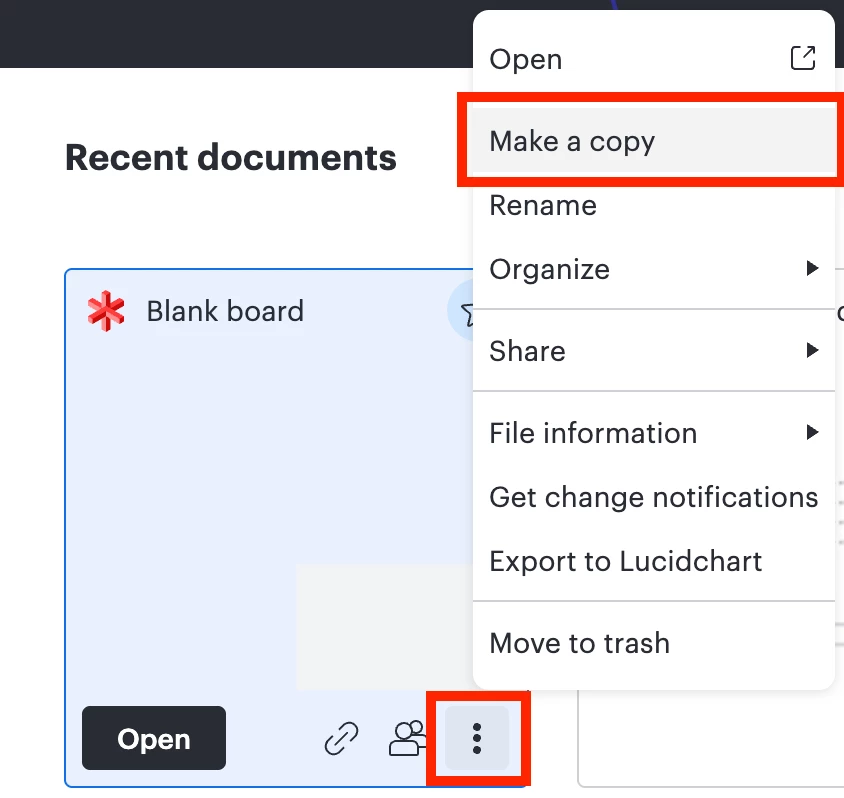
  • Would you mind trying to copy the document as shown below, and letting me know if this is resolved for you in the new copy? From the home page, locate your document and select the three dots, then select ‘Make a copy’. 


Forum|alt.badge.img+1
  • Author
  • June 2, 2026

Hi Ambar, thank you for the prompt response! I am happy to provide more diagnostics:

  1. No error codes are shown after the document is opened. The document is able to display. 
  2. VM1378 edit:33 Error: Error while rendering
    at Uc$xh.render (201d4d3……b3f0c.js.gz:1392:28)
    at UcMZh (201d4d3……3f0c.js.gz:3476:229)
    at 201d4d3……3f0c.js.gz:3515:328
    at UcLj.dispatchEvent (f457ff4……2debb7.js.gz:542:97)
    at Uch6g (201d4d3……b3f0c.js.gz:197:178)
    at 201d4d3……3f0c.js.gz:2832:238
    at Generator.next (<anonymous>)
    at b (e6725e2……6eb5648f.js.gz:3:42)
    at u.invoke (6350cce……a0e12.js.gz:16:7719)
    at $.run (6350cce……a0e12.js.gz:16:2295)
    at 6350cce……3a0e12.js.gz:17:557
    at u.invokeTask (6350cce……a0e12.js.gz:16:8344)
    at $.runTask (6350cce……a0e12.js.gz:16:2936)
    at X (6350cce……0e12.js.gz:16:10534)
    at p.invokeTask [as invoke] (6350cce……a0e12.js.gz:16:9590)
    at O (6350cce……0e12.js.gz:16:16552)
    at A (6350cce……0e12.js.gz:16:16848)
    at HTMLScriptElement.K (6350cce……0e12.js.gz:16:17106)
    at HTMLScriptElement.r (VM1378 edit:504:5813)

    VM1378 edit:33
    Object
    errorChain
    :
    "0"
    errorCount
    :
    "1"
    location
    :
    "Viewport.render"
    [[Prototype]]
    :
    Object
    VM1378 edit:33 Error: Setting property while not running actions. This might corrupt document state!
    at UctTe.setValue (e594a04……2aff9.js.gz:515:123)
    at UctTe.setValue (f69446c……f97b4.js.gz:1096:88)
    at UctTe.LO (f69446c……cf97b4.js.gz:19:121)
    at UcdHg.lZi (7c94700……bb94.js.gz:1082:340)
    at 1fc52cc……2296d.js.gz:937:322
    at Uc5De (f69446c……f97b4.js.gz:106:238)
    at UcOjk (1fc52cc……2296d.js.gz:937:305)
    at 1fc52cc……2296d.js.gz:939:270
    at UcU_c.trigger (01b1c6b……0c9736b.js.gz:97:15)
    at Ucg_c.fireEvent (01b1c6b……c9736b.js.gz:61:334)
    at Ucg_c.Glv (01b1c6b……c9736b.js.gz:61:219)
    at R.<computed> (6350cce……0e12.js.gz:16:22855)
    at u.invokeTask (6350cce……a0e12.js.gz:16:8344)
    at Object.onInvokeTask (e594a04……2aff9.js.gz:203:256)
    at u.invokeTask (6350cce……a0e12.js.gz:16:8265)
    at $.runTask (6350cce……a0e12.js.gz:16:2936)
    at invokeTask (6350cce……a0e12.js.gz:16:9561)
    at g.useG.invoke (6350cce……a0e12.js.gz:16:9461)
    at E._.args.<computed> (6350cce……0e12.js.gz:16:22472)
    at r (VM1378 edit:504:5813)
    cdn-assets.lucid.app…073d8f9.module.gz:1
    Failed to load resource: the server responded with a status of 403 ()
    cdn-assets.lucid.app…e0e073d8f9.module:1
    Failed to load resource: the server responded with a status of 403 ()
    users.lucid.app/userAvatars/221039270:1
    Failed to load resource: the server responded with a status of 404 ()
    cdn.lucid.app/module…d6241c7de81848960:1
    Failed to load resource: the server responded with a status of 404 ()
    VM1378 edit:33 AggregateError
    at 3ee74a7……e6e69.js.gz:339:419
    at Generator.throw (<anonymous>)
    at c (e6725e2……6eb5648f.js.gz:3:78)
    at u.invoke (6350cce……a0e12.js.gz:16:7719)
    at $.run (6350cce……a0e12.js.gz:16:2295)
    at 6350cce……3a0e12.js.gz:17:557
    at u.invokeTask (6350cce……a0e12.js.gz:16:8344)
    at $.runTask (6350cce……a0e12.js.gz:16:2936)
    at X (6350cce……0e12.js.gz:16:10534)
    documents.lucid.app/…eUserManagedGroup:1
    Failed to load resource: the server responded with a status of 404 ()
    gravatar.com/avatar/…600b3d?s=32&d=404:1
    Failed to load resource: the server responded with a status of 404 ()
    documents.lucid.app/…4/retentionPolicy:1
    Failed to load resource: the server responded with a status of 404 ()
    documents.lucid.app/…tributes/embedded:1
    Failed to load resource: the server responded with a status of 404 ()

    activity.lucid.app/u…7645047372/recent:1
    Failed to load resource: the server responded with a status of 404 ()
    activity.lucid.app/u…7645047372/recent:1
    Failed to load resource: the server responded with a status of 404 ()
    documents.lucid.app/…tributes/embedded:1
    Failed to load resource: the server responded with a status of 404 ()
    documents.lucid.app/…tributes/embedded:1
    Failed to load resource: the server responded with a status of 404 ()

  3. I successfully made a copy as guided; however, the new copy still shows up corrupted. 
  4. Converting to LucidSpark did not solve the issue either. 

    I appreciate your support!

Forum|alt.badge.img
  • June 2, 2026

Hi ​@Ambar D , I’m experiencing exactly the same issue and was about to submit a Customer Support ticket.


I’ve even tried re-instating old (like Feb-26) versions and they all look the same, and this had a lot less threads to the mindmap (I thought it might have got corrupted due to size). But not sure why old versions would also be affected, so must have been a change somewhere in the application rendering these images.


No error codes, and the copy is the same.


Ambar D
Forum|alt.badge.img+12
  • Lucid community team
  • June 2, 2026

Thank you ​@timeguo for getting back to me with this information! I am adding this to the report for our development team to continue investigating. 

Would you mind providing me with the following information?

  • A temporary Document Support PIN for this document. This will help our teams take a closer look at what’s going on. This PIN is safe to post in this thread because it is only accessible by members of the Lucid support staff. You can find steps for generating a Support PIN in this Lucid Help Center article: Generate a Lucid Support PIN.
  • Is there data linked in this document?
  • Are you seeing this across multiple documents in your account, or just this one?

Ambar D
Forum|alt.badge.img+12
  • Lucid community team
  • June 2, 2026

Hi ​@Ben_H, I’m sorry to hear that you’re also experiencing this issue. Thank you for trying the copy workaround and for confirming that you’re not experiencing any error codes. 

Are you seeing this issue across multiple documents in your account, or just this one? Is there any linked data in your affected document(s)?


Would you mind providing me with these details to help us take a closer look?

  • A screenshot of the associated Javascript Console output after reproducing the issue. You can open your Javascript Console by pressing Ctrl+Shift+J (if your computer is a Windows/Linux) OR Cmd+Opt+J (if your computer is a Mac).
  • temporary Document Support PIN for your document. This will help our teams take a closer look at what’s going on. This PIN is safe to post in this thread because it is only accessible by members of the Lucid support staff. You can find steps for generating a Support PIN in this Lucid Help Center article: Generate a Lucid Support PIN.

Thank you for your help and patience as we continue looking into this.


Forum|alt.badge.img
  • June 2, 2026

Hi ​@Ambar D , ​@timeguo  the problem seems to have resolved itself. 


It wasn’t affecting any other docs that I could tell. But when I’ve just gone back into the original mindmap that was experiencing the issue, it is all rendering ok now. Phew!


Thanks for your help with this.

B


Forum|alt.badge.img+1
  • Author
  • June 2, 2026

Hi ​@Ambar D, the problem has also been resolved for me, though there are a few lingering formatting errors. I’m still happy to provide that information to help with further diagnosis and traceback:

  1. PIN: duwg9CgWhColO1DBblvxnHB8LLqlQ73DB9221039270
  2. No data linked to my knowledge. 
  3. Just this one. 

Thanks again for your support. 


Ambar D
Forum|alt.badge.img+12
  • Lucid community team
  • Answer
  • June 2, 2026

Thank you both ​@Ben_H and ​@timeguo for providing that additional information. I have good news! As it seems you’ve both discovered which I’m happy to hear, our development team has let me know that this issue should not be resolved. 

Once again, I’m sincerely sorry for the inconvenience this has caused. I appreciate you both for your patience and help as the team urgently tackled this today. 

If you’re still seeing the issue or have any other questions, please let me know in this thread.