operations
Apr 18, 2019 10:39 PM UTC
Solved

Merging Lucid Org charts

How do I copy-paste from parts of one chart into another? Currently the org chart is broken into departmental pieces now it needs to reassembled back together.

Andrew D
Andrew DAnswer
Lucidite
Apr 19, 2019 3:11 PM UTC

Hi there

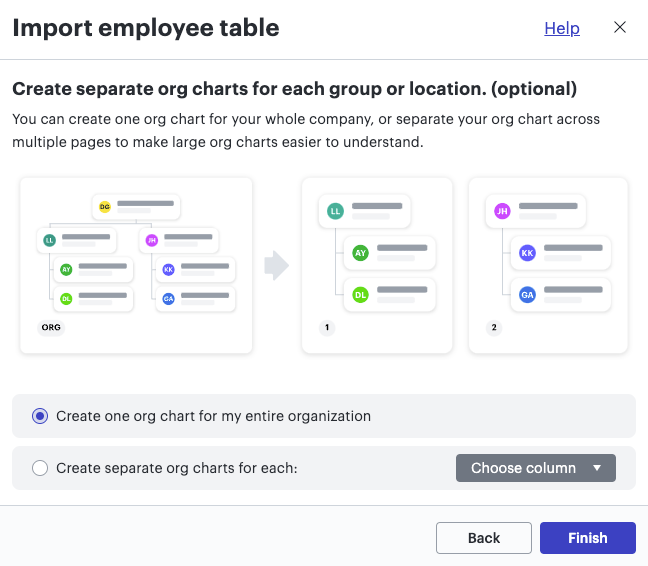
Thanks for reaching out in the community. I would suggest to import your org chart again by following the steps provided here. When the pop up below appears be sure to select "Create one Org Chart for my entire organization." I hope this helps!


Comments

Andrew D
Andrew DAnswer
Lucidite
Apr 19, 2019 3:11 PM UTC

Hi there

Thanks for reaching out in the community. I would suggest to import your org chart again by following the steps provided here. When the pop up below appears be sure to select "Create one Org Chart for my entire organization." I hope this helps!


Translate
Network A
Jul 12, 2021 4:13 PM UTC

It would be helpful to be able to merge 2 documents not just import on page at a time.

Translate
Sami H
Lucid support team
Jul 12, 2021 9:43 PM UTC

Hello there!

Thanks for your suggestion- I agree it would be a lot easier to be able to merge two documents together. Would you mind adding your idea to our Product Feedback section? Submitted ideas are directly passed to our development team for consideration and I'm sure they'd love to hear your idea. Thank you and I'm sorry for any inconvenience this may cause.

Translate
Oct 28, 2024 4:42 PM UTC

Hi, do we have a solution for this already? It's very frustrating not being able to merge org charts, or even get one employee from one chart and move to the other. It would be great if I could simply move it. 

Translate
Kelsey Gaag
Lucidite
Oct 28, 2024 5:18 PM UTC

Hi @aunglaub, 

Thank you for the reply! Currently there is not a feature to merge existing Org Charts. I would recommend trying one of the following solutions:

  • You can re-import your data and follow the steps @Andrew D’s post above. 
  • If you are on an Enterprise level account, you can utilize our Data linking feature and refresh your data. This will update your Org Chart automatically based on the linked data. 
  • You can select the shapes you would like to move, copy them, then select the org chart you would like to move them to, and paste. This step may require you to move the shapes around after pasting.

You can also submit an idea and feedback in our Product Feedback section, these ideas re directly passed to our development team for consideration. Please let me know if you have any questions or concerns!

Translate