I oversee the org charts for our organization and I’m finding that updating them every quarter is a lot of work and time. I see that I can import Excel files into Lucid and I’ve tested it and it works. My challenge is that every time I upload revised data, I have to reformat all the pages to get the org chart looking how I want it. Is there a way to automate it? Specifically, I’d like to upload my revised Excel spreadsheet and have it pull the info and put it into my template. I’ve tried creating a Master sheet and applying the formatting to all, but that doesn’t seem to work. I’ve also created a template to try to open my data with the saved template, but that also doesn’t work. Thanks!
I’m happy to chime in here for @Ambar D! Thank you for providing your support pin and more details on the steps you’ve taken to upload your data. That information helps a lot in pinning down what's going on!
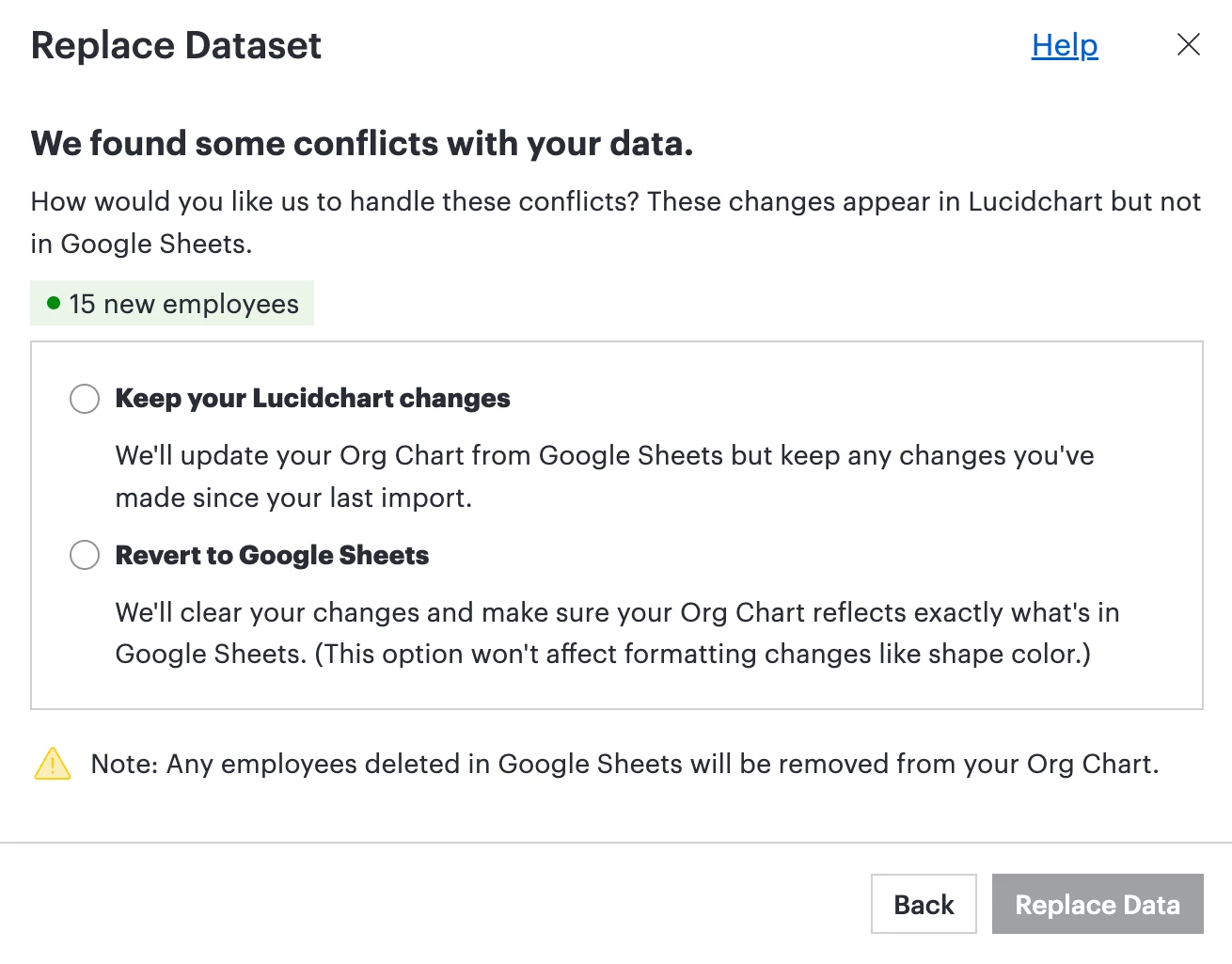
There are two things that determine whether you see that menu (the "Keep your Lucidchart changes" vs. "Revert to Google Sheets/source" prompt; see screenshot below):
1. Plan subscription Data linking is actually an Enterprise plan feature, so since your subscription recently lapsed, that functionality of seeing the "Keep your Lucidchart changes" vs. "Revert to Google Sheets/source" options goes away temporarily. That lines up exactly with what you're seeing! You can read more about how it all works here: Link data to a Lucidchart document
2. Active data linking vs. one-time import Here's the other piece: a standard one-time file import won't trigger that “Keep/Revert” prompt — it only shows up when shapes are actively linked to an ongoing dataset. So separate from the subscription question, I'm curious: when you first built this org chart, did you actively link the data, or was it more of a one-time import? If it was one-time, that'd explain why you never saw those options pop up in the first place!
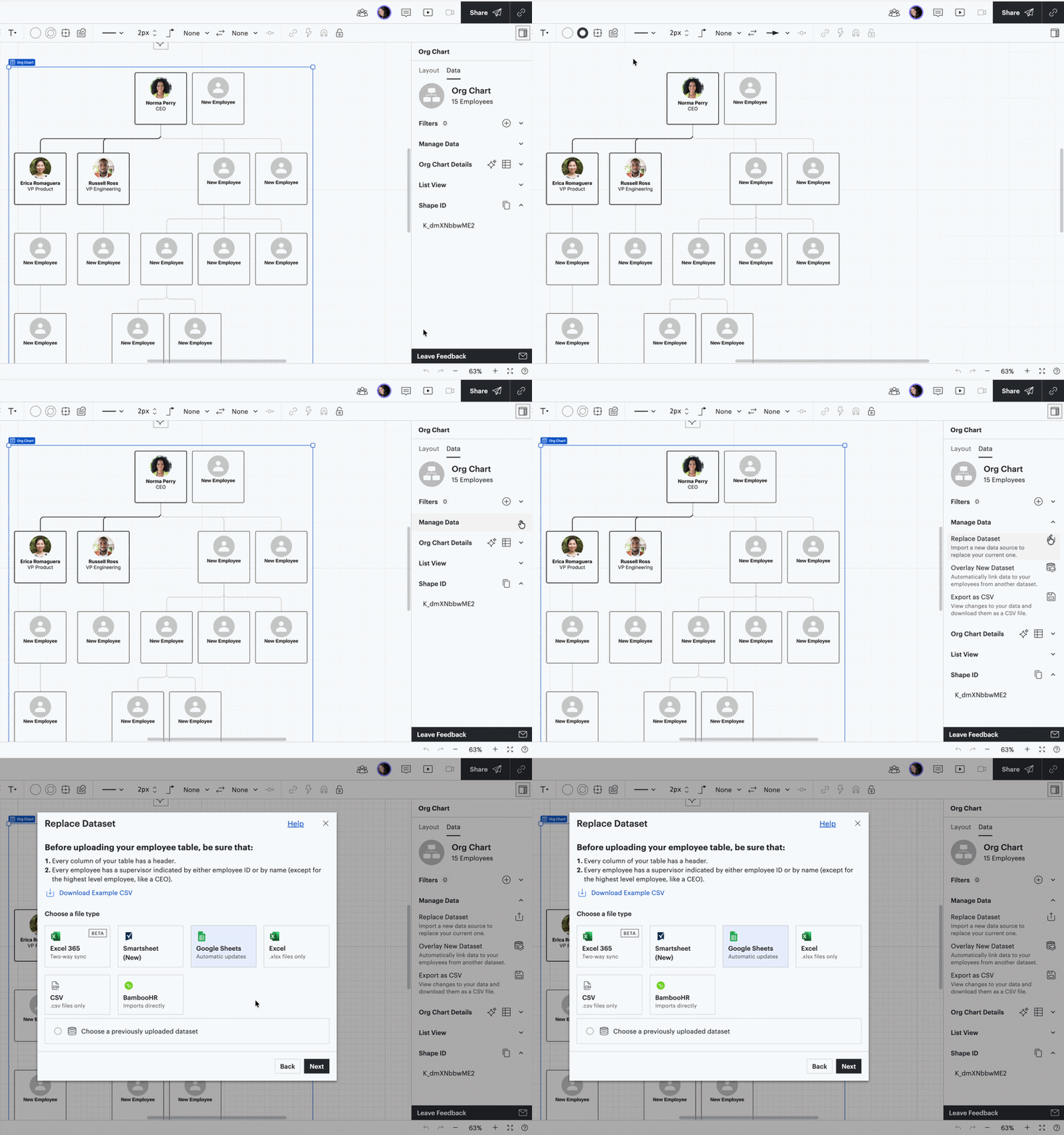
Once your subscription has renewed, here's how to re-link things:
Open your Lucidchart document with the org chart
Select the org chart which will open the Org Chart Panel on the right
Select Manage Data > Replace Dataset
Upload your updated dataset and map your primary fields
Here is a Gif showing exactly how to do the steps above:
Once you're back up and running, would you mind rechecking whether that keep/revert prompt shows up when you re-import? I want to make sure everything's working the way it should!
Thank you for your patience and let me know if you have any additional questions that come up in the meantime!
When replacing your dataset to update your org chart, you should be given the option to keep any manual changes you made or revert to the original data. Here is what each option means:
Keep your Lucidchart changes: This option tells Lucidchart to keep manual changes you've made to your org chart since your last import. This means changes made to the data source such as name, role, or contact information will be updated, but manual updates you’ve made in Lucidchart will not be overwritten.
Revert to the original data source: With this option, your org chart will reflect exactly what is in the data source. If you’ve made manual changes in Lucidchart, they will be overwritten if they differ from the data source.
Note that any new shapes added from the data will have default formatting or will adhere to any conditional formatting rules that have been set up.
Are you seeing the two options when replacing your dataset? Would you mind letting me know what you experience if you select the option to keep your changes?
Hi Ambar, Thank you for replying! It lets me update the data source, but I don’t get the options that you mentioned. Any suggestions on how to proceed?
Would you mind providing me with the steps you’ve taken to upload your data @LeahK, and how you’re attempting to update?
Additionally, could you share a temporary Document Support PIN for this document? This will help me take a closer look at what’s going on. This PIN is safe to post in this thread because it is only accessible by members of the Lucid support staff. You can find steps for generating a Support PIN in this Lucid Help Center article: Generate a Lucid Support PIN.
To upload my data I went to “File” → “Import” → “Data”.
I can’t exactly remember how I tried to update and I went to recreate it, but my subscription lapsed over the weekend and that feature is no longer available to me. I’m waiting for my organization to renew.
I’m happy to chime in here for @Ambar D! Thank you for providing your support pin and more details on the steps you’ve taken to upload your data. That information helps a lot in pinning down what's going on!
There are two things that determine whether you see that menu (the "Keep your Lucidchart changes" vs. "Revert to Google Sheets/source" prompt; see screenshot below):
1. Plan subscription Data linking is actually an Enterprise plan feature, so since your subscription recently lapsed, that functionality of seeing the "Keep your Lucidchart changes" vs. "Revert to Google Sheets/source" options goes away temporarily. That lines up exactly with what you're seeing! You can read more about how it all works here: Link data to a Lucidchart document
2. Active data linking vs. one-time import Here's the other piece: a standard one-time file import won't trigger that “Keep/Revert” prompt — it only shows up when shapes are actively linked to an ongoing dataset. So separate from the subscription question, I'm curious: when you first built this org chart, did you actively link the data, or was it more of a one-time import? If it was one-time, that'd explain why you never saw those options pop up in the first place!
Once your subscription has renewed, here's how to re-link things:
Open your Lucidchart document with the org chart
Select the org chart which will open the Org Chart Panel on the right
Select Manage Data > Replace Dataset
Upload your updated dataset and map your primary fields
Here is a Gif showing exactly how to do the steps above:
Once you're back up and running, would you mind rechecking whether that keep/revert prompt shows up when you re-import? I want to make sure everything's working the way it should!
Thank you for your patience and let me know if you have any additional questions that come up in the meantime!
A Lucid or airfocus account is required to interact with the Community, and your participation is subject to the
Supplemental Lucid Community Terms.
You may not participate in the Community if you are under 18. You will be redirected to the Lucid or airfocus app to log in.
A Lucid or airfocus account is required to interact with the Community, and your participation is subject to the
Supplemental Lucid Community Terms.
You may not participate in the Community if you are under 18. You will be redirected to the Lucid or airfocus app to log in.


 Your privacy choices


