February 29, 2024
Solved

Lucidspark export to multi-page PDF, with embedded links

  • February 29, 2024
  • 11 replies
  • 706 views

Hello - I’ve got a whiteboard workshop that I run which has 5 separate frames on the board. At the end of the workshop, I’d like to send a PDF output (with functioning embedded hyperlinks) that has each frame on a new page of the PDF. In this instance, there would then be a 5 page, well formatted PDF to share with the attendees. I thought the export to Google Slides might be an option, but the hyperlinks aren’t coming through (only a static image on each slide). Doing a print to PDF just grabs the whole board.  Searching help I think it might work for Lucidchart, but not Lucidspark. Am I missing something? 

Best answer by Zuzia S

Hi @CJG, thank you for following up! 

Exporting multiple Pages in PDF at once is definitely an option in Lucid, all while keeping the links to other Pages/URLs in the document/page when the multipage PDF has been downloaded. 

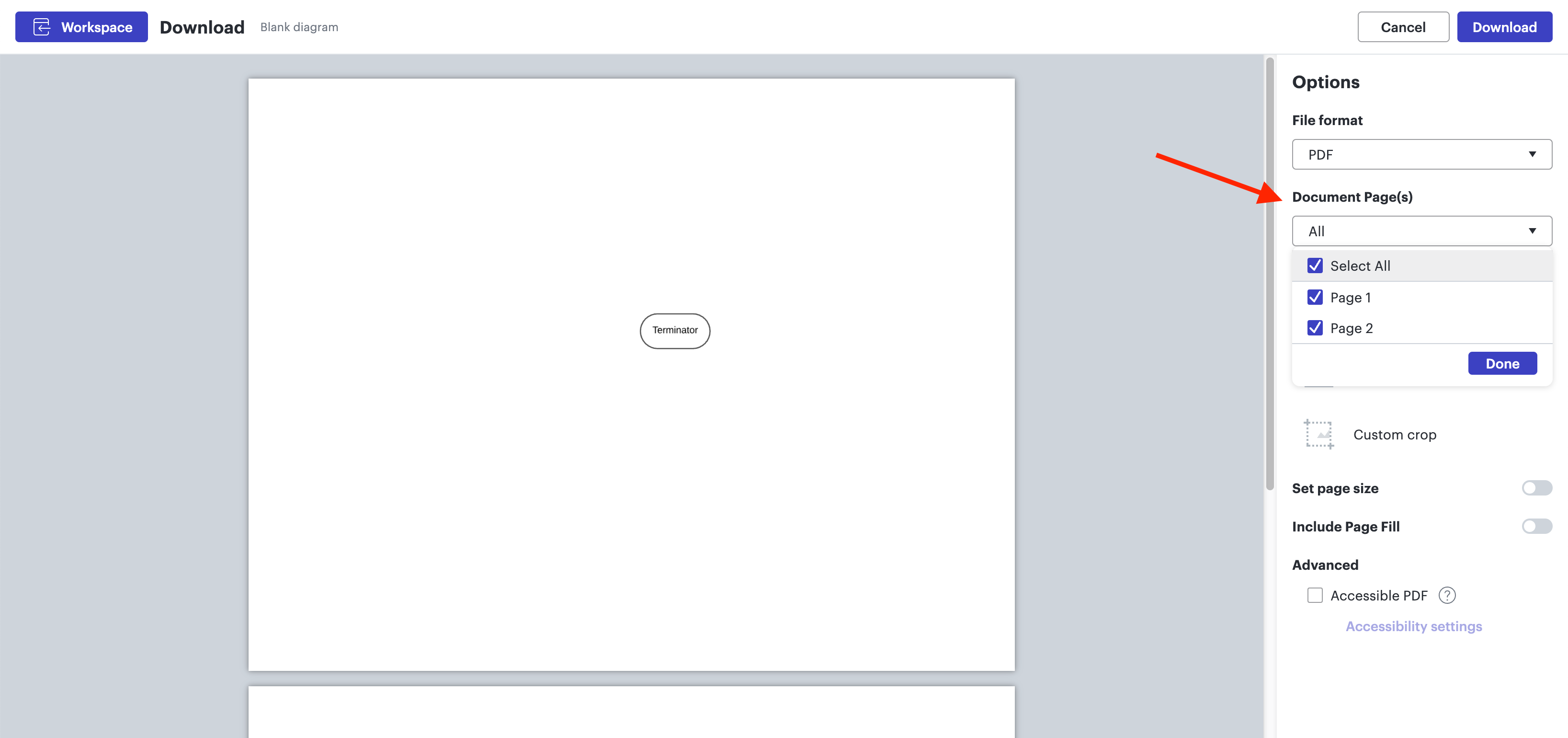
When exporting to PDF and clicking on File > Export > PDF, could you please make sure you select the Document pages you wish to include in your export in the Options panel on the right, as per the screenshot below:


Could you please try these steps and let me know how it goes? 

Cheers!

Comments

Zuzia S
Lucid community team
November 12, 2024

@CJG Glad to hear that helped! Feel free to create a new topic if you have any questions or anything you’d like to discuss - we love hearing from everyone! :)