I have a LucidChart document that has about 32 pages. Each page contains a state chart for a process. Some state charts are small and fit easily on an 8,5x11 inch letter sheet, but some are huge and must be in a customized page that is large enough to contain the whole chart.
But after I assign page sizes for all the pages through the “Document Properties” menu and export a PDF file of the pages, I noticed that the page size is not remembered, so every time I want to export a PDF file I have to go through the entire process of assigning page sizes to all 32 pages.
Is there some setting that tells LucidChart to recall the page sizes and orientations that were used the last time I exported the diagram?
Best answer by Leianne C
Hi @Fklein23, thank you for following up with that information. To confirm, have you noticed this happening in other documents before or only this one document? If the behaviour happens again, could you please try checking Revision History and see if you are able to quickly restore the document this way?
I would also love to take a closer look at the issue on my end. Could you share a temporary Document Support PIN for this document or a copy/example? This PIN is safe to post in this thread because it is only accessible by members of the Lucid support staff. You can find steps for generating a Support PIN in this Lucid Help Center article: Generate a Lucid Support PIN.
Thank you for your help and patience. Please don’t hesitate to let me know if you have any questions or concerns.
Hi @Fklein23, thank you for posting in the Community! Just to confirm my understanding —are your canvas pages in Lucidchart reverting back to a standard size after you finish exporting, or is it that the exported PDF file forces all 32 pages into the exact same size regardless of what your canvas looks like?
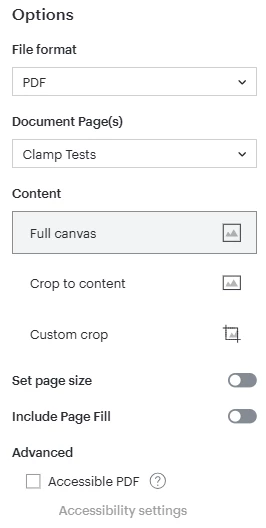
If possible, could you please also share a screenshot of settings (file type, document pages, cropping, quality, etc.) that you selected for the export? This will help me take a closer look at the issue on my end.
Thank you in advance for your help and patience! Please let me know if you have any questions.
Regarding your 2-part question, the answer is “neither”. It seems completely random. Sometimes one or two pages are contaminated and sometimes EVERY page is damaged.
I just screen-shot several examples and didn’t post the response because I wanted to show an exhaustive set of examples, But as I kept adding examples to my response, I accidentally closed the browser and lost the entire document.
So I will just summarize:
I noticed that the mistakes in page format and size were completely random.
I discovered that sometimes the document properties get trashed by just closing the LucidChart document and reopening it. Sometimes the pages in the PDF file were wrong and when that happened, the document properties remained erroneously changed in the LucidChart document.
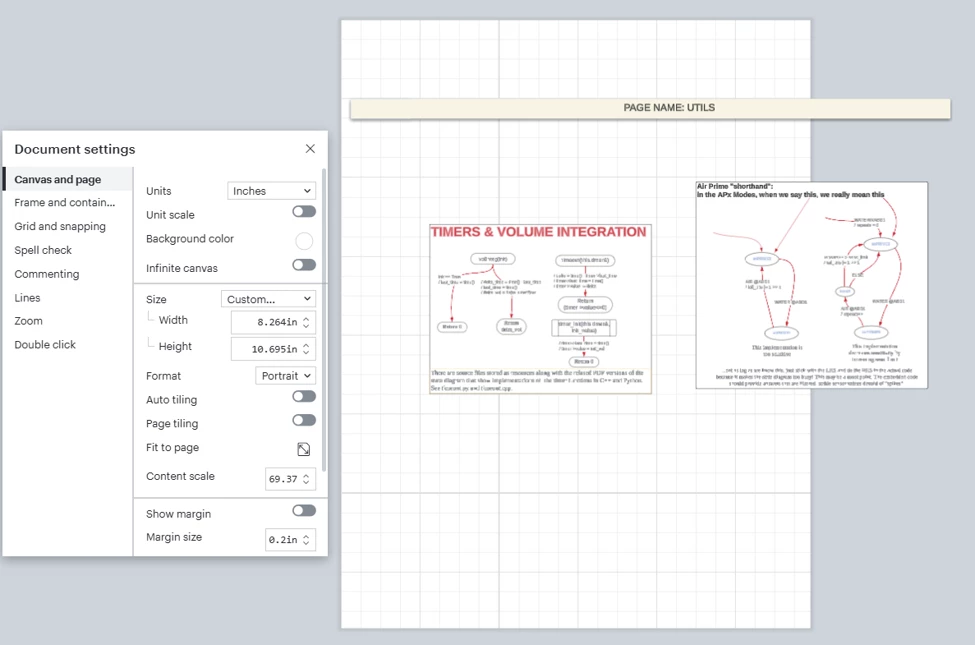
In every example I tried in today’s experiment, 1 or two pages were damaged. In each instance, the pages changed to a custom size that seemed entirely random. One example that I didn’t lose from an earlier experiment was this one:
This one happened by just closing and reopening the document. The correct size was letter/landscape. How that got changed to a custom 8.3”x10.7” just seems random.
Here are the settings for exporting:
Is there a stand-alone LucidChart app for Windows? I just wonder if the involvement of the browser could be a culprit.
Hi @Fklein23, thank you for following up with that information. To confirm, have you noticed this happening in other documents before or only this one document? If the behaviour happens again, could you please try checking Revision History and see if you are able to quickly restore the document this way?
I would also love to take a closer look at the issue on my end. Could you share a temporary Document Support PIN for this document or a copy/example? This PIN is safe to post in this thread because it is only accessible by members of the Lucid support staff. You can find steps for generating a Support PIN in this Lucid Help Center article: Generate a Lucid Support PIN.
Thank you for your help and patience. Please don’t hesitate to let me know if you have any questions or concerns.
I have worked on this document for more than 3 years. But it has only been during the past year that I broke the design up into pages, so this is the only document I have ever seen that has this problem.
When I first started using pages, I just assumed that it was not able to remember page sizes, and I just expected to have to reassign page sizes before every export.
The document is a high level design document for a new medical device and there is no way I can hand off a copy of this document to anyone, because of intellectual property concerns.
I created a saved copy of the document and deleted all the content except the page title on each page. It has the same number of pages, by the same names, and if anything, the pages are more complex than the original, because I made sure the pages were very busy with random snippets of diagrams on all the pages and I placed a light green shaded rectangle over the whole page to make it easy to spot any pages where the contents spill outside the page boundary.
I have tried
closing and reopening the document.
exporting a PDF
powering down and cold-starting my PC
and so far, I have not encountered the problem.
I tried looking at the original document’s history. In different versions, there are simply occasional occurrence of pages with incorrect sizing. I could detect no pattern.
Furthermore, with the new test file I saved, I have not been able to re-create the problem.
That last sentence gave me reason to ask this question: The test document I created “Test page-sizes” was saved to my hard disk. The production document was exported to OneDrive. Do you know if there are issues related to saving exports to OneDrive?
If I can cause one of these page size faults by changing something about the test (like exporting it to OneDrive) I will create a Document support PIN and send it to you.
Hi @Fklein23, thank you for sharing that detail. I understand the privacy concern and appreciate your help with trying to recreate this in a copy of the document. Would you mind clarifying what you mean by the test document was saved to your hard disk and the production document was exported to OneDrive? Is this the saving location of the exported file?
Based on the provided details, it sounds like the issue may be document specific. If you haven’t already, it may be worth trying a duplicate your document (with all the content) and try exporting that to PDF. Do the page sizes revert when you try it this way?
Please let me know if you try the above and if you notice any changes, or if you have any any questions!
A Lucid or airfocus account is required to interact with the Community, and your participation is subject to the
Supplemental Lucid Community Terms.
You may not participate in the Community if you are under 18. You will be redirected to the Lucid or airfocus app to log in.
A Lucid or airfocus account is required to interact with the Community, and your participation is subject to the
Supplemental Lucid Community Terms.
You may not participate in the Community if you are under 18. You will be redirected to the Lucid or airfocus app to log in.




 Your privacy choices


