Idea

Lucidchart new Layer UI renaming process

Related products:Lucidchart
  • May 18, 2026
  • 1 reply
  • 7 views

Forum|alt.badge.img

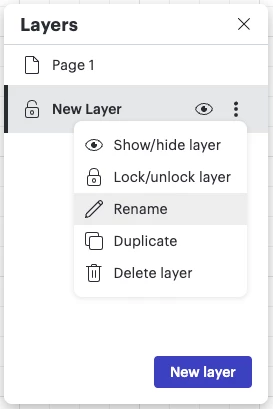
I was working through layers on a document today and noticed the new UI for adding layers.  I now cannot easily rename my layers.  Once I add a new layer, I then have to right click and choose rename.
 

I am unable to double click on the layer to change the name.  This makes creating layers very cumbersome.  Further, I used to be able to rename and click on another new layer to continue adding layers quickly.  Now I have to highlight the label, rename, and hit enter to save before I can start a new layer.  Old design would do all of that and save the name I type automatically, and the “new layer” label would be highlighted waiting for me to type.

It’s not the end of the world but the previous UI works a lot better.  Can we at least enable the double click to rename option like we used to have?

Comments

Ambar D
Forum|alt.badge.img+12
  • Lucid community team
  • May 18, 2026

Thank you for your post and feedback ​@JSzeto! You’re correct- now to rename a layer, you’ll navigate to the three dots and select Rename from the dropdown list as shown below.

Thank you for sharing your honest thoughts about this experience! We’re very interested in your feedback and committed to continually improving our products. I’ve gone ahead and converted your post to an ‘idea’ within the Product Feedback section. This ensures that your feedback is available to our product team as they continue to review feedback in this space of the community, as well as any other users who have the same feedback.


We encourage anyone else who’s interested in this to upvote this post and share any additional details about your use case or what you’d like to see in this experience. 

For more information about how we manage feedback in this community, please take a look at this post: