August 5, 2026
Solved

Lucidchart auto-adding unwanted connector

  • August 5, 2026
  • 1 reply
  • 87 views

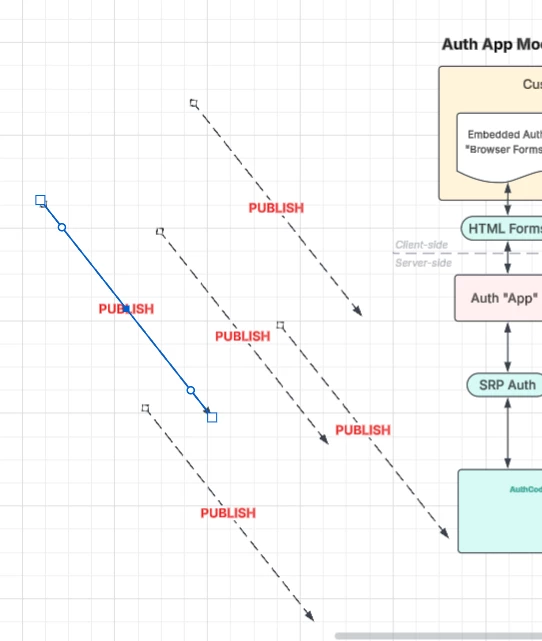
After the most recent update, I’ve started experiencing a problem where LucidChart automatically adds a connector on my drawing every time I either open the drawing or switch to the shapes menu.  If I then delete the added connector, it immediately creates a new one under my cursor.  I can’t get rid of them.  They just keep compounding.  How do I stop this behavior?
 

Best answer by Leianne C

Hi ​@CCT-Rod, thank you for posting in the Community! To make sure I understand the issue fully and can point you in the right direction, would you mind providing me with the following information so I can take a closer look?

  • The highlighted line in your shape shows 3 connection points, is this the extra connector that you’re having trouble with? If not, would you mind sharing more information about where the connector is appearing? 
  • If possible, could you please try creating a new blank document and confirm if the behaviour persists there? 

Thank you your help and patience! Please let me know if you have any questions. 

Comments

Leianne C
Leianne CAnswer
Lucid support team
August 19, 2026

Hi ​@CCT-Rod, thank you for posting in the Community! To make sure I understand the issue fully and can point you in the right direction, would you mind providing me with the following information so I can take a closer look?

  • The highlighted line in your shape shows 3 connection points, is this the extra connector that you’re having trouble with? If not, would you mind sharing more information about where the connector is appearing? 
  • If possible, could you please try creating a new blank document and confirm if the behaviour persists there? 

Thank you your help and patience! Please let me know if you have any questions.